
This section explains yield measurement in Oracle Process Manufacturing and covers the following topics:
Overview
Understanding Yield Calculations and Formulas
Yield Measurement in Process Execution
Entering Step Transfer Quantities and Viewing Yield Information
Running the Calculate Yield Concurrent Program
Yield, in Process Manufacturing, is the usable output quantity divided by the input quantity at every stage of the production process. The Oracle Process Manufacturing Process Execution and Product Development applications allow you to measure the yield of a product during an operation. Product Development application allows you to define the planned yield for an operation, routing and recipe. When a batch is executed, the actual yield is calculated including yield for an operation/step, cumulative yield across steps, yield for a batch, and yield for a product. The timely capture and measurement of planned and actual yield allows users to evaluate, maintain, and maximize the efficiency of the manufacturing process.
The following diagram provides a high-level flow of the yield measurement process:
Yield calculation begins at the operation level and rolls up to the batch and the products. It is influenced by various factors such as process loss, scrap and yield of incoming ingredients and applied to both products and by-products.
Yield at every step of the batch is the ratio of total output quantity (including final products, byproducts, and the intermediate products) and the total input quantity (ingredients that contribute to yield and intermediates). Byproducts of yield type as 'yield' only are included in output. and the other types (waste, rework and sample) are excluded from the output quantity.
Cumulative yield at every step of the batch is defined as the ratio of total output quantity and the cumulative input material transferred from the previous steps to the current step.
Cumulative input at a step is calculated as the sum of the ingredient material added into that step and the ingredient material that has been converted into the intermediate transferred into that step.
The formula for cumulative input is:
SUM ((Intermediate Input transferred to the current step from previous step/Previous step cumulative yield), Ingredient quantity)
Step cumulative yield is useful to understand the yield of the product or co-product or by-product that has been yielded out of that step. The products that are yielded out of the same step are considered to be of the same yield percentage.
Planned yield at every step of the batch is derived from the planned yield defined on that of the recipe. For the new steps added on the batch, the planned yield is defaulted from that of the operation.
Planned Cumulative yield at every step of the batch is defined as the ratio of total planned output quantity and the cumulative input of material transferred from the previous steps to the current step.
The formula for cumulative input is:
SUM ((Intermediate Input transferred to the current step from previous step/Previous step cumulative yield), Ingredient quantity added to the current step)
The formula for planned output is:
SUM ((Intermediate Input transferred to the current step from previous step/Previous step cumulative yield) * Previous step plan cumulative yield, Ingredient quantity added to the current step) * current step planned yield
Planned Step cumulative yield is useful to understand if the actual input material is converted as per the planned efficiency defined on the recipe operations or not.
Batch Yield is the ratio of the total actual output quantity to the total actual input quantity.
The total actual output quantity is the sum of actual quantities of all the products and byproducts yielded. The total actual input quantity is the sum of the actual quantities of ingredient issued. Ingredients that are contributing to the yield are only considered.
The following example illustrates yield calculations for a linear routing batch with byproduct of type, yield:
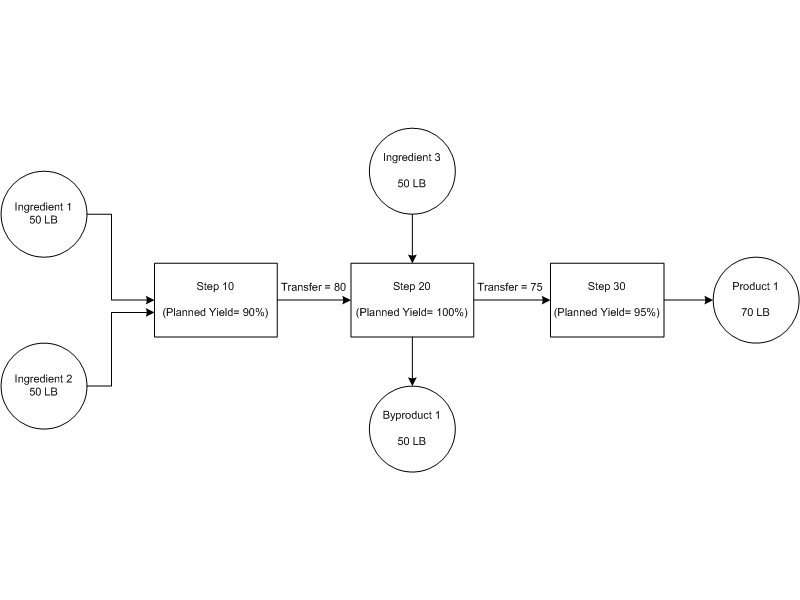
Actual Step Yield:
Yield for Step 10 = 80/100 = 80%
Yield for Step 20 = 125/130 = 96%
Yield for Step 30 = 70/75 = 93.3%
Actual Step Cumulative Yield:
Cumulative Input for Step 10 = 50+ 50 = 100
Cumulative Yield for Step 10 = 80/100 = 80%
Cumulative Input for Step 20 = (80/0.8) + 50 = 150
Cumulative Yield for Step 20 = 125/150 = 83.333%
Cumulative input for Step 30 = (75/0.83333) = 90
Cumulative Yield for Step 30 = 70/90 = 77.778%
Planned Step Cumulative Yield:
Cumulative Planned Output for Step 10 = (50+ 50)*90% = 90
Planned Cumulative Yield for Step 10 = 90/100 = 90%
Cumulative Planned Output Step 20 = ((80/0.8)*90%) + 50)*100 = 140
Planned Cumulative Yield for Step 20 = 140/150 = 93.333%
Cumulative Planned Output for Step 30 = ((75/0.83333)*93.333%)*95% = 79.8
Planned Cumulative Yield for Step 30 = 79.8/90 = 88.67018%
Batch Yield:
Batch Yield = (70+50)/ (50+50+50) = 80%
Yield for P1 = Cumulative yield for step 30 = 77.778%
Yield for BP1 = Cumulative yield for step 20 = 83.333%
The following example illustrates yield calculations for a network routing batch:

Actual Step Yield:
Yield for Step 10 = 90/100 = 90%
Yield for Step 20 = 90/90 = 100%
Yield for Step 30 = 40/50 = 80%
Yield for Step 40 = 37/40 = 92.5%
Yield for Step 50 = 70/77 = 90.90909%
Actual Step Cumulative Yield:
Cumulative Input for Step 10 = 50 + 50 = 100
Cumulative Yield for Step 10 = 90/100 = 90%
Cumulative Input for Step 20 =90/0.9 = 100
Cumulative Yield for Step 20 = (50+40)/100 = 90%
Cumulative Input for Step 30 = 50/0.9 = 555.55556
Cumulative Yield for Step 30 = 40/555.55556 = 72%
Cumulative Input for Step 40 = 40/0.9 = 444.44444
Cumulative Yield for Step 40 = 37/444.44444 = 83.25%
Cumulative Input for Step 50 = (50/0.9) + (40/0.9) = 100
Cumulative Yield for Step 50 = 70/100 = 70%
Batch Yield:
Batch Yield = 70/(50 + 50) = 70%
Yield for Product 1 = Cumulative yield for step 50 = 70%
Oracle Process Manufacturing Process Execution enables you to enter the step-level transfer quantities for the intermediate products and automatically picks up the material input and material output quantity from the actual material transactions. The system considers the intermediate input and output quantities, the material Inputs (ingredients) and material outputs (products, byproducts) based on their actual quantities and calculates various yields at batch steps, batches and across batches.
Upon batch or batch step completion events, system calculates actual step yield, actual step cumulative yield, actual step grand cumulative yield, planned step cumulative yield, planned step grand cumulative yield and batch yield based on the input and output quantities.
The yield calculations are not accurate if:
The input or output is null; the step yield cannot be calculated.
The preceding steps are not complete; the step cumulative yield and grand cumulative yield cannot be calculated.
The material transactions are not done.
The intermediate transfer quantities are not entered.
The Operation Yield tab on the Batch Steps form allows you to enter the transactions for the intermediate quantities transferred from one step to another. The Operation Yield tab mainly tracks the quantities that are useful for the yield calculation, the material input, material output, Intermediate input and intermediate output quantities.
The Operation Yield tab consists of two regions:
Summary: This region displays output and input quantities for each step (one record per step). This region also displays various types of yields calculated and yield loss for the selected batch step and the complete batch.
Step Transfer Details: This region allows you to enter multiple transfer transactions of the intermediate quantities.
For example, if Step 10 has intermediate output quantity of 100 out of which 60 is transferred to Step 20 and 40 is transferred to Step 30, the Intermediate Output Quantity in the Summary region is displayed as 100 and Step Transfer Details region displays two transactions of 40 and 60. See Editing Batch Steps for detailed information about various fields in the Operation Yield tab.
The following business rules and validations are applied on the Step Transfer Details region of the Operation Yield tab:
You can transfer material between the steps only when the status of step is released. The yield for a step is calculated when the status is changed to Complete.
UOM of the transferred quantity must be same as that of the step UOM.
The transfer quantity from the current step to the multiple steps at various points of time can be entered in the step transfer detail block. The To Step of the Transfer Details region defaults as per the step dependency but you can edit the value.
The Transfer Out Quantity that you enter in the Step Transfer Details region is displayed in the Transfer In Quantity and cannot be edited if the UOMs of quantities in the From and To Step UOM fields are same and they belong to the mass or volume UOM classes. If the UOMs are different or do not belong to the mass or volume classes, you can edit the quantity in the To Step UOM field which is defaulted according to the conversion in case of the unit of measures of two steps belonging to the same class.
Transaction Date in the Step Transfer Details region is defaulted to the system date of the transaction however; the date should be between the step actual start date and step actual completion date.
There should not be circular sequence created through the transfer quantities entered between the steps, for example, you cannot transfer quantities from step 10 to 20 and then step 20 to Step 10.
The batch step transfer quantities cannot be modified if the batch is on hold either in Stop or Pause mode.
The following business rules and validations are applied on the Summary region of the Operation Yield tab:
The Material In quantity is derived from the total actual quantity of the associated ingredients which are set as Yes for Contribute to Yield and converted into the step UOM.
The Material Out Quantity is derived from the total actual quantity of the associated products and by products of type Yield and converted into the step UOM.
If there is no step-material association, then the ingredients are assumed to be associated with the first step and the products and byproducts are assumed to be associated with the last step.
The Intermediate In and Out quantities fields in the Summary region are non editable and are derived from the Transfer In and Transfer Out Quantities respectively for that step from the Step Transfer Details region.
The value in the Intermediate Out field in the Summary region should always match to the sum of the Transfer Out Quantity fields in the Step Transfer Details region.
The value of the step's Intermediate Out quantity must match with the sum of the input quantities of the following steps.
The process manufacturing yield calculation concurrent program allows you to calculate yield related information for all the steps in a completed batch.
This program is useful if there are any modifications or corrections to the step transfer quantities after the step or batch is complete, if there are any material transactions entered after step or batch is complete, if the parent batch is completed after the completion of a child batch etc.
Running the concurrent program before closing the batch gives the final picture of the yield. You can also schedule the Calculate Yield concurrent program to run at a scheduled frequency.