Voucher Numbers and Document Sequences
You can assign a unique voucher number to each invoice and payment document in your Payables system so you have a unique identifier for each document. For example, you may get two invoices with identical invoice numbers from two different suppliers. If you assign a voucher number to each, you can locate each invoice based on its unique voucher number.
Attention: Plan your setup carefully. Before you set up your system for voucher numbers, read this section and the related documentation on Document Sequences in the Oracle E-Business Suite System Administrator Guide.
Assigning unique voucher numbers to documents is called document sequencing. You can set up document sequencing for all of the documents you use in all of your Oracle Applications.
Voucher numbers provide proof of completeness. If you use sequential voucher numbers, you can confirm that no document has been lost. Even if invoices or payments are deleted, each voucher number retains audit records. You can also maintain an audit trail because you can trace a journal entry back to the original document in Payables.
When setting up document sequencing, you select a set of numbers, called a sequence, that you will assign to a type of document. The type of document is called a document category. For example, you may decide to assign the sequence of numbers to a document category of Credit Memo Invoices. Then, each Credit Memo you create will have a unique voucher number. Specifying the sequence that will be assigned to a category is called assignment.
When you create and save a sequence, you cannot change it. When you save it, a concurrent process starts that automatically generates the sequence. Wait until this process completes successfully before continuing with assigning the sequences to a category.
Attention: Do not use voucher numbers that exceed nine digits. If your voucher number exceeds nine digits in Payables, then Payables cannot process the document.
Document Sequences
You can define any number of document sequences. When you define sequences, you define automatic sequences and (optionally) manual sequences.
-
Manual Sequences. Enter voucher numbers manually by entering a number in the Voucher Number field when you create a document. Since numbers are entered manually, you can add coding to the number, for example, the transaction date. The system confirms only that the number is unique and that it is in the correct sequence for the document category. The system does not ensure that you have entered the next available document number in the sequence. Do not assign manual sequences to documents that Payables creates automatically (for example, electronic payments) because you cannot manually enter a voucher number for those documents.
-
Automatic Sequences. Payables assigns numbers automatically when the document is created. Payables can assign numbers automatically for any document, whether it is created manually by users or automatically by Payables. If Payables creates a document automatically (for example, recurring invoices), then assign only an automatic sequence to it. When Payables automatically assigns sequence numbers it always assigns the next available number in the sequence. However, you may still have gaps in the sequence, for example, if there is a system problem while you are saving a document.
-
Gapless Sequences (Type of Automatic Sequence valid only in the context of certain localizations): Payables assigns numbers automatically, it confirms that the document has been successfully created before it assigns the next available number in the sequence. This ensures that you have no gaps of unassigned numbers in the sequence.
For the following documents that users enter manually, you can assign either manual or automatic sequences:
-
Manually entered invoices in the Quick Invoices window.
-
Manually entered invoices in the Invoice Workbench
-
Manual payments
-
Quick payments
-
Invoices you import through the Payables Open Interface Tables (Manual voucher numbers are possible but not recommended, since you would have to enter correct voucher information for each invoice in the Open Interface Invoices window.)
For the following documents that Payables automatically creates, you can assign automatic sequences.
For detailed information, see: What is a Document Sequence? and Sequence Assignments Window.
Document Categories
A document category is a set of documents (invoices or payments) that share similar characteristics. You can assign a single document sequence to one or more document categories. For example, you could assign one sequence to all invoice categories. Payables predefines the following categories for Payables documents:
-
Predefined invoice categories: Standard Invoices, Credit Memo Invoices, Debit Memo Invoices, Expense Report, Interest Invoices, Mixed Invoices, Prepayment Invoices, Recurring Standard Invoices, PO Price Adjustment Invoices, Adjustment Invoices
-
Predefined payment categories: Check Payments, Clearing Payments, Electronic Payments, Supplier Refund Payments, Wire Payments
When a document is created, Payables automatically assigns the default document category to the document.
-
Invoices: Payables assigns a default invoice document category in the Document Category Name field in the Invoices window based on the value you select in the Invoice Type field in the Invoices window
-
Payments: In the Payment Documents window, Payables defaults the payment document category based on the payment method you assign to the payment document.
When you create a payment, the document category defaults from the payment document.
You can use the document categories that Payables provides and you can define additional categories. If you enable Document Category Override in the Invoices region of the Payables Options window, you can override the default document category that Payables automatically assigns to invoices or payments. If you enable this Payables option for payments you can also override the document category in the Payment Documents window.
For detailed information, see: Define Document Categories.
Additional Information About the Document Categories Window
The following is additional information for some of the fields in the Document Categories window. Use these hints as a reference while you are using the following documentation: Document Categories Window.
Attention: Once you save a Document Category you cannot change it.
Application. The application that owns the tables where the voucher number will be stored: Oracle Payables.
Code. This is the code for the category that is stored in the application tables. When you select a document category for a document, the system stores this value in the DOC_CATEGORY_CODE column for the document record.
Name. Document category name that the user sees in the Document Category field in Payables windows. This is also the name you enter in the Category field of the Sequence Assignments window.
Table Name. The Payables table that stores the document (and the document's voucher number).
-
AP_INVOICES_ALL stores all invoices.
-
AP_EXPENSE_REPORT_HEADERS_ALL stores all expense report information before it is imported. This includes expense reports entered in Payables, Internet Expenses, and Projects.
-
AP_CHECKS_ALL stores all payment information.
Sequence Assignments
In the Sequence Assignments window, you assign sequences to one or more document categories. You further specify a unique combination of Oracle Application, ledger, and document entry method (Manual or Automatic). The document entry method indicates whether Payables automatically creates the document or a user manually enters the document.
You can assign the same document sequence to more than one category if the application specified in the sequence is the same as the application specified for the category. For example, you can assign an automatic numbering sequence to documents you enter manually (such as category Standard Invoices) and documents created automatically (such as category Expense Reports), if both categories are in the same application (Payables). Remember that if Payables creates a document automatically (Expense Reports), then you need to assign an automatic sequence to the document category.
Sequential Numbering Profile Option
The Sequential Numbering profile option controls whether you can assign voucher numbers to documents, and whether you are required to assign voucher numbers to documents. This option can be enabled at the Responsibility, Application, or Site level. You can choose one of the following options:
-
Not used. The system does not enforce sequential numbering. It does ensure that any numbers entered are unique but it does not require the next available number. You cannot enable the Allow Document Override Payables Option. You cannot enter a document category or sequence name
-
Partially Used. The system enforces sequential numbering for all of the sequences that are assigned to a document category. If you create a document and no active sequence has been assigned to its document category, then Payables displays a warning message that a sequence does not exist. You can proceed without a sequence, or you can define and assign the sequence before you proceed.
-
Always Used. The system enforces sequential numbering for all document categories. If you attempt to create a document and no active sequence has been assigned to its document category, then you cannot proceed until you define and assign a sequence.
Attention: We recommend that you do not change this value once you have set it. When you select Not Used, if you enter a number it is stored in the VOUCHER_NUM column. If you select Partially Used or Always Used, the system populates the DOC_SEQUENCE_VALUE column. Consequently, if you update the value after you have been using voucher numbers, existing voucher number data, while not lost, is no longer displayed because the system is using a different column.
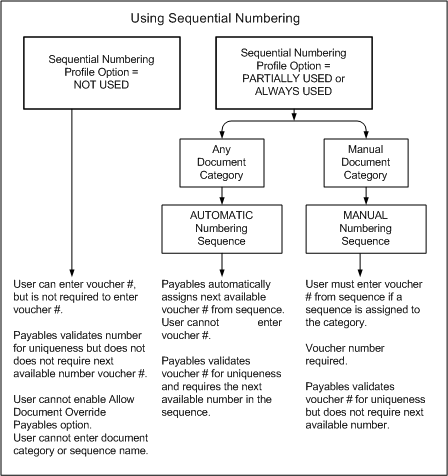
For a text description of the previous graphic, see: Text Description of the Using Sequential Numbering Graphic.
Document Sequencing Setup Examples
Example 1
You specify Always Used for the Sequential Numbering profile option. You create a document sequence named Auto Expense that uses automatic numbering. You assign the sequence to the document category Expense Report, used for invoices created from expense reports. Payables enters the next available number from the Auto Expense sequence into the Voucher Number field. Payables ensures that the number assigned is unique for the Auto Expense sequence.
Example 2
You also create a document sequence named Man Inv Standard that uses manual numbering. You assign the sequence to a document category you create called Standard Manual Invoice. You enable the Document Category Override Payables option for invoices. When you manually enter a Standard invoice, you can override the default category, Standard Invoice, and enter Standard Manual Invoice in the Document Category field. Because you set Sequential Numbering to Always Used, you must enter in the Voucher Number field an available number from the Man Inv Standard sequence. Payables ensures that the number you assign is in the sequence and that it is unique within that sequence. When you enter voucher numbers in this manner, Payables does not require you to use the next available voucher number.

Making a Sequence or Assignment Inactive
In the Sequence Assignments window, you can disable an assignment by entering an End date. The End date is the last date that the assignment is active. Once you have disabled the assignment, you can then disable the sequence in the Document Sequences window. Once disabled, a sequence cannot be reactivated.
Attention: Always disable the assignment before you disable a sequence or you will have a category with an inactive sequence assigned to it.