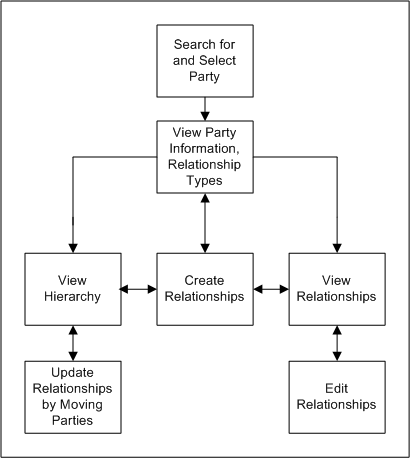
This diagram describes the general process flow of managing party relationships with the Relationship Manager.
Search for the party that you want to view and manage relationships for and select the party from the search results. See: Searching for Parties and Viewing Results.
Note: If you want to see a relationship hierarchy, keep in mind that the party you search for is the root of the hierarchy.
View the party's overview information as well as the relationship types that it is involved in.
From here, you have three options:
View relationships of selected relationship types. See: Viewing Relationships.
Create new relationships with a relationship type that the party is not currently involved in. See: Creating Relationships.
After you create relationships, Relationship Manager takes you back to view the party's information and relationship types.
View the hierarchy of a hierarchical relationship type. See: Viewing Relationship Hierarchies.
If you choose to view relationships, you can also:
Create new relationships with a relationship type that you are viewing. See: Creating Relationships.
Edit the existing relationships that you are viewing. See: Editing Relationships.
After you edit or create a relationship, Relationship Manager takes you back to view the relationships.
If you choose to view a hierarchy, you can also:
Update relationships by moving parties within the hierarchy. See: Updating Relationships by Moving Parties in a Hierarchy.
Create relationships for any party in the hierarchy, using the relationship type of the hierarchy. See: Creating Relationships.
After you move parties or create relationships, Relationship Manager takes you back to the hierarchy view.
