Organizations are departments, sections, divisions, companies, or other organizational units in your business.
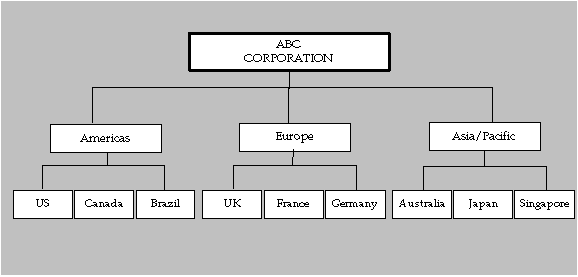
The illustration below depicts ABC Corporation's organization structure. There are three levels of organizations. ABC Corporation, the top-level organization, has three child organizations Americas, Europe, and Asia/Pacific. Each of these organizations also has several child organizations. For example, the Americas organization has the following child organizations: US, Canada, and Brazil.
ABC Corporation uses the following information to define its default reporting organization hierarchy:
| Name | Oracle Assets |
| Version | 1 |
| Organization Name | ABC Corporation |
A business group is the highest level of organization and the largest grouping of employees across which you may report.
Oracle Human Resources includes a predefined organization named Setup Business Group. We recommend that you modify the definition of this predefined business group rather than defining a new one. If you define a new business group instead of modifying the predefined Setup Business Group, you need to set the HR: Security Profile profile option to point to the security profile for the new business group. Oracle Human Resources automatically creates a security profile with the business group name when you define a new business group. Oracle Human Resources incorporates all other organizations you specify into the business group you define. See: Security.
You use the Organization window to retrieve the predefined Setup Business Group. Then, you can create your own business group by changing the name of the Setup Business Group. The business group you define here appears in the list of values when you set up the HR: Security Profile profile option.
Note: If you already use Oracle Human Resources, we recommend that you continue using the same business group you defined in Human Resources. If you are using a shared installation of Human Resources, we recommend you use the pre-defined Setup Business Group.
A business group is a special classification of an organization, so you also need to specify its organization type, location, and whether it is an internal or external organization. It is also essential to select the correct legislation code for a business group for correct functioning of Oracle Human Resources. You cannot change the legislation code after entering employees in a business group. See also: Entering Business Group Information.
Attention: Employees, organizations, and other entities are partitioned by business group. If you set up more than one business group, your data will be partitioned accordingly. In addition, classifying an organization as a business group is not reversible. Be sure to plan your business group setup carefully. For more information, refer to the Oracle Human Resources Documentation Set.
You use the Organization window in Oracle Assets or Oracle Human Resources to specify all the organizations within your company. By choosing the Others button on this window, you can then set up the corporate and tax book information for that particular organization.
Oracle Human Resources uses organization classifications to determine the type of organizations being set up. To flag an organization for use in Oracle Assets, you enable the Asset Organization classification.
An asset organization is an organization that allows you to perform asset-related activities for specific Oracle Assets corporate depreciation books. Oracle Assets uses only organizations designated as asset organizations.
If you require other types of organization classifications, see the Oracle Human Resources Documentation Set.
