Custom interface definitions can be created and annotated for almost all interface types. With appropriate validation, if no error occurred, the validated custom definition sources compiled in a generated iLDT file can be uploaded to Oracle Integration Repository through backend processing.
Note: Please note that custom interface types of EDI, Open Interface Tables and Interface Views are not supported in this release.
Oracle Integration Repository currently does not support the creation of custom Product Family and custom Business Entity.
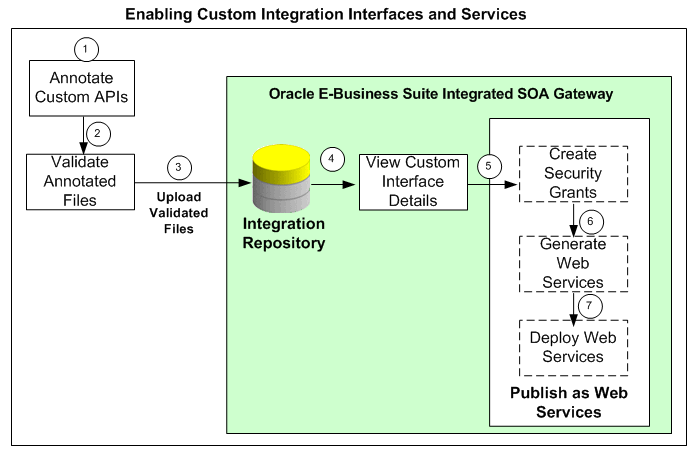
The custom interface design and service enablement process flow can be illustrated in the following diagram:
Note: Not all integration interface definitions can be service enabled. Oracle Integration Repository supports service enablement only for the following interface types:
PL/SQL
XML Gateway Map (inbound)
Concurrent Program
Business Service Object (Service Beans)
Java Bean Services
Application Module Services
Please note that the Business Event and XML Gateway Map (outbound) interface types are supported through subscription model.
Users who have the Integration Developer role annotate custom integration interface definition based on the Integration Repository annotation standards for the supported interface types.
Users who have the Integration Administrator role validate the annotated custom interface definitions against the annotation standards. This validation is performed by executing the Integration Repository Parser (IREP Parser), a design-time tool, to read the annotated files and then generate an Integration Repository loader file (iLDT ) if no error occurred.
For information on how to generate and upload the iLDT files, see Generating and Uploading iLDT Files.
Users who have the Integration Administrator role upload the generated iLDT file to Oracle Integration Repository.
All users can view the uploaded custom interfaces from the Integration Repository user interface.
(Optional) Users who have the Integration Administrator role then create necessary security grants for the custom integration interfaces if needed.
This is achieved by first locating the custom interface from the Integration Repository, and then selecting methods contained in the selected custom interface before clicking Create Grant. The Create Grants page is displayed where the administrators can grant the selected method access permissions to a user, user group, or all users. See: Creating Security Grants.
(Optional) Users who have the Integration Administrator role can generate Web services if the custom interfaces can be service enabled.
This is achieved by first locating the custom interface, and then specifying the interaction pattern either at the interface level or the method level before clicking Generate in the selected custom interface details page. See: Generating Custom SOAP Web Services.
(Optional) Users who have the Integration Administrator role deploy the Web services from Oracle Integration Repository to the application server.
To deploy generated SOAP Web services, the administrators must first select one authentication type (Username Token or SAML Token) for each selected Web service and then click Deploy in the selected interface details page. This deploys the generated service with 'Active' state to Oracle SOA Suite where Oracle E-Business Suite services can be exposed as standard Web services for service execution at run time. See: Deploying and Undeploying Custom SOAP Web Services.
If the custom interfaces can be exposed as REST services, the administrators must enter a unique service alias for each selected custom interface and specify the desired service operations before deploying the service. Additionally, the administrators need to specify HTTP methods for the service operations contained in the selected interface if it is an interface type of Java Bean Services or Application Module Services.
Note: In this release, PL/SQL APIs and Concurrent Programs can be exposed as both SOAP and REST services; Java Bean Services and Application Module Services can be exposed as REST services only.
Once a custom integration definition of a specific interface type is created, an integration developer must properly annotate the custom file based on the Integration Repository annotation standards so that the custom interface can be displayed with appropriate description from the browser interface.
For example, the integration developer can create a Supplier Ship and Debit Request custom interface using PL/SQL API. This custom PL/SQL API package specification file (zz_sdrequest_s.pls) can be as follows:
set verify off
whenever sqlerror exit failure rollback;
WHENEVER OSERROR EXIT FAILURE ROLLBACK;

create or replace package ZZ_SDREQUEST as
/* $Header: isgdg_customover1.htm 120.17 2017/06/06 20:57:20 appldev noship $ */

-- Custom procedure to create single supplier ship and debit request

procedure ZZ_CREATE_SDREQUEST (
CP_API_VERSION_NUMBER  IN    NUMBER,
CP_INIT_MSG_LIST  IN    VARCHAR2 := FND_API.G_FALSE,
CP_COMMIT  IN    VARCHAR2 := FND_API.G_FALSE,
CP_VALIDATION_LEVEL  IN    NUMBER := FND_API.G_VALID_LEVEL_FULL,
CX_RETURN_STATUS  OUT    VARCHAR2,
CX_MSG_COUNT  OUT    NUMBER,
CX_MSG_DATA  OUT    VARCHAR2,
CP_SDR_HDR_REC  IN    OZF_SD_REQUEST_PUB.SDR_HDR_REC_TYPE,
CP_SDR_LINES_REC  IN    OZF_SD_REQUEST_PUB.SDR_lines_rec_type,
CP_SDR_CUST_REC  IN    OZF_SD_REQUEST_PUB.SDR_cust_rec_type,
CP_SDR_BILLTO_REC  IN    OZF_SD_REQUEST_PUB.SDR_cust_rec_type,
CX_REQUEST_HEADER_ID  OUT    NUMBER
)
;
end ZZ_SDREQUEST;

/
commit;
exit;
Based on the PL/SQL API annotation standards, the integration developer must annotate the Supplier Ship and Debit Request custom package specification file by adding the annotation information specifically in the following places:
Annotate the PL/SQL API package specification
Annotate the PL/SQL procedure
The annotations for the procedure should be placed between the definition and ';'.
Please note that you only need to annotate the custom package specification file, but not the package body file. For information on how to annotate custom interfaces for the interface types supported by Oracle Integration Repository, see Integration Repository Annotation Standards and Oracle Application Framework Developer's Guide, available from My Oracle Support Knowledge Document 1315485.1.
set verify off
whenever sqlerror exit failure rollback;
WHENEVER OSERROR EXIT FAILURE ROLLBACK;

create or replace package ZZ_SDREQUEST as
/* $Header: isgdg_customover1.htm 120.17 2017/06/06 20:57:20 appldev noship $ */
/*#
* This custom PL/SQL package can be used to create supplier ship and debit request for single product.
* @rep:scope public
* @rep:product OZF
* @rep:displayname Single ship and debit request
* @rep:category BUSINESS_ENTITY OZF_SSD_REQUEST
*/

-- Custom procedure to create single supplier ship and debit request

procedure ZZ_CREATE_SDREQUEST (
CP_API_VERSION_NUMBER  IN    NUMBER,
CP_INIT_MSG_LIST  IN    VARCHAR2 := FND_API.G_FALSE,
CP_COMMIT  IN    VARCHAR2 := FND_API.G_FALSE,
CP_VALIDATION_LEVEL  IN    NUMBER := FND_API.G_VALID_LEVEL_FULL,
CX_RETURN_STATUS  OUT    VARCHAR2,
CX_MSG_COUNT  OUT    NUMBER,
CX_MSG_DATA  OUT    VARCHAR2,
CP_SDR_HDR_REC  IN    OZF_SD_REQUEST_PUB.SDR_HDR_REC_TYPE,
CP_SDR_LINES_REC  IN    OZF_SD_REQUEST_PUB.SDR_lines_rec_type,
CP_SDR_CUST_REC  IN    OZF_SD_REQUEST_PUB.SDR_cust_rec_type,
CP_SDR_BILLTO_REC  IN    OZF_SD_REQUEST_PUB.SDR_cust_rec_type,
CX_REQUEST_HEADER_ID  OUT    NUMBER
)
/*#
* Use this procedure to create single supplier ship and debit request
* @param CP_API_VERSION_NUMBER Version of the custom API
* @param CP_INIT_MSG_LIST Flag to initialize the message stack
* @param CP_COMMIT Indicates Flag to commit within the program
* @param CP_VALIDATION_LEVEL Indicates the level of the validation
* @param CX_RETURN_STATUS Indicates the status of the program
* @param CX_MSG_COUNT Provides the number of the messages returned by the program
* @param CX_MSG_DATA Returns messages by the program
* @param CP_SDR_HDR_REC Contains details of the new Ship Debit Request to be created
* @param CP_SDR_LINES_REC Contains the product line information for the new Ship Debit Request
* @param CP_SDR_CUST_REC Contains the Customer information for the new Ship Debit Request
* @param CP_SDR_BILLTO_REC Contains the Bill-to information for the new Ship Debit Request
* @param CX_REQUEST_HEADER_ID Returns the id of the new Ship Debit Request created
* @rep:displayname Create ship and debit request
* @rep:category BUSINESS_ENTITY OZF_SSD_REQUEST
* @rep:scope public
* @rep:lifecycle active
*/
;
end ZZ_SDREQUEST;

/
commit;
exit;
Once annotated custom integration interface definitions are created, these annotated source files need to be validated against the annotation standards before they can be uploaded to Oracle Integration Repository. This validation is performed by executing the Integration Repository Parser (IREP Parser), a design-time tool, to read the annotated files and then generate an Integration Repository loader file (iLDT ) if no error occurred.
Note: Please note that Integration Repository Parser does not support the integration interfaces registered under custom applications.
It is currently tested and certified for Linux, Unix, Oracle Solaris on SPARC, HP-UX Itanium, and IBM AIX on Power Systems.
Microsoft Windows platform is currently not supported in this release.
Once an iLDT file is generated, an integration administrator can upload the generated file to Oracle Integration Repository where the custom interfaces can be exposed to all users.
For information on how to set up and use the Integration Repository Parser to generate the iLDT file as well as how to upload the generated file to the repository, see:
Searching and Viewing Custom Interfaces
Once annotated custom interface definitions have been uploaded successfully, they are merged into the interface types they belong to and displayed together with Oracle seeded interfaces from the Integration Repository browser window. To easily distinguish annotated custom interface definitions from Oracle ones, the Interface Source "Custom" is used to categorize those custom interfaces in contrast to Interface Source "Oracle" for Oracle seeded interfaces in Oracle E-Business Suite.
To search for custom integration interfaces, you can use either one of the following ways:
From the Interface List page, select 'Custom' from the Interface Source drop-down list along with a value for the Scope field to restrict the custom integration interfaces display.
From the Search page, click Show More Search Options to select 'Custom' from the Interface Source drop-down list along with any interface type, product family, or scope if needed as the search criteria.
After executing the search, all matched custom integration interfaces will be displayed. For more information on how to search and view custom integration interfaces, see Searching Custom Integration Interfaces and Viewing Custom Integration Interfaces.
Performing Administrative Tasks
Once custom integration interfaces have been successfully uploaded and displayed from the Integration Repository user interface, an integration administrator can perform the same administrative tasks on these custom interfaces as they are for the native integration interfaces. These administrative tasks including creating security grants for newly created custom interfaces if needed, generating Web services, deploying Web services, and managing services throughout the entire deployment life cycle. See Administering Custom Integration Interfaces and Services.
For information on how to use custom integration interfaces as Web services, see Using Custom Integration Interfaces as Web Services.