Implementing Service Invocation Framework
This section discusses the following topics:
Setup Tasks
Web services can be invoked from any one of the following tiers:
-
OACORE WebLogic Server: Web service invocations from OA Framework page using a synchronous event subscription (phase < 100) is executed from the OACORE WebLogic Server.
-
Concurrent Manager (CM) Tier JVM: The following Web service invocations are executed from CM tier JVM within Java Deferred Agent Listener that runs within Workflow Agent Listener Service:
-
Standalone JVM: Web service invocations from a Java process that runs outside OACORE or CM using a synchronous event subscription are executed from within that JVM.
Proxy Host and Port Setups
If a target Web service resides within the firewall and is directly accessible from an Oracle E-Business Suite server, administrators do not need to configure proxy host and port.
However, if a target Web service that is invoked resides outside the firewall and thus the request needs to be routed through the proxy, in this circumstance, administrators must set up and configure proxy host and port appropriately for the tiers that Web service invocations occur in order to perform the following activities:
Common Proxy Setup at WebLogic Server and Concurrent Manger Tier JVM
Use common setup information to configure proxy host and port. This information is applicable to the following conditions:
-
Proxy host and port at WebLogic Server
For a Web service invoked from OA Framework, the JBES seeded Java rule function would run within the OACORE's WebLogic Server.
WebLogic Server start script (<EBSDomain>/bin/startWebLogic.sh) should have the following system properties setup in the JAVA_OPTIONS in order for it to work:
-Dhttp.proxyHost=myproxy.host.name
-Dhttp.proxyPort=80
-Dhttp.nonProxyHosts=*.mydomain.com|localhost
-
Proxy host and port at Concurrent Manger Tier JVM
For a Web service invoked from PL/SQL and Java using an asynchronous subscription, the event is raised by the application code wherever it executes and then enqueued to the WF_JAVA_DEFERRED queue by the Event Manager. The event subscription is executed from the CM tier by the Java Deferred Agent Listener.
If a Web service is invoked by the Java Deferred Agent Listener, then the code would run within the CM tier Java service's JVM. If the Web service resides outside the firewall, proxy host and port need to be configured properly.
To configure proxy host and port for WebLogic server and CM tier JVMs, you need to update AutoConfig context file with the following entries and run AutoConfig:
<!-- proxy -->
		<proxyhost oa_var="s_proxyhost">myproxyhost</proxyhost>
   <proxyport oa_var="s_proxyport">80</proxyport>
   <nonproxyhosts oa_var="s_nonproxyhosts">any domain that needs to be by-passed (such as *.us.oracle.com)</nonproxyhosts>
Proxy Host and Port Setup When Using Standalone Java Class
You must set the following entries:
java -Dhttp.proxyHost=myproxyhost -Dhttp.proxyPort=80 classname
Setup Tasks for Invoking SSL-based Web Services over HTTPS
Service Invocation Framework supports SSL-based Web service invocation using Server Authentication method. When a client connects to a Web server via HTTPS, the server sends back its server certificate to the client for verification. Once verified, the client sends the data, encrypted, to the server. Server Authentication allows the client to identify the server. Before invoking a Web service from a server over HTTPS (HTTP protocol over TLS/SSL), you need to perform manual setup tasks in order to read SSL-based WSDLs and invoke SSL service endpoints.
A client may receive one of the following two types of server certificates:
Perform the following two setup tasks for the Service Invocation Framework to invoke a SSL-based Web service:
Importing Server SSL Certificate into a SIF JVM's Certificate Store
Public Certificate Issued by a Certification Authority (CA)
If server certificate is a public certificate and is issued by a public CA such as VeriSign, then it is most likely available in a SIF JVM's certificate store or in a trusted certificate list.
Self-signed Certificate or Certificate is not in Trusted Certificate List
Perform the following tasks to import the server's SSL certificate into a SIF JVM's certificate store or add it to a trusted certificate list:
-
Export the server certificate using either one of the following methods:
-
Use openssl Utility:
Use openssl utility to connect to the destination server with the following syntax:
$ openssl s_client -connect <server>:<port> -showcerts
Attention: If there is no port in destination, default HTTPS port 443 should be used.
For example: $ openssl s_client -connect host.domain.com:443 -showcerts
Copy the certificate content from BEGIN CERTIFICATE to END CERTIFICATE (including BEGIN CERTIFICATE and END CERTIFICATE lines as shown in the sample certificate) into a file and save the file (such as my_cert.cer).
A sample output of above openssl command can be like:
$ openssl s_client -connect host.domain.com:443 -showcerts

...
Server certificate
-----BEGIN CERTIFICATE-----
MIIFVjCCBD6gAwIBAgIQBVWzfUyIcCa5LtuV+f9WvjANBgkqhkiG9w0BAQUFADCB
sDELMAkGA1UEBhMCVVMxFzAVBgNVBAoTDlZlcmlTaWduLCBJbmMuMR8wHQYDVQQL
ExZWZXJpU2lnbiBUcnVzdCBOZXR3b3JrMTswOQYDVQQLEzJUZXJtcyBvZiB1c2Ug
YXQgaHR0cHM6Ly93d3cudmVyaXNpZ24uY29tL3JwYSAoYykwNTEqMCgGA1UEAxMh
VmVyaVNpZ24gQ2xhc3MgMyBTZWN1cmUgU2VydmVyIENBMB4XDTA5MDQyMTAwMDAw
MFoXDTEwMDUwNTIzNTk1OVowgckxCzAJBgNVBAYTAlVTMRMwEQYDVQQIEwpDYWxp
Zm9ybmlhMRcwFQYDVQQHFA5SZWR3b29kIFNob3JlczEbMBkGA1UEChQST3JhY2xl
IENvcnBvcmF0aW9uMR8wHQYDVQQLFBZJbmZvcm1hdGlvbiBUZWNobm9sb2d5MTMw
MQYDVQQLFCpUZXJtcyBvZiB1c2UgYXQgd3d3LnZlcmlzaWduLmNvbS9ycGEgKGMp
MDUxGTAXBgNVBAMUECoub3JhY2xlY29ycC5jb20wgZ8wDQYJKoZIhvcNAQEBBQAD
gY0AMIGJAoGBAL/EBxxt2keWTuJbo4SogWmiaJxThYDMvy8nWkpvKIp3s7OCQW0G
t17sAirfBkUirbGRlcWi5fi0RReruGXgYxFnf12fBNAimRWVo3mjeQo8BpRBm27n
3YcTZUlaIE77FvB3913jzD9c4sbjIe2fGpVmx+X9PZmDKSY9KPGjDbFNAgMBAAGj
ggHTMIIBzzAJBgNVHRMEAjAAMAsGA1UdDwQEAwIFoDBEBgNVHR8EPTA7MDmgN6A1
hjNodHRwOi8vU1ZSU2VjdXJlLWNybC52ZXJpc2lnbi5jb20vU1ZSU2VjdXJlMjAw
NS5jcmwwRAYDVR0gBD0wOzA5BgtghkgBhvhFAQcXAzAqMCgGCCsGAQUFBwIBFhxo
dHRwczovL3d3dy52ZXJpc2lnbi5jb20vcnBhMB0GA1UdJQQWMBQGCCsGAQUFBwMB
BggrBgEFBQcDAjAfBgNVHSMEGDAWgBRv7K+g3Yqk7/UqEGctP1WCvNfvJTB5Bggr
BgEFBQcBAQRtMGswJAYIKwYBBQUHMAGGGGh0dHA6Ly9vY3NwLnZlcmlzaWduLmNv
bTBDBggrBgEFBQcwAoY3aHR0cDovL1NWUlNlY3VyZS1haWEudmVyaXNpZ24uY29t
L1NWUlNlY3VyZTIwMDUtYWlhLmNlcjBuBggrBgEFBQcBDARiMGChXqBcMFowWDBW
FglpbWFnZS9naWYwITAfMAcGBSsOAwIaBBRLa7kolgYMu9BSOJsprEsHiyEFGDAm
FiRodHRwOi8vbG9nby52ZXJpc2lnbi5jb20vdnNsb2dvMS5naWYwDQYJKoZIhvcN
AQEFBQADggEBADBi9NfljQLuD2Tnol3pmQl717rc8kKmpLYEO6u5MxIK0+L2MslV
4NE1qbNx1dfIoW68HHXtpsF5KtKFLYk9EoOkBd7oMp7fFv31RANV3LpdAHZC9EaK
CA/oKB2RrSu7ZmaUvoRb+3v5FdhAmgtoY6Wljk0yxMvXVf/TOeXqKl8C/r1gSzyC
s/jVmy6N81Oeleqtozzt/aJNGu7xu/MdtP13eyu7RSEBRGJwEwTXH+rTUKK8mle0
Kz15DgJ6ByK2XZmD4Z+O8DTUhUhIHR1OhuLR7zjGp9W7wQuCizUcTvuKEGzVf5D/
y7orhV0U+AoXnl/5wntVMZc/Tmqr/Fkb8+g=
-----END CERTIFICATE-----

...
-
Use Web Browser:
Access the WSDL file available through HTTPS URL (such as https://<hostname>:<port>/webservices/SOAProvider/xmlgateway/ont__poi/?wsdl) through a Web browser.
-
After the WSDL file has been successfully loaded in a browser, double click on the Lock icon in the bottom right corner of the browser and export the certificate.
For example, in Internet Explorer, double click on the Lock icon > Details > Copy to File. In Mozilla Firefox, double click on the Lock icon > Security > View Certificate > Details > Export.
-
You can also use browser menu to access the certificate. For example, in Internet Explorer, select Internet Options from the Tools drop-down menu to open the Internet Options pop-up window. Select the Content tab, click Certificates. Select the Personal (or Other People) tab to select your certificate and click Export.
-
You can export or save the certificate either in DER encoded binary X.509 (.CER) or in Base 64 encoded.
Note: Different browser versions may have different steps to export SSL certificates.
-
Import the server's SSL certificate into an appropriate SIF JVM's certificate store to add it to the list of trusted certificates.
Attention: Information about where Web services are invoked through the Service Invocation Framework is described in the Setup Tasks.
There are many utilities available to import certificates. For example, you can use keytool, a key and certificate management utility that stores the keys and certificates in a keystore. This management utility is available by default with JDK to manage a keystore (database) of cryptographic keys, X.509 certificate chains, and trusted certificates.
The keytool commands have the following syntax:
keytool -import -trustcacerts -keystore <key store location> -storepass <certificate store password> -alias <alias name> -file <exported certificate file>
For example:
keytool -import -trustcacerts -keystore "$AF_JRE_TOP/jre/lib/security/cacerts" -storepass password -alias xabbott_bugdbcert -file my_cert.cer
Note: This must be typed as a single line. The file (-file) is the exported certificate file i.e. my_cert.cer.
Setting Up SSL Proxy Host and Port
If a SSL-based Web service resides outside the firewall, the JVM that invokes the Web service has to communicate through SSL proxy. Following setup tasks are required in all appropriate tiers to use SSL proxy.
Setting Up Proxy Host and Port at WebLogic Server
For a Web service invoked from OA Framework, the JBES seeded Java rule function would run within the OACORE's WebLogic Server.
WebLogic Server start script (<EBSDomain>/bin/startWebLogic.sh) should have the following system properties setup in the JAVA_OPTIONS in order for it to work:
-Dhttps.proxyHost=myproxy.host.name
-Dhttps.proxyPort=80
-Dhttps.nonProxyHosts=*.mydomain.com|localhost
AutoConfig does not support properties https.proxyHost and https.proxyPort currently. To ensure the above properties are retained during the execution of AutoConfig, the context file could be customized to add these two properties.
For information on how to customize AutoConfig-managed configurations, see Using AutoConfig to Manage System Configurations in Oracle E-Business Suite Release 12, My Oracle Support Knowledge Document 387859.1 for details.
Setting Up Proxy Host and Port at Concurrent Manger Tier JVM
For a Web service invoked from PL/SQL and Java using an asynchronous subscription, the event is raised by the application code wherever it executes and then enqueued to the WF_JAVA_DEFERRED queue by the Event Manager. The event subscription is executed from the CM tier by the Java Deferred Agent Listener.
If a Web service is invoked by the Java Deferred Agent Listener, then the code would run within the CM tier Java service's JVM. Workflow Agent Listener Service does not currently support Service Parameters to set SSL proxy. The SSL proxy could be set up directly to Concurrent Manager's JVM system properties in $APPL_TOP/admin/adovars.env using AutoConfig.
<oa_environment type="adovars">
 <oa_env_file type="adovars" oa_var="s_adovars_file" osd="unix">
  $APPL_TOP/admin/adovars.env</oa_env_file>
...
 <APPSJREOPTS oa_var="s_appsjreopts">="-Dhttps.proxyHost=[proxyhost]
  -Dhttps.proxyPort=[sslproxyport]</APPSJREOPTS>
...
</oa_environment>
Setting Up Proxy Host and Port When Using Standalone Java Class
You must set the following entries:
java -Dhttps.proxyHost=[proxyhost] -Dhttps.proxyPort=[sslproxyport]
<classname>
Implementing Service Invocation Framework
The invocation of Oracle E-Business Suite Web services using the Service Invocation Framework involves the following steps:
-
Defining invocation metadata and invoking Web services through the Business Event System
-
Calling back to Oracle E-Business Suite with Web service responses
-
Managing errors
-
Testing Web service invocation
-
Extending Web service invocation
Defining Invocation Metadata and Invoking Web Services Through the Business Event System
Web service invocation metadata can be defined by using Oracle Workflow Business Event System to create events and event subscriptions. When a triggering event occurs, a Web service can be invoked through an appropriate event subscription.
Specifically, the invocation metadata can be defined through the following steps:
-
Create a Web service invoker event
A business event that serves as a request message for a service needs to be created first.
-
Create a local subscription to invoke a Web service
You must subscribe to the invoker event with 'Invoke Web Service' action type.
To create an event subscription to the Invoker event, enter basic subscription information (such as source type, phase, event filter) and select 'Invoke Web Service' action type. Click Next to display the Invoke Web Service wizard where you can specify a WSDL URL as an input parameter for the event subscription. The Business Event System then parses the given WSDL and displays all services contained in the WSDL for selection.
This parsing feature allows developers to select appropriate service metadata including service port, port type, and operation for a selected service and then stores the selected information as subscription parameters that will be used later during service invocation.
Configuring UsernameToken based WS-Security
If the Web service being invoked enforces Username/Password based authentication, then the Service Invocation Framework also supports the UsernameToken based WS-Security header during Web service invocation.
Attention: This UsernameToken based WS-Security header is implemented during the service invocation only if the Web service provider that processes the Web service request needs this security header.
To authenticate the users invoking Web services, the UsernameToken based WS-Security model passes a username and an optional password in the SOAP Header of a SOAP request sent to the Web service provider.
After specifying needed information in the Invoke Web Service wizard during the creation of event subscription, the Web Service Security region is displayed letting you enter username and password required for authentication.
Note: The security information is now entered through the Web Service Security region which replaces the security parameters (WFBES_SOAP_USERNAME, WFBES_SOAP_PASSWORD_MOD, and WFBES_SOAP_PASSWORD_KEY) used in earlier releases.
Specifying a Subscription Parameter for WS-Security Header
When creating the subscription to the Invoker event, you can specify the following parameter to set the expiration time for the security header:
By default, the header is set to expire 60 seconds in the <wsu:Timestamp> element (with <wsu:Created> and <wsu:Expires>) after it is created. You can optionally use this parameter to set a different expiration time in seconds for the header. This helps protect the header from being reused during a replay attack.
For example, a WS-Security header can be like:
<wsse:Security soapenv:mustUnderstand="1"
 xmlns:wsse="http://docs.oasis-open.org/wss/2004/01/oasis-200401-wss-wssecurity-secext-1.0.xsd">
		<wsu:Timestamp wsu:Id="Timestamp-2"
 xmlns:wsu="http://docs.oasis-open.org/wss/2004/01/oasis-200401-wss-wssecurity-utility-1.0.xsd">
			<wsu:Created>2013-09-02T04:56:59.592Z</wsu:Created>
			<wsu:Expires>2013-09-02T04:57:59.592Z</wsu:Expires>
		</wsu:Timestamp>
	<wsse:UsernameToken wsu:Id="UsernameToken-1"
 xmlns:wsu="http://docs.oasis-open.org/wss/2004/01/oasis-200401-wss-wssecurity-utility-1.0.xsd">
		<wsse:Username>myUser</wsse:Username>
		<wsse:Password
 Type="http://docs.oasis-open.org/wss/2004/01/oasis-200401-wss-username-token-profile-1.0#PasswordText">password</wsse:Password>
		<wsse:Nonce
	EncodingType="http://docs.oasis-open.org/wss/2004/01/oasis-200401-wss-soap-message-security-1.0#Base64Binary">RDyVo/jbXJdSKuVEPrQW6Q==</wsse:Nonce>
		<wsu:Created>2013-09-02T04:56:48.597Z</wsu:Created>
	</wsse:UsernameToken>
</wsse:Security>
Note: In the <wsse:UsernameToken> element, <Nonce> provides random string for the password which helps protect the UsernameToken security from being reused. <Created> indicates the creation time of the UsernameToken security.
For more information about UsernmaeToken security, see UsernameToken Based Security.
Configuring Security Information with Customization Level
Oracle Workflow allows various levels of updates on business event and subscription based on the customization level. If the Invoke Web Service event subscription's customization level is Core or Limit, and if the username is supplied by the subscription owner, then the username cannot be updated. If the username was not already supplied, you can update it if required. Password can always be updated if it's needed regardless of the customization level.
For more information about customization level and how to configure security parameters, see Configuring Web Service Security Through Event Subscription User Interface.
Specifying Subscription Parameters for XSL Transformation
While defining a local subscription to the Invoker event, you can specify the following message transformation parameters to support XSL transformation:
-
WFBES_OUT_XSL_FILENAME
-
WFBES_IN_XSL_FILENAME
Parameters to Set Values for Input Parts
Two topics are discussed in this section:
Event Payload as SOAP Body
Because the seeded Java rule function accepts SOAP body part value through business event payload, that payload can be passed in either one of the following ways:
After the event data or payload is passed, if the XML payload is available at the time of invoking the Web service and the payload is required to be transformed into a form that complies with the input message schema, the seeded Java rule function performs XSL transformation on the XML payload and then invokes the service.
Note: An input message is the XML payload that is passed to the Web service in the SOAP request. An output message is the XML document received as a response from the Web service after a successful invocation.
Message Transformation Parameters to Support XSL Transformation
For the synchronous request - response operation, when the output (response) message, an XML document, is available, if this XML document requires to be transformed to a form that is easier for Oracle E-Business Suite to understand, then XSL transformation on the output message will be performed.
The following subscription parameters are used to pass the XSL file names to the seeded Java rule function for XSL transformation:
Note: The XSL file name is structured with the following format:
<filename>:<application_short_name>:<version>
For example, it can be like "PO_XSL_OUT_2.xsl:FND:1.1".
-
WFBES_OUT_XSL_FILENAME: XSL file to perform transformation on the output (response) message
For example, it can be like WFBES_OUT_XSL_FILENAME=PO_XSL_OUT_2.xsl:FND:1.1.
-
WFBES_IN_XSL_FILENAME: XSL file to perform transformation on the input message
For example, it can be like WFBES_IN_XSL_FILENAME=PO_XSL_IN_2.xsl:FND:1.1.
At run time, a triggering event can be raised either from a PL/SQL layer using a PL/SQL API WF_EVENT.Raise or from a Java layer using a Java method oracle.apps.fnd.wf.bes.BusinessEvent.raise through the Business Event System.
If event parameters are passed with the same names, then the event parameters override the subscription parameters. For example, the event parameters are passed as follows:
-
BusinessEvent.setStringProperty("WFBES_OUT_XSL_FILENAME", "PO_XSL_OUT_2.xsl:FND:1.1");
-
BusinessEvent.setStringProperty("WFBES_IN_XSL_FILENAME", "PO_XSL_IN_2.xsl:FND:1.1");
For more information on Web service security and message payload, see the Oracle E-Business Suite Integrated SOA Gateway Developer's Guide.
Setting Other Web Service Input Message Parts
Apart from passing the SOAP body part as event payload, Service Invocation Framework supports passing values for other parts that are defined for the Web service operation's input message.
For example, consider the operation PROCESSPO in Oracle E-Business Suite XML Gateway service (http://<hostname>:<port>/webservices/SOAProvider/xmlgateway/ont__poi/?wsdl) as described below.
<definitions targetNamespace="ONT__POI" targetNamespace="http://xmlns.oracle.com/apps/ont/soaprovider/xmlgateway/ont__poi/">
<type>
   <schema elementFormDefault="qualified" targetNamespace="http://xmlns.oracle.com/apps/ont/soaprovider/xmlgateway/ont__poi/">
    <include schemaLocation="http://<hostname>:<port>/webservices/SOAProvider/xmlgateway/ont__poi/PROCESS_PO_007.xsd"/>
   </schema>
...
<message name="PROCESSPO_Input_Msg">
	 <part name="header" element="tns:SOAHeader"/>
   <part name="body" element="tns1:PROCESS_PO_007"/>
</message>
...
<binding name="ONT__POI_Binding" type="tns:ONT__POI_PortType">
<soap: binding style="document" transport="http://schemas.xmlsoap.org/soap/http"/>
	 <operation name="PROCESSPO">
		<soap:operation soapAction="http://<hostname>:<port>/webservices/SOAProvider/xmlgateway/ont__poi/"/>
		<input>
			<soap:header message="tns:PROCESSPO_Input_Msg" part="header" use="literal"/>
			<soap:body parts="body" use="literal"/>
   </input>
  </operation>
</binding>
...
</definitions>
The operation PROCESSPO requires input message PROCESSPO_Input_Msg, which has two parts:
-
Body: The value of PROCESS_PO_007 type to be set as SOAP body is sent as business event payload.
-
Header: The value of SOAHeader type to be sent in the SOAP header which is required for Web Service authorization can be set by using the business event parameter with the following format:
WFBES_INPUT_<partname>
<partname> is the same part name in the input message definition in WSDL.
For example, the header part for above example is passed to business event as parameter WFBES_INPUT_header during the invoker event raise. The following code snippet shows the header part that is used to pass username, responsibility, responsibility application, and NLS language elements for Web service authorization:
	String headerPartMsg = "<SOAHeader
xmlns=\"http://xmlns.oracle.com/xdb/SYSTEM\" " +
			 	  					"env:mustUnderstand=\"0\"
xmlns:env=\"http://schemas.xmlsoap.org/soap/envelope/\"> \n" +
									" <MESSAGE_TYPE>XML</MESSAGE_TYPE>\n" +
									" <MESSAGE_STANDARD>OAG</MESSAGE_STANDARD>\n" +
									" <TRANSACTION_TYPE>PO</TRANSACTION_TYPE>\n" +
									" <TRANSACTION_SUBTYPE>PROCESS</TRANSACTION_SUBTYPE>\n" +
									" <DOCUMENT_NUMBER>123</DOCUMENT_NUMBER>\n" +
									" <PARTY_SITE_ID>4444</PARTY_SITE_ID>\n" +
									"</SOAHeader>\n";
businessEvent.setStringProperty("WFBES_INPUT_header", headerPartMsg);
Note: Please note that this WFBES_INPUT_<partname> parameter can only be passed at run time during the event raise, not through the event subscription. Several constants are defined in interface oracle.apps.fnd.wf.bes.InvokerConstants for use in Java code.
If the Web service input message definition has several parts, value for the part that is sent as SOAP body is passed as event payload. Values for all other parts are passed as event parameters with parameter name format WFBES_INPUT_<partname>. If the value for a specific input message part is optional to invoke the Web service, you still have to pass the parameter with null value so that invoker subscription knows to which part the event payload should be set as SOAP body. For example, pass the following parameter with null value:
businessEvent.setStringProperty("WFBES_INPUT_myheader", null);
-
Create an error subscription to enable error processing
To enable error processing in the Business Event System that communicates with SYSADMIN user about error conditions during subscription execution, you must subscribe to the event with 'Launch Workflow' action type for error processing.
-
Create a receive event (optional)
If a Web service has an output or a response message to communicate or callback to Oracle E-Business Suite, and the invoker event is raised from Java code with the subscription phase >= 100 or if the event is raised from PL/SQL, then you should create a receive event for callback feature to complete the invocation process. Additionally, create an external subscription to the receive event to pass the Web service response.
Note: If it is raised from Java with subscription phase < 100, then the Web service is invoked immediately and response is available to the calling program using BusinessEvent.getResponseData() method after calling BusinessEvent.raise(). In this case, the response may not have to be communicated back to Oracle E-Business Suite using callback event.
If a Web service does not require a response, then there is no need to create a receive event.
-
Create a receive event subscription (optional)
If you have a receive event created, you must also create an external event subscription to pass the Web service response.
Please note that the subscription to the receive event does not have to be with "Launch Workflow" action type. It can be created with any action type that the integration developer wants.
To create an event, log in to Oracle Workflow with the Workflow Administrator Web Applications responsibility and select the Business Event link and click Create.
To access the business event subscription page, log in to Oracle Workflow with the same Workflow Administrator Web Applications responsibility and select the Business Event link > Subscriptions. Click Create Subscription to access the event subscription page.
For detailed instructions on how to create business events and event subscriptions to invoke Web services, see the Oracle E-Business Suite Integrated SOA Gateway Developer's Guide.
Calling Back to Oracle E-Business Suite With Web Service Response
As mentioned earlier, if a Web service has an output or a response message to communicate or callback to Oracle E-Business Suite, then a receive event and the local subscription to the receive event must be created first in the Business Event System.
To accomplish this synchronous request - response process, the Service Invocation Framework uses the callback mechanism to communicate the response back to Oracle E-Business Suite through the Business Event System. As a result, a new or waiting workflow process can be started or executed. The following callback subscription parameters are used to support the callback mechanism:
-
WFBES_CALLBACK_EVENT
This subscription parameter can have a valid business event to be raised upon completion of the Web service with the service output message as payload.
For example, it can be like:
WFBES_CALLBACK_EVENT=oracle.apps.wf.myservice.callback
-
WFBES_CALLABACK_AGENT
This subscription parameter can have a valid business event system agent to which the event with the service response message as payload can be enqueued.
For example, it can be like:
WFBES_CALLBACK_AGENT=WF_WS_JMS_IN
Note: WF_WS_JMS_IN is a standard default inbound agent for Web service messages. If desired, a custom agent can also be created to enqueue Web service responses. Additionally, if an agent listener is not available, you need to create one. See the Oracle Workflow Developer's Guide for details.
If event parameters are passed with the same names as the subscription parameters that have been parsed and stored, the event parameter values take precedence over subscription parameters. For example, the event parameters are passed as follows:
-
BusinessEvent.setStringProperty("WFBES_CALLBACK_EVENT", "oracle.apps.wf.myservice.callback");
-
BusinessEvent.setStringProperty("WFBES_CALLBACK_AGENT", "WF_WS_JMS_IN");
To process Web service responses from inbound workflow agent, make sure that you have agent listener set up properly.
Detailed information about these callback subscription parameters, see the Oracle E-Busines Suite Integrated SOA Gateway Developer's Guide.
Managing Errors
If there is a runtime exception when invoking the Web service by raising the Invoker event with synchronous subscription (phase <100), the exception thrown to the calling application. It is the responsibility of the calling application to manage the exception.
If there is a runtime exception when the Workflow Java Deferred Agent Listener executes event subscription to invoke the Web service, the event is enqueued to the WF_JAVA_ERROR queue. If the event has an Error subscription defined to launch Error workflow process WFERROR:DEFAULT_EVENT_ERROR2, the Workflow Java Error Agent Listener executes the error subscription which sends a notification to a user (SYSADMIN) with Web service definition, error details and event details. The SYSADMIN user can correct the error and then invoke the Web service again from the notification if necessary.
For more information on error handling during Web service invocation, see the Oracle E-Busines Suite Integrated SOA Gateway Developer's Guide.
Testing Web Service Invocations
To validate whether Web services can be successfully invoked from concurrent manager and OACORE WebLogic Server, integration developers can run a test case through Oracle Workflow Test Business Event page. Use this test to check the basic operation of Business Event System by raising a test event from Java or from PL/SQL and executing synchronous and asynchronous subscriptions to that event.
By using 'Raise in Java' option to raise the Invoker event with synchronous subscription (phase <100), Web service invocation within OACORE WebLogic Server can be tested. If there is a runtime exception when invoking the Web service using synchronous subscription, the exception message is shown on the Test Business Event page.
The following event parameters may be specified when raising the event from the Test Business Event page to invoke a Web service:
-
Message transformation: XSL transformation for Web service input message and output message
-
WFBES_OUT_XSL_FILENAME
-
WFBES_IN_XSL_FILENAME
-
Input Message part value: Pass values for any part that may be required to embed applications context into SOAP envelopes
-
WS-Security: Information required to add UsernameToken header to a SOAP request as event parameters
The Web service security information is entered in the Web Service Security region of the event subscription page after the Invoke WSDL wizard. See: Create a local subscription to invoke a Web service.
Note: As described here that security information is now entered through the event subscription user interface to replace the security parameters used in Oracle E-Business Suite Release 12.1.
These WS-Security parameters (WFBES_SOAP_USERNAME, WFBES_SOAP_PASSWORD_MOD, and WFBES_SOAP_PASSWORD_KEY) are now maintained internally by service invocation framework.
-
Callback: Callback to Oracle E-Business Suite with Web service responses
-
WFBES_CALLBACK_EVENT
-
WFBES_CALLBACK_AGENT
-
SOAP Body:
Detailed information on how to test Web service invocations, see the Oracle E-Business Suite Integrated SOA Gateway Developer's Guide.
Extending Web Service Invocation
Oracle E-Business Suite Integrated SOA Gateway allows developers to extend the invoker subscription seeded rule function oracle.apps.fnd.wf.bes.WebServiceInvokerSubscription using Java coding standards for more specialized processing.
Developers could extend the seeded rule function to override following methods for custom processing:
-
preInvokeService
-
postInvokeService
-
addWSSecurityHeader
-
setInputParts
-
addCustomSOAPHeaders
For more information on these methods, see the Oracle E-Business Suite Integrated SOA Gateway Developer's Guide.
Implementation Limitation and Consideration
While implementing the Service Invocation Framework, consider the following limitations:
-
WFBES_INPUT_<partname> Parameter Can Only be Passed at the Event Raise
The Service Invocation Framework uses event parameter WFBES_INPUT_<partname> to support passing values for any header part that may be required to embed applications context into SOAP envelopes. However, unlike other parameters that can be defined while subscribing to the Invoker event, this event parameter can only be defined during the event raise.
-
Support Document Style Web Services Only
The Service Invocation Framework supports invoking only document-based Web services. The RPC (remote procedure call) style remote Web service invocation is not supported in this release.
-
Support One-to-One Relationship of Event Subscriptions
To successfully invoke Web services, each event should only have one subscription (with 'Invoker Web Service' action type) associated with it. This one-to-one relationship of event subscription is especially important in regards to synchronous request - response service invocation.
For example, if there are three event subscriptions (S1, S2, and S3) for the same event (Event 1), when a triggering event occurs at run time, the services associated with each subscription can be invoked three times (WS1, WS2, and WS3) respectively. The scenario is illustrated in the following diagram:
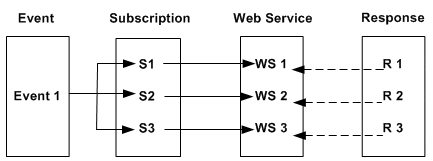
-
If callback parameters are not passed, getResponseData() method on the BusinessEvent object returns the output (response) message in the same session after the Invoker event raise. The R2 overrides the R1; R3 overrides the R2. As a result, you will only get R3 message back.
-
If callback parameters are passed, since there are three different instances of the receive event with the same event key, it is difficult to match the response to the corresponding Invoke Web Service subscription.