You can create parent-child relationships for account segments with a validation type of Independent or Table. You cannot create parent-child relationships for dependent value sets or value sets with a validation type of None.
Note that parent and child value sets have a relationship different from the relationship between independent and dependent values.
See: Designing Your Accounting Flexfield
See: Planning Your Summary Accounts
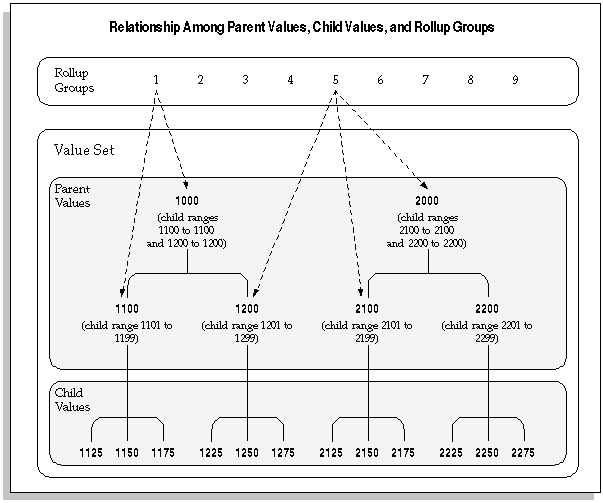
The following figure shows an example of rollup groups with a value set that has parent and child values.
For a text description of the preceding figure, see Text Description of Relationship Among Parent Values, Child Values, and Rollup Groups.
A parent value is a value that has one or more child values associated with it. A parent value can be assigned to a rollup group. You create parent-child relationships by defining a range of child values that belong to a parent value. You can use parent-child relationships for reporting and other application purposes. In the figure above, account 1000 is a parent value with child values 1100 and 1200. Account 1100 is a parent value with child values 1125, 1150, and 1175.
A child value is a value that lies in a range of values belonging to a parent value. A child value can belong to more than one parent value. A child value is not a dependent value; that is, the actual value of the child does not depend on the value of another segment. You create parent-child relationships by defining a range of child values that belong to a parent value. In the figure above, accounts 1125, 1150, and 1175 are child values of parent value 1100.
If you plan to use summary accounts, you should specify the pseudo parent value "T" for each segment. This segment should not have any child values assigned to it. The value "T" is reserved by the system for use in Summary Accounts and represents all child values for that segment.
Warning: The segment value "T" should only be used to mean all segment values, in other words, the total of all parent values. You cannot use it for any other purposes.
A rollup group is a collection of parent values. Only parent values can be assigned to a rollup group. Parent values and child values belong to the same value set, which is then attached to a key flexfield segment.
A rollup group allows you to group related parent values for creating summary templates. Given a summary template, General Ledger creates summary balances using all parent values assigned to that rollup group.
You define rollup groups using the Rollup Groups window before you define your key segment values. Then, you assign your parent values to the rollup groups when you define the parent values.
See: Rollup Groups Window
Rollup groups are separate from parent-child relationships. You can assign any parent value to a given rollup group, regardless of that parent value's position in a value hierarchy you might create. In the previous figure, rollup group 5 is composed of parent values 2000, 2100, and 1200. In this case the parent values in the rollup group are from different branches in the value set hierarchy.
Oracle Applications provides you with windows to define relationships between parent and child values. You create these relationships by defining a parent value and assigning a range of values to become the children of the parent value.
For instructions on how to define rollup groups, see Oracle E-Business Suite Flexfields Guide.
You can also use the Account Hierarchy Manager to define new rollup groups then graphically create parent-child relationships and assign parent values to rollup groups.
For information on the Account Hierarchy Manager, see: The Account Hierarchy Manager.
An Independent value set provides a predefined list of values for a segment. A Dependent value set is also a list of values, but the list of available values and their associated meanings depends on which independent value is selected for the previous flexfield segment. You can see the relationship between independent and dependent value sets and parent values and child values in the following diagram:
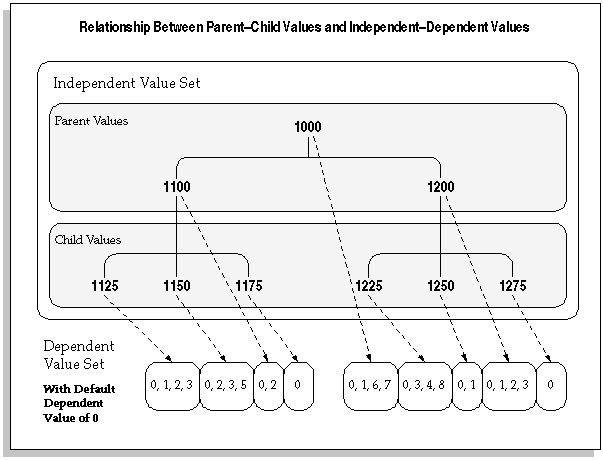
For a text description of this figure, see Text Description of Relationship Between Parent-Child Values and Independent-Dependent Values
Oracle Applications stores parent-child relationship information in the FND_FLEX_VALUES and FND_FLEX_VALUE_HIERARCHIES tables.
You can create parent-child relationships for any independent value set used by a key flexfield segment. If your value set is a Table validation type value set, you can also use the Define Segment Values form to create parent values for the values in your table. You cannot create new child values using this form, however (you must create your own application form to maintain your validation table). Oracle Applications stores your parent values for you in the Oracle Application Object Library table and does not add your new parent values to your validation table. In the previous diagram, the parent values would reside in the Object Library table, and the child values would reside in your validation table, though all the values are part of the same value set.
Warning: Do not use the Value Sets form to enter parent values that already exist as values in your validation table. Doing so can cause data corruption issues. If two different descriptions for the same value exist, you will not be able to choose values from the list of values on that segment.
Note: You must run the program called Setup Flattening Program for Table Validated Value Sets whenever you change the parent/child hierarchies or add segment values to the value set.
