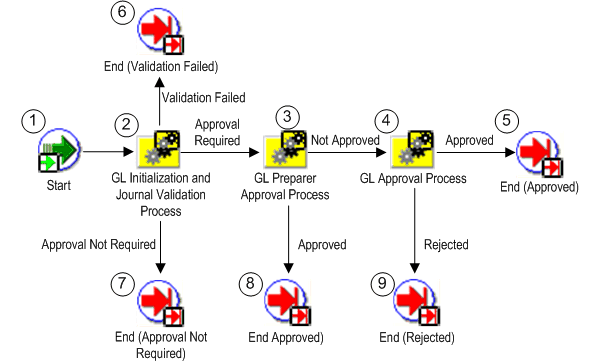
The GL Journal Approval Process obtains the necessary management approvals for manual journal batches. The process validates the journal batch, determines if approval is required, submits the batch to approvers (if required), then notifies appropriate individuals of the approval results.
The process has a result type of GL Journal Approval Process Result that gives one of four results:
Approval Not Required: The journal batch does not need approval.
Approved: The journal batch was approved by all necessary approvers. In some cases, this may be the preparer.
Rejected: The journal batch was rejected by an approver.
Validation Failed: The journal batch failed the validation process and was never submitted to the approver.
The process consists of 5 unique activities, some of which are reused, to comprise the 9 activity nodes that appear in the workflow diagram:
General Ledger Journal Approval Process
You can customize Journal Approval to meet your organization's specific needs through three mechanisms:
Profile options: There are two profile options that affect how Journal Approval operates:
Journals: Allow Preparer Approval: Determines whether preparers can approve their own journals.
Journals: Find Approver Method: Sets the default method for seeking approval.
Workflow activity settings: You can change the default settings for the:
Request Approval From Approver timeout: The standard setting is 7 days. After this time has expired, Journal Approval notifies the preparer that no approver response has been received.
Reached Manager Notification Resend Limit: The standard setting is 1 notification. Journal Approval will resend notifications to the approver until the limit is reached.
Note: If you decide to change these settings, be careful when selecting your new values, since the settings work together with a compounding effect. Specifically, the approver timeout is processed for each manager notification sent.
For example, if the approver timeout is 7 days and the notification resend limit is 3, a journal batch will remain in the approval cycle for 21 days if the approver does not respond.
Default Error Notification: Journal Approval uses Oracle Workflow's standard error processing to handle runtime errors. You can choose to send a notification to your system administrator whenever such errors occur. Open the Journal Approval workflow file in Oracle Workflow and set the Performer for the Default Error Notification, in the Default Error process, to your system administrator's userid.
Customizable activities: You can customize four activities and one process:
Customizable: Is Journal Batch Valid activity
Customizable: Does Journal Batch Need Approval activity
Customizable: Is Preparer Authorized to Approve activity
Customizable: Verify Authority activity
Customizable: Verify Authority Process
Note: We strongly recommend that you modify only these activities and processes when customizing the GL Journal Approval Process.
Following is a description of each activity listed by the activity's function name. You can create all the components for an activity in the graphical Oracle Workflow Builder except for the PL/SQL stored procedures that the function activities call. All function activities execute PL/SQL stored procedures which you must create and store in Oracle8. The naming convention for the PL/SQL stored procedures used in the GL Journal Approval process is:
Following is a description of each activity listed by the activity's function name. You can create all the components for an activity in the graphical Oracle Workflow Builder except for the PL/SQL stored procedures that the function activities call. All function activities execute PL/SQL stored procedures which you must create and store in Oracle8. The naming convention for the PL/SQL stored procedures used in the GL Journal Approval process is:
GL_WF_JE_APPROVAL_PKG.<PROCEDURE>
GL_WF_JE_APPROVAL_PKG is the name of the package that groups all the procedures used by the GL Journal Approval process, except the customizable procedures. <PROCEDURE> represents the name of the procedure.
Customizable procedures are grouped together in the package named GL_WF_CUSTOMIZATION_PKG. The naming convention is the same as described for the GL Journal Approval package.
This activity marks the start of the process.
| Function | WF_STANDARD.NOOP |
| Result Type | None |
This activity is a subprocess that performs initialization, then validates the journal batch. If the journal batch is valid, the subprocess also determines whether the batch requires approval. To view the subprocess, choose GL Initialization & Validation Process under the Processes branch of the Workflow Builder navigator tree.
| Result Type | GL Initialization & Validation Process Result |
This activity is a subprocess that determines if the journal batch preparer is authorized to approve his/her own journal batch. If so, the batch is approved, the approver name is set, and notifications are sent. To view the subprocess, choose GL Preparer Approval Process under the Processes branch of the Workflow Builder navigator tree. See: GL Preparer Approval Process.
| Result Type | GL Preparer Approval Process Result |
| Prerequisite Activities | GL Initialization & Validation Process |
This activity is a subprocess that finds all necessary approvers, seeks journal batch approval, and sends notifications of approval or rejection. To view the subprocess, choose GL Approval Process under the Processes branch of the Workflow Builder navigator tree. See: GL Approval Process.
| Result Type | GL Approval Process Result |
| Prerequisite Activities | GL Initialization & Validation Process, GL Preparer Approval Process |
This function activity marks the end of the process. Although the activity itself does not have a result type, each node of this activity in the process must have a process result assigned to it. The process result is assigned in the property page of the activity node. Since the GL Journal Approval process activity has a result type of GL Journal Approval Process Result, each End activity node must have a process result matching one of the lookup codes in the GL Journal Approval Process Result lookup type.
| Function | WF_STANDARD.NOOP |
| Result Type | None |
