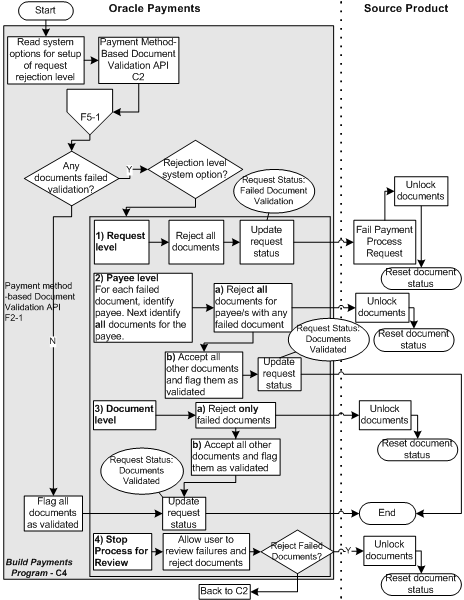
Oracle Payments performs validation on all data received in the Payment Process Request. This validation process may result in failures when documents payable do not pass the validation checks. All steps performed by Oracle Payments in the Document Validation Flow are part of the Build Payments program. For information on the Build Payments program, see Build Payments Program.
The diagram below shows the steps performed when Oracle Payments validates documents in a source product's Payment Process Request.
Document Validation Flow
The table below describes the steps performed in the Document Validation Flow (F5).
Document Validation Flow
| Action | Description |
|---|---|
| Read System Options for Setup of Request Rejection Level | Oracle Payments supports four setup options for Oracle Payments to control how documents payable are rejected if they fail validation. The first option is Request Level. If this option was selected during implementation, it means that if any document in the entire Payment Process Request fails validation, then all the documents in the Payment Process Request are rejected. The second option is Payee Level. This option rejects all documents for a payee if any document for that payee fails validation. This option is useful when you want certain documents of a payee to be paid together, such as invoices with offsetting credit memos. The third option is Document Level. This option only rejects documents with validation errors. All other documents continue in the payment process. The fourth option is Stop Process For Review. No documents are immediately rejected and the validation errors are presented to you for review. |
| Payment Method-Based Document Validation API (C2) | Oracle Payments validates all documents using the Payment Method-Based Document Validation API (C2). All document validations are based on the payment method of the document. |
| Payment Format-Based Document Validations (F5-1) | Oracle Payments validates all documents using the Payment Format-Based Document Validations Flow (F5-1). These validations are based on the payment format assigned to the payment profile of the document. |
| Any Documents Failed Validation? | At this point, the flow branches, depending on whether any documents failed validation. |
| (No) Flag all Documents as Validated | When all documents pass validation, Oracle Payments assigns a validated status to each of them. Then the process updates the request status to Documents Validated and moves on to the Payment Creation Flow (F6). |
| (Yes) Rejection Level System Option? | Oracle Payments knows which rejection level it is by reading the system setup in the first step. Oracle Payments next performs one of four actions depending on the setting of the system option. |
| Request Level | Reject all Documents: At the Request Level, if one document fails validation, all documents in the Payment Process Request are rejected. Update Request Status: The status of the Payment Process Request is updated to Failed Document Validation. Payment Process Request Rejected: Oracle Payments informs the source product of the rejection of the Payment Process Request and the validation failures. The message instructs the source product to fail/cancel the Payment Process Request. The message sends the source product a list of all documents that failed, with identifying information and rejection reasons. Oracle Payments marks those documents as failed and takes no further action. The source product then treats those documents as new documents payable. The source product must correct any errors and send the documents to be paid in a new Payment Process Request. Fail Payment Process Request: The source product fails the Payment Process Request if Oracle Payments rejects it. Unlock Documents: The source product unlocks documents that were sent in the request and resets the document status. The documents are then ready for a new selection process. |
| Payee Level | Oracle Payments identifies:
Reject all Documents for Payees with any Failed Document: Oracle Payments rejects all documents for the payee that had one or more failed documents. Documents Rejected: Oracle Payments informs the source product of the validation failures and rejection of the documents payable. The message sends a list of documents that failed with identifying information and rejection reasons. Oracle Payments marks those documents as failed and takes no further action. The source product treats those documents as new documents payable. The source product corrects any errors and sends the documents to be paid in a new Payment Process Request. Unlock Documents: The source product unlocks the documents that were rejected and resets the document status. The documents are then ready for a new selection process. Accept all Other Documents and Flag them as Validated: Oracle Payments continues processing all the documents that were not rejected. Update Request Status: Once all documents have been flagged as either failed or validated, Oracle Payments updates the status of the payment process request to Documents Validated. All documents marked as failed are invalid and disregarded for future processing. |
| Document Level | Reject Only Failed Documents: Oracle Payments rejects only those documents that fail validation. Documents Rejected: Oracle Payments informs the source product of the validation failures and rejection of the documents payable. The message sends a list to the source product of documents that failed, with identifying information and rejection reasons. Oracle Payments marks those documents as failed and takes no further action. The source product treats the failed documents as new documents payable. The source product corrects any errors and sends the documents to be paid in a new Payment Process Request. Unlock Documents: The source product unlocks the documents that were rejected and resets the document status. The documents are then ready for a new selection process. Accept all Other Documents and Flag them as Validated: Oracle Payments continues processing documents that were not rejected. Update Request Status: Once all documents have been flagged as failed or validated, Oracle Payments updates the status of the Payment Process Request to Documents Validated. All documents marked as failed are invalid and disregarded for future processing. |
| Stop Process for Review | No Documents Rejected: Oracle Payments does not immediately reject any documents payable. Instead, it updates the status of the Payment Process Request to Document Validation Errors - Pending Action, and presents the failed documents for review. Using the Resolve Document Validation Errors Page, you may review the errors and take action. You may fix related data, such as third party payee information, and submit the documents for revalidation. You may also remove documents from the Payment Process Request, which sends the documents back to the source product with the validation failure reason, just as rejection does. Unlock Documents: The source product unlocks the documents that were removed and resets the document status. The documents are then ready for a new selection process. Accept all Other Documents and Revalidate them: Oracle Payments runs the payment method-based document validations and the payment format-based document validations again. If there are further errors, they are again presented to you for review. Otherwise, Oracle Payments continues processing documents. Update Request Status: Once all documents have been flagged as failed or validated, Oracle Payments updates the status of the Payment Process Request to Documents Validated. All documents marked as failed are invalid and disregarded for future processing. |
The diagram below shows the steps performed in the Payment Format-Based Document Validations Subflow (F5-1).
Payment Format-Based Document Validations Subflow
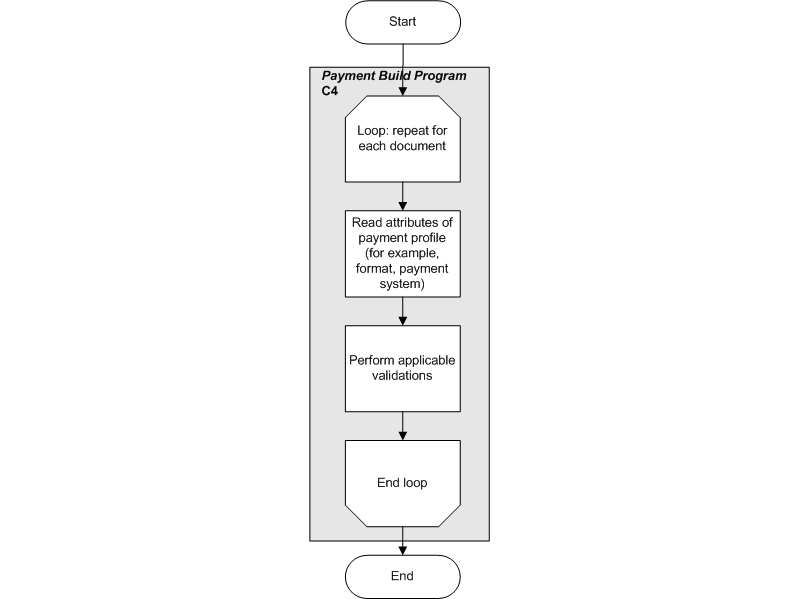
All steps in the Payment Format-Based Document Validations Subflow (F5-1), as shown in the table below, are performed by the Build Payments program component. For information on the Build Payments program component, see Build Payments Program.
Payment Format-Based Document Validations Subflow
| Action | Description |
|---|---|
| Loop: Repeat for each Document | Each document must pass through this validation process. |
| Read Attributes of Payment Profile | Oracle Payments reads the attributes of the payment profile - most importantly the payment format. Examples of payment profile attributes are the payment format and the payment system. |
| Perform Applicable Validations | Once the payment attributes are read, Oracle Payments performs all validations that are attached to the payment format. |