Based on a common core application for all countries, Oracle HRMS provides you with the ability to support both local and corporate requirements for global enterprises.
People who are employees, contingent workers, applicants, or contacts of other internal people are entered within a legislative or cultural context. In Oracle HRMS, this means they have a record in a business group that complies with the legislative requirements of a specific country.
From a corporate perspective, for your employees, contingent workers, and applicants you also need to view this information across business groups to enable you to set up reporting lines and relationships between people and organizations in different countries.
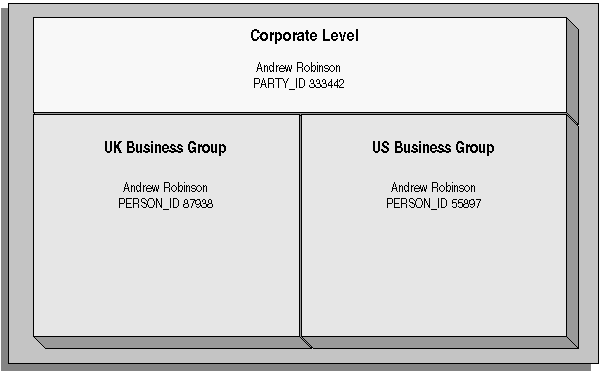
As part of your global enterprise, you may have international employees who transfer between business groups to work temporarily in other countries. It is likely in this instance that you will have several local records for that person in different business groups. You still however, need to be able to identify at a corporate level that these records all relate to the same person.
A Multi-Organization Person Record
Oracle HRMS provides you with a corporate level record for each of your employees, contingent workers, and applicants. This record links all the local records for a person and is available in all business groups and also to other E-Business applications.
Note: People who are entered only as contacts of other internal people do not have a corporate level record. This enables you to restrict access to a contact's information to one business group.
To create this global view of a person, Oracle HRMS is integrated with Trading Community Architecture (TCA). TCA enables you to store person information at a corporate level so that it is available across all applications in your e-business suite. TCA provides a single place in which a person can be uniquely identified as a party. A sub-set of the personal information entered in HRMS is automatically held at the corporate level in TCA.
Some people, for example, customers, are only held at the corporate level as parties. They can be linked to other HR people as appropriate.
Note: You must have the HR: Cross Business Group profile option set to Yes for your responsibility to create links between people in different business groups.
To ensure the records in the corporate and local levels are synchronized it is important that lookup types that relate to global person information contain exactly the same lookup codes in TCA and HRMS. For example, if you add a new code to the TITLE lookup type, you must ensure the same code is added to the equivalent TCA lookup type. If the codes do not match identically then the field is cleared in TCA when an update is made in HRMS.
One of the benefits of having the person records linked is that if any of the following information is updated in one business group, then it will be visible, in read-only format, in all other business groups relating to the person.
Qualifications
Establishments attended
Competencies
Note: Competencies may be defined as global or local to a business group. Only global competencies are visible from within another business group. Those that are local to one business group can only be seen within the context of that business group.
In addition to this, you can enable person synchronization. This enables you to update certain information against one record and have it automatically applied to all other records relating to the person. This ensures that you have a common set of information for one person across all countries in which that person operates.
Note: To control the synchronization of your person records you use the HR: Propagate Changes profile option.
See: Person Record Synchronization
When creating a new person record, you can search for existing duplicate person records in a single or multiple business groups:
Multiple business groups: This search uses the global name format (Global List Name). HRMS provides the HR: Cross BG Duplicate Person Check profile option to enable the duplicate person check functionality across multiple business groups. You must set the HR: Cross Business Groups and HR: Cross BG Duplicate Person Check profile options to Yes to display a list of potential duplicates across business groups.
For more information about the HR: Cross BG Duplicate Person Check user profile, see: User Profiles
For information about the global name format (Global List Name), see: Person-Name Formats
Single business group: This search uses values such as, last name, first name, date of birth, or national identifier to search for duplicate records.
When you create a new person record in any business group in Oracle HRMS, the application looks for matching records in all business groups and lists the records of potential duplicates. If you indicate that one of these records relates to the same person as your new record, the application automatically adds the global person reference to the new record.
When determining whether to store information at the corporate or legislative level, Oracle HRMS applies the following rules:
Employees, applicants, and contingent workers have both corporate and legislative records.
Ex-employees, ex-applicants, and ex-contingent workers retain both corporate and legislative records.
People whose system person type is Other have a legislative record only.
Note: HRMS considers any person with a system person type of Other to be a contact; contacts do not have to be part of an active contact relationship in Oracle HRMS.
Employees, applicants, contingent workers, ex-employees, ex-applicants, and ex-contingent workers who are also contacts have both corporate and legislative records.
When a contact becomes an employee, contingent worker, or applicant, the application creates a corporate-level record if one does not already exist.
Note: In this case, if you subsequently cancel (rather than terminate) the contact's employment, application, or placement, the application deletes the corporate-level record.
HRMS makes all changes to corporate-level and legislative-level records that are required as a result of person-type changes at the time the change is entered, rather than when the change comes into force.
Using the Global Deployments function, HR Professionals can transfer employees permanently or temporarily between business groups. Oracle HRMS automatically creates or updates employee records in both source and destination business groups when you initiate the transfer. Similarly, when a temporary transfer ends, Oracle HRMS automatically updates records in both business groups again.
See: Employee Transfers and Secondments
In Oracle HRMS, every employee, applicant, and contingent worker has a person number. If you select global person numbering, Oracle HRMS allocates numbers from a single sequence to workers of the relevant person type throughout the enterprise.
If you transfer an employee between business groups using the Global Deployments function when global employee numbering is in effect, then the transferred employee automatically retains the employee number from the source business group. In all other cases, a person who moves from one business group to another does not retain the person number from the original business group, even when global person numbering is in effect. Note, however, that you can write a formula to generate a global custom number sequence for a person type. You can handle other business needs, including the need to retain person numbers between business groups, in a person number formula.
Oracle HRMS defines some standard formats for person names, which you can edit. You can also define your own person-name formats. For example, you can define formats for use in custom code or legislation-specific versions of the standard formats if your localization does not supply them. Person-name formats can be local or global:
Local formats are suitable for users in a single legislation who view person names in a character set appropriate to their legislation.
Global formats are generally suitable for users in global enterprises who prefer to view person names in a single (typically, Western) character set, so that all names, regardless of origin, have the same representation.
See: Person-Name Formats
If Oracle Human Resources Information Discovery is licensed and implemented, you can use the Workforce Explorer page to search and view dashboard metrics related to person data. As a HR executive, manager or as a member of senior management, you can use the Workforce Explorer page to search employees by leveraging quick search and guided navigation capabilities. HR users can analyze and interpret person data with the aid of key metrics, maps, tags, flexible charts and graphs. It also provides the ability to navigate to HR transaction pages (Talent Profile) for performing employee personnel actions.
For more information about how to set up Oracle Human Resources Extensions for Oracle Endeca and using the Workforce Explorer Page, refer to the Oracle Human Resources Information Discovery, chapter in the Oracle E-Business Suite Information Discovery Integration and System Administration Guide.