Employees are often required to move to different business locations. When such moves occur internationally, they usually involve moving from a source HRMS business group to a destination HRMS business group. To support such a move, you must create or update the employee record in the destination business group. In the source business group, you must either terminate the employee record (if the move is permanent) or suspend active assignments.
By means of deployment proposals, the Oracle HRMS Global Deployments function automatically creates or updates records as required when you move an employee between business groups. This function supports both temporary deployments (known in HRMS as secondments) and permanent transfers. Some setup tasks are necessary before first use of the Global Deployments function.
See: Setting Up Employee Transfers and Secondments
The deployment proposal controls the secondment or transfer of an employee to a different business group. The deployment proposal identifies the:
Source and destination business groups
Reason for the deployment
Deployment dates
Employee to be deployed
Employee's new assignment
Contacts accompanying the employee
To create a deployment proposal, the HR Professional in the destination business group uses the Global Deployments function.
Note: To create a deployment proposal, the HR Professional must have access to the employee's record in the source business group. Depending on security settings, this access may not be available. In this case, either the employee or an HR Professional in the source business group can use the SSHR Release Information function to release the employee's record to the HR Professional in the destination business group.
The status of the deployment proposal can be:
Draft
Active
Complete
The deployment proposal is in Draft status until the deployment begins. Its status is Active if the deployment is temporary and has started. Its status is Complete if:
The deployment is temporary and has finished.
The deployment is permanent and has started.
An employee can have multiple Draft deployment proposals but only one Active deployment proposal at a time.
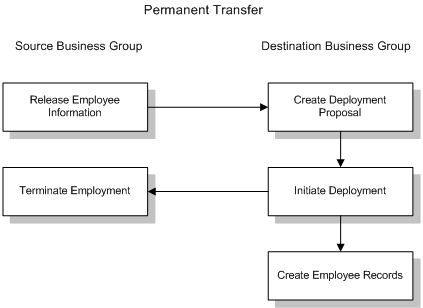
To initiate a deployment, the HR Professional selects Initiate Deployment for the relevant deployment proposal on the Global Deployments page.
When the HR Professional initiates a permanent transfer, the status of the deployment proposal changes from Draft to Complete.
In the source business group, HRMS terminates the employee record on the day before the deployment start date and sets the status of all assignments to the default terminate-assignment status. The person type is Ex-Employee from the deployment start date.
Note: HRMS does not automatically set the Final Process Date (FPD) in the source business group. Setting FPD remains a manual task.
In the destination business group, HRMS creates or updates employee, assignment, and contact records using information from the deployment proposal. The person type and assignment status are those entered in the deployment proposal for the new assignment.
The following figure summarizes the stages of a permanent transfer:
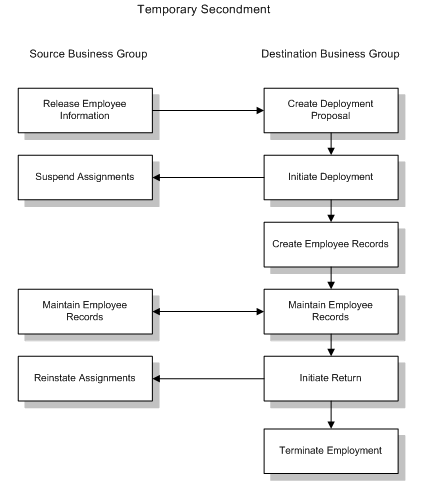
When the HR Professional initiates a temporary secondment, the status of the deployment proposal changes from Draft to Active.
In the source business group, HRMS:
Changes the current assignment status to the default suspended-assignment status. The effective date of the change is the start date of the deployment.
If the default suspended-assignment status is not included in a payroll, but you want to continue paying the employee in the source business group, you can change the assignment status manually.
Leaves the person type unaltered. However, you can update the person type manually to indicate that the employee is on secondment, for example.
In the destination business group, HRMS creates or updates employee, assignment, and contact records using information from the deployment proposal. The person type and assignment status are those entered in the deployment proposal for the new assignment.
For information about maintaining the records of employees on secondment, see Employee Records During Secondment
For both permanent transfers and temporary secondments, HRMS sets key dates in the destination business group as follows:
| Date Field | Contains | Comments |
|---|---|---|
| Effective Date (Hire Date) | Deployment Start Date | |
| Latest Start Date | Deployment Start Date | |
| Date First Hired | Date First Hired from Source Business Group | |
| Period of Service Start Date | Deployment Start Date | |
| Adjusted Service Date | Hire Date from Source Business Group | |
| Projected Termination Date | Deployment End Date | For temporary secondments only |
| Projected Assignment End Date | Deployment End Date | For temporary secondments only |
To terminate a secondment, the HR Professional selects Initiate Return for the relevant deployment proposal on the Global Deployments page and enters the end date, which is the final day of the deployment. This date can differ from the deployment end date recorded in the deployment proposal. (Note that the application takes no action by default on the end date recorded in the deployment proposal.)
The status of the deployment proposal changes from Active to Complete when you initiate the return, regardless of how far in the future the end date occurs.
Note: As you cannot update a complete proposal, do not initiate the return until the end date is certain.
In addition, in the destination business group, HRMS:
Terminates the employee record and sets assignments to the default terminate-assignment status on the deployment end date
Sets the termination reason and person type to values specified on the Initiate Return page
HRMS sets the following dates in the destination business group to the deployment end date:
Projected Termination Date
Actual Termination Date
Projected Assignment End Date
Assignment Status Change Date
The employee's person type is Ex-Employee from the day following the deployment end date.
Note: HRMS does not automatically set the FPD in the destination business group. Setting FPD remains a manual task.
In the source business group, HRMS changes the status of assignments suspended at the start of the secondment to Active Assignment. The effective date of these changes is the day following the deployment end date.
The following figure summarizes the stages in a temporary secondment:
An employee returning from a secondment must have at least one day's employment in the source business group before beginning any subsequent secondment or transfer. You cannot use the Global Deployments function to move an employee directly from one destination business group to a second destination business group.
For information about updating deployment proposals, see Updating Deployment Proposals
When you transfer an employee permanently or temporarily to a different business group using the Global Deployments function:
The employee keeps the employee number from the source business group if your enterprise uses global employee numbering.
You can enter an employee number in the deployment proposal if your enterprise uses manual employee numbering in the destination business group.
In all other cases, HRMS allocates a new number to the employee using the numbering scheme in effect in the destination business group when you initiate the deployment.
The deployment proposal contains sufficient information for HRMS to create employee records in the destination business group and supply key data. However, you may need to enter additional information manually. For example:
The application creates basic assignment information. You are recommended to review the assignment record and complete it as required.
Other than assigning the employee to any payroll that you identify in the deployment proposal, the Global Deployments function has no effect on payroll and benefits setup. You may need to supply additional pay and benefits information for the employee.
The application does not create optional records, such as the competency profile and qualifications records. If you intend to maintain these records in the destination business group, you must create them manually.
In the U.S., you cannot assign an employee to a payroll unless you also enter the employee's primary address. As the deployment proposal does not contain address data, you must leave the Payroll field blank if the destination business group is in the U.S. and you use Oracle Payroll. After you initiate the deployment, you can log on to the destination business group to complete payroll setup and enter the employee's primary address.
See: Entering People's Addresses at Sites with Oracle Payroll
For information about maintaining the records of employees transferred temporarily, see Employee Records During Secondment
If the HR Professional or manager in the source business group needs access to the employee's records in the destination business group, the employee can release that information using the SSHR Release Personal Information function.
HR Professionals and managers in the destination business group can access the deployed employee's records in the source business group using the SSHR My Employee Information function. After a permanent transfer, employee information in the source business group remains available only while the deployment proposal exists. If you delete the deployment proposal, the employee record in the source business group is no longer accessible from the destination business group.