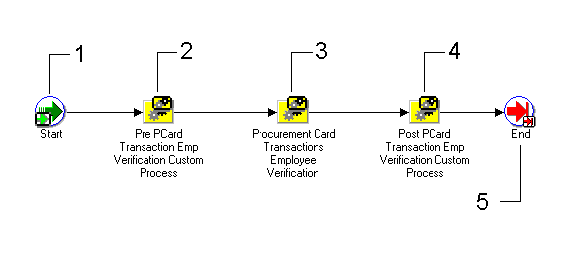
The AP Procurement Card Employee Verification Workflow is a predefined workflow that you can initiate to notify employees of transactions that have been posted to their credit card accounts. The AP Procurement Card Employee Verification Workflow determines if workflow will notify an employee of transactions created by the employee's credit card, and it determines if the employee is required to verify the transaction information.
This section describes the AP Procurement Card Employee Verification Workflow in detail to give you an understanding of what each activity in this workflow does. You cannot replace this workflow with a new workflow process. You can customize this process as necessary to meet your business requirements.
You initiate the AP Procurement Card Employee Verification Workflow from the Submit Request window by submitting the Procurement Card Transactions Verification Process. See: Procurement Card Transactions Verification Process.
The status of a transaction after the successful completion of the AP Procurement Card Employee Verification Workflow is contingent upon the Employee Notification Method (ENM) and Manager Notification Method (MNM) settings in the Profiles window. If ENM is set to None or if both notification settings are set to None, then the transaction will not be selected because it was already set to Approved or Verified by the successful completion of the Procurement Card Transactions Validation program. If Employee Verification is required, then the status must be set by the employee to one of the following: Hold, Personal, Disputed, Verified. If ENM is set to Notification Only and MNM is set to Approval or Notification, then the transaction status is set (once the AP Procurement Card Employee Verification Workflow completes successfully) to Verified.
The following table summarizes how the ENM and MNM settings affect the transaction status after the AP Procurement Card Employee Verification Workflow completes successfully:
| MNM | ENM = Verification | ENM = Notification |
|---|---|---|
| MNM = None | Set by employee | Approved |
| MNM = Approval or Notification | Set by employee | Verified |
A predefined sample AP Procurement Card Employee Verification Workflow is included with Oracle Applications.
Select your employee notification method in the Profiles window. See: Profiles Window.
Install Oracle Workflow. See: Installing Oracle Applications.
To set up the AP Procurement Card Employee Verification Workflow:
Install and set up Self-Service Web Applications to allow verification of transactions via Self-Service Web Applications.
Install the Oracle Workflow Builder client component program. See: Oracle Workflow Client Installation Notes for Oracle Applications.
The AP Procurement Card Employee Verification Workflow definition (.wft) file is automatically loaded into the database under the APPS account when you install Self-Service Web Applications. Using the Oracle Workflow Builder program, you can open the AP Procurement Card Employee Verification Workflow definition file by providing the APPS username, password, and database. Show the AP Procurement Card Employee Verification Workflow item type and choose OK.
Define the Timeout value for the following activity:
Request Emp To Review Incurred PCard Transactions
Use the Workflow Builder program to Customize the following Procurement Card Transaction Employee Verification Workflow messages:
Notify Employee of Incurred Procurement Card Transactions
Request Emp To Review Incurred PCard Transactions
The Procurement Card Transactions Verification Process consists of four unique process-type activities.
The following is a description of each activity listed by the activity's display name. You can create all the components for an activity in the graphical Oracle Workflow Builder except for the functions associated with function activities. All function activities execute PL/SQL stored procedures, which are created and stored in Oracle 9i by your workflow designer/developer. The naming convention for the PL/SQL stored procedures used in the Procurement Card Transactions Verification Process is:
AP_WEB_PCARD_WORKFLOW_PKG.<PROCEDURE>
AP_WEB_PCARD_WORKFLOW_PKG is the name of the package that groups all of the procedures used by the Procurement Card Transactions Verification Process. <PROCEDURE> represents the name of the procedure. You can view the script that creates the AP_WEB_PCARD_WORKFLOW_PKG package and other Oracle Payables-specific stored procedure packages used by the Procurement Card Transactions Verification Process in the admin/sql subdirectory of the Self-Service Applications for the Web directory structure on your server.
This is a Standard function activity that simply marks the start of the process.
| Function | WF_STANDARD.NOOP |
| Result Type | None |
| Prerequisite Activities | None |
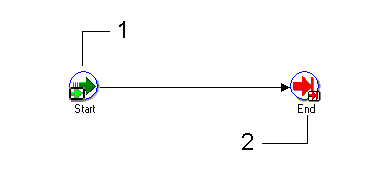
You can customize this activity to meet your business needs. If you do not customize this activity, the activity will not affect the Workflow process.
| Required | No |
| Prerequisite Activities | None |
This process selects employee transactions from the AP_EXPENSE_FEED_DISTS table, if the status of the transaction is Validated and the EMPLOYEE_VERIFICATION_ID column is NULL. The process then checks the Employee Notification method (Notification Only, None, or Verification Required) that you selected in the Profiles window. The process groups transactions on the notification by employee and credit card profile. See: Credit Card Profiles.
Note: This process does not select records in AP_EXPENSE_FEED_DISTS that have a status of Hold, Disputed, or Personal. You can modify the Pre or Post Procurement Card Transactions Verification Process if you want to select these statuses for employee notification.
The activities in this process are described below. See: Procurement Card Transactions Verification.
| Result Type | Transactions are categorized. |
| Required | If you do not use this process you must manually change the transaction status from validated to verified. Use either the Verify Open Transactions function in Self-Service Web Applications, or the Procurement Card Transactions window in Payables to change the status of transactions from validated to verified. |
| Prerequisite Activities | None |
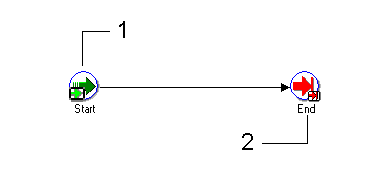
You can customize this activity to meet your business needs. If you do not customize this activity, the activity will not affect the Workflow process.
| Required | No |
| Prerequisite Activities | None |
This function activity marks the end of the process.
| Function | WF_STANDARD.NOOP |
| Result Type | None |
| Prerequisite Activities | Start |
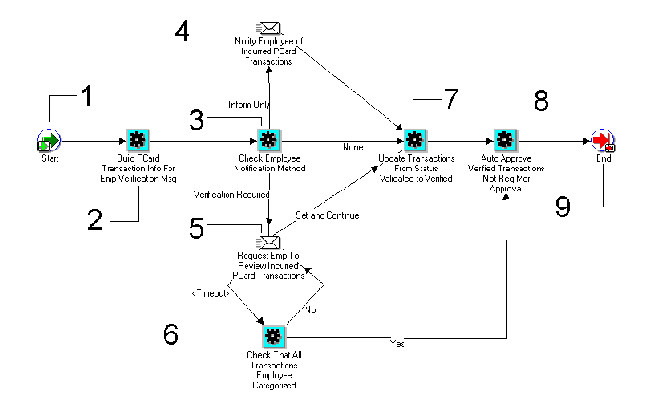
This is a Standard function activity that simply marks the start of the process.
| Function | WF_STANDARD.NOOP |
| Result Type | None |
| Prerequisite Activities | None |
This function activity selects and builds transaction notification information for the employee. This information is sent to the employee if the verification method you selected in the Profiles window was Notification Only or Verification Required.
| Function | AP_WEB_PCARD_WORKFLOW_PKG. BUILDEMPVERIFICATIONMESSAGE |
| Result Type | |
| Required | This is required if the verification method you selected in the Profiles window was Notifications Only or Verification Required. |
| Prerequisite Activities | Start |
This function activity checks which verification method you selected in the Profiles window. The options are: Notification Only, None, and Verification Required.
| Function | AP_WEB_PCARD_WORKFLOW_PKG. CHECKEMPNOTIFICATIONMETHOD |
| Result Type | Returns the Employee Notification Method |
| Required | Yes |
| Prerequisite Activities | None |
This notification activity sends a message to the employee that incurred the credit card charges. The message itemizes the credit card transactions.
| Required | This is required if the verification method you selected in the Profiles window was Notifications Only. |
| Prerequisite Activities | Build PCard Transaction Info For Employee Verification Message, and Check Employee Notification Method |
This notification activity sends a message to the employee requesting verification of the credit card transactions. The employee can either update the transaction status by responding to the message, or the employee can assign a status to each transaction using the Verify Open Transactions function in Self-Service Web Applications.
| Required | Yes (if Employee Notification method is Verification Required) |
| Prerequisite Activities | Build PCard Transaction Info For Employee Verification Message, and Check Employee Notification Method |
At the end of the Timeout period, this function activity checks the status of each employee transaction. If all transactions have been categorized, this activity function initiates the Update Transactions From Status Validated to Verified activity function. If any transactions remain uncategorized by the employee at the end of the Timeout, this activity function initiates the Request Emp To Review Incurred PCard Transactions function activity.
| Function | AP_WEB_PCARD_WORKFLOW_PKG. CHECKEMPVERIFICATIONCOMPLETE |
| Result Type | Yes/No |
| Required | Yes |
| Prerequisite Activities | None |
This function activity updates the status of uncategorized employee transactions from Validated to Verified. If an employee responds to a request to verify incurred procurement card transactions by choosing the Automatically Verify Remaining and Continue button in the message, this process updates all uncategorized transaction distribution status from Validated to Verified.
| Function | AP_WEB_PCARD_WORKFLOW_PKG. MARKREMAININGTRANSVERIFIED |
| Result Type | Transaction status updated from Validated to Verified. |
| Required | Yes |
| Prerequisite Activities | None |
This function activity is used only if you selected Notifications Only or None as the manager verification method in the Profiles window. See: Profiles Window. For any verified transactions not requiring manager approval, the system changes the status from Verified to Approved.
| Function | AP_WEB_PCARD_WORKFLOW_PKG. AUTOAPPROVERTRANSNOTREQAPRVL |
| Result Type | Transaction status updated from Verified to Approved. |
| Required | No |
| Prerequisite Activities | Transaction status must be Verified. |
This function activity marks the end of the process.
| Function | WF_STANDARD.NOOP |
| Result Type | None |
| Prerequisite Activities | Start |