Receivables lets you process refunds to your customers' credit card accounts. You can refund all or part of a previously remitted credit card receipt.
Note: Refund of a previously remitted credit card receipt is initiated even if the expiry date of the credit card is past because card issuers usually renew the same credit card. In case the credit card issuer declines the transaction, the refund is appropriately reversed using Oracle Payments framework.
To create a credit card refund, you apply a special credit card refund application to the receipt, which generates a negative miscellaneous receipt. The Automatic Remittances program works with Oracle Payments to process this negative receipt, thereby transferring funds from your account back to your customer's credit card.
Attention: You can automate the credit card refund process for all imported credit memos against paid invoices. See: Automatic Receipt Handling for Credits.
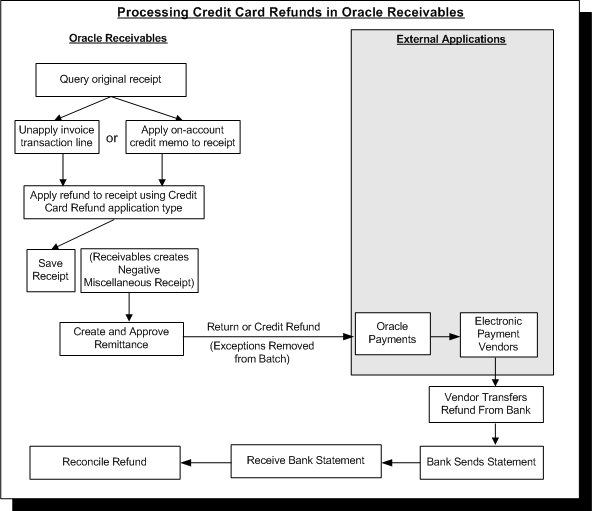
To manually process credit card refunds, complete these steps:
Query the credit card receipt that you want to refund.
Create an unapplied balance in the amount of the refund against the receipt. You can create this unapplied amount in one of two ways:
Unapply the amount of the refund from one or more application lines on the original credit card receipt, or
Apply an on-account credit memo in the amount of the refund to the original credit card receipt.
Apply the refund to the receipt using the Credit Card Refund application type. Receivables automatically creates a negative miscellaneous receipt for the amount of the refund.
You can apply as many credit card refund lines to a receipt as you would like. You cannot, however, refund more than the unapplied amount of a receipt. The total amount of the refund lines that you create, therefore, cannot exceed the lesser of the unapplied amount or the total amount of the receipt.
You can also apply credit card refund lines to different dates on a receipt. For example, a customer may request three different refunds for transactions on three different invoices, all of which were paid with a single credit card receipt. You can unapply each refund amount from the three different invoice application lines on the receipt, and reapply the refund using three separate credit card refund application lines. Creating multiple refund lines on a receipt lets your customer see multiple refund transactions on their credit card statement.
Suggestion: Each credit card refund line that you apply to a receipt generates a separate refund transaction. If the credit card issuer charges a separate transaction fee for each refund against a receipt, then you should consider the potential costs before applying multiple credit card refund lines to a receipt, if one refund line will suffice.
Run the Automatic Remittances program to remit the negative miscellaneous receipt and initiate the refund.
When you run the Automatic Remittances program, Receivables passes the negative miscellaneous receipt information to Oracle Payments. The Automatic Remittances program uses Payments to transfer funds back and forth between your customer's credit card issuer and your bank.
Payments will initiate a refund even if the credit card has expired because, typically, expired credit cards are automatically reissued with a new expiration date. If a credit card has truly expired and was not reissued, then the credit card issuer will decline the transaction and Payments will reverse the refund accordingly.
Note: Unlike the credit card payment process, the refund process does not require authorization before funds can be transferred back to your customer's credit card. You must build refund approvals into your business process, therefore, if you wish to approve credit card refunds before processing.
For more information about Oracle Payments and the internal processes that Receivables uses to validate credit card payments and refunds, see: Credit Card Validation and Integration.
For more detailed information about the steps that are required to process credit card refunds, see: Processing Credit Card Refunds.
This illustration shows the manual and automatic steps involved in processing credit card refunds in Receivables.
Processing Credit Card Refunds