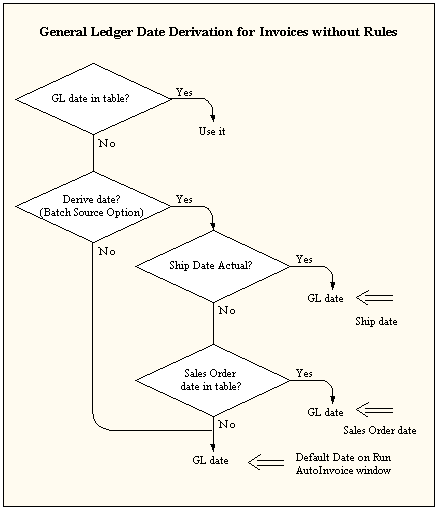
AutoInvoice determines the General Ledger date for invoices using the following criteria:
Does a GL date exist for this invoice in the interface table?
Does the invoice use rules?
What is the setting of the Derive Date option for this Transaction Batch Source (Yes or No)?
What is the setting of the GL Date in a Closed Period option for this Transaction Batch Source (Adjust or Reject)? See: Adjusting General Ledger Dates.
If your invoice does not use rules, AutoInvoice uses the following process to determine the general ledger date:
AutoInvoice uses the general ledger date in the interface table, if one exists and it is in an open or future enterable period.
If you did not pass a general ledger date and Derive Date is set to No, AutoInvoice uses the value of the Default Date parameter for this AutoInvoice submission.
If you did not pass a general ledger date and Derive Date is set to Yes, then AutoInvoice uses the ship date in the interface table. If the ship date does not exist, then AutoInvoice uses the sales order date. If the sales order date does not exist, then AutoInvoice uses the value of the Default Date parameter for this AutoInvoice submission.
Note: If the derived general ledger date for a transaction line exists but is in a closed period, and the GL Date in the Closed Period field in the Transaction Sources window is set to Adjust, then AutoInvoice automatically adjusts the GL date to the first GL date of the next open or future enterable period.
The following diagram illustrates this process.
General Ledger Date Derivation for Invoices without Rules
If your invoice uses Bill in Advance as the invoicing rule, then AutoInvoice uses the GL date provided in the interface table as the invoice GL date. If no GL date is provided in the interface table, then AutoInvoice uses the earliest accounting rule start date as the invoice GL date.
If your invoice uses Bill in Arrears as the invoicing rule, the invoice line has an accounting rule of type Fixed Schedule and a period of Specific Date, AutoInvoice computes an ending date using the latest accounting rule date.
For all other accounting rules, AutoInvoice computes an ending date for each invoice line based on the accounting rule, accounting rule start date, and duration. Once AutoInvoice computes the ending date for each line of your transaction, it takes the latest date and uses it as the invoice GL date.
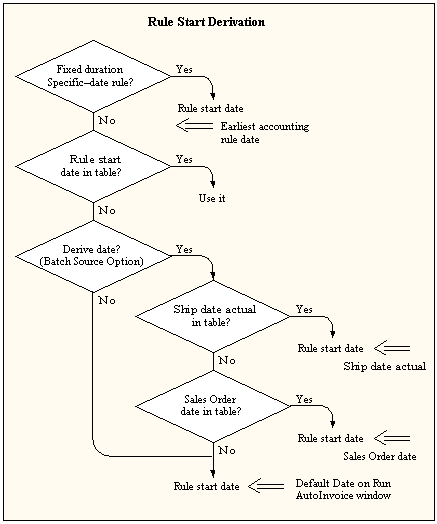
If your invoice does not use an accounting rule with a type of Fixed Schedule and a period of Specific Date, or if you have not elected to derive the rule start date, Receivables uses the date specified in the Run AutoInvoice window.
If your invoice has an accounting rule with a type of Fixed Schedule and a period of Specific Date, AutoInvoice uses the earliest accounting rule date as your rule start date. For example, if your accounting rule dates are 10-JUN-93, 10-JUL-93 and 10-AUG-93, AutoInvoice uses 10-JUN-93 as your rule start date.
If you elected to derive the rule start date, AutoInvoice first uses the ship date in the interface table. If the ship date does not exist, AutoInvoice uses the sales order date. If the sales order date does not exist, AutoInvoice uses the date you entered in the Run AutoInvoice window.
The following diagram illustrates this process.
Rule Start Derivation
If a transaction date is passed for your credit memo, AutoInvoice uses the following hierarchy to determine the credit memo date:
The credit memo general ledger date.
The general ledger date for the invoice's receivable distribution, or the Default Date in the Run AutoInvoice window, whichever is later.
If a general ledger date is not passed, AutoInvoice uses the general ledger date for the invoice's receivable distribution or the Default Date in the Run AutoInvoice window, whichever is later.
If a transaction date is not passed for your invoice or debit memo, AutoInvoice uses the general ledger date.
Suggestion: If you use Oracle Inventory and Oracle Order Management for sales order shipments, you should elect to derive your dates and use the shipment date for your invoice general ledger date. In this way you can ensure that you have booked your revenue and cost to the same accounting period.
If you do not match revenue and cost in the same period, you violate basic GAAP principles, and may distort your profit. In addition, you cannot run a meaningful Margin Analysis report. This report summarizes your revenue and cost of goods sold transactions by item and customer order, and specifies a transaction date range. If your transactions are booked in the wrong period, the Margin Analysis report reflects those incorrect transactions.
