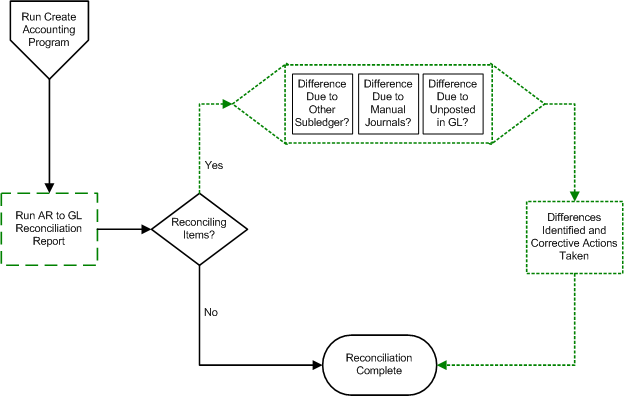
After you internally reconcile Oracle Receivables data (see: Reconciling Subledger Details) and post to the general ledger, complete the external reconciliation process. The external reconciliation process includes two main steps:
Confirm that what was sent from Receivables matches what was posted in Oracle General Ledger.
Posting from Receivables operates through Oracle Subledger Accounting, and consists of two stages: General Ledger transfer and posting.
Run the Create Accounting program to extract transaction and receipt data from Receivables, create final accounting in Subledger Accounting, and then transfer the accounting into Oracle General Ledger and post the journal entries. Receivables provides reporting tools to track and reconcile the posting process.
Confirm that all journals posted to the correct GL accounts.
See: Verifying GL Accounts.
Follow these recommended reconciling steps:
The Create Accounting program produces the Subledger Accounting Program report that shows you the subledger journal entries created for successful accounting events. Compare this report to the Journal Entries report (run in Posted status mode) and verify that they match. Use the same General Ledger date ranges for the Journal Entries report and the Create Accounting program.
When reconciling the Journal Entries report with the Subledger Accounting Program report, review the total untransferred items that appear on the report as well.
If some transactions cannot successfully post to the general ledger due to invalid GL accounts, then make corrections, and rerun draft accounting.
Once transactions and receipts have been transferred to Oracle General Ledger, they are considered posted within the Receivables subledger.
Journal Import lets you create detail or summary journal entries in Oracle General Ledger. Choose the Detail option to see the transaction detail in your General Ledger. In this case, the program creates one journal line for each transaction. You can see this information when you run the Unposted Journals report from the General Ledger, or online using the Account Inquiry window in the General Ledger. Choose the Summary option if you do not want the invoice detail in your General Ledger and simply want the debits and credits summarized by account. In this case you will see one journal line for each accounting flexfield, per currency, instead of one journal line per invoice line. See: Posting.
Follow these recommended reconciling steps:
Journal Import produces an execution report that shows you the total debits and credits for the journals it created. These totals should match the totals on the Posting Execution report.
Note: Journal import is run by Group ID, which is equivalent to the post control ID from the General Ledger Transfer program execution report.
To see your journals, run the Unposted Journals report from General Ledger. The grand totals on this report should match the Journal Import Execution report. Confirm transfer dates with journal dates, in case multiple transfers occurred.
Note: If you choose the Detail option when you run Journal Import, the invoice and customer numbers appear in the description of your journal lines so you can easily see the invoices that affect each account.
Once you have run the Oracle General Ledger Post Journals program, view posted journal entries by running the General Journals report (submitted for posted journals). The grand totals on this report should match the totals on the Journal Import Execution report. This allows a direct comparison of what was transferred by Receivables to what is posted in the general ledger. See: General Journals Report - Posted Journals.
Be sure to use the same General Ledger Date ranges and accounting periods when running these reports:
Submit the above reconciliation reports from the Print Accounting Reports or the Submit Requests window.
Submit the Posted and Unposted Journals reports from Oracle General Ledger.
Run the AR to GL Reconciliation report to verify that all Receivables journal entries posted to the correct GL accounts.
Note: If the GL account you are reviewing has had postings from other journal sources, such as Oracle Payables, be sure to account for these postings when reconciling Receivables with General Ledger. Postings from non-Receivables journal sources, summarized on the AR to GL Reconciliation report, might explain balance discrepancies between Receivables and General Ledger.
After making corrections where necessary, the reconciliation process is complete.
The following illustration describes the external reconciliation process.
