Reconcile the subledger internally before posting to promote a smoother transfer process from Oracle Receivables to the general ledger. This pre-posting activity also minimizes the amount of manual journal entries that might later be required in the general ledger, thus ensuring that you maintain adequate supporting detail in the subledger for future audit purposes.
Receivables provides a comprehensive set of reports to help reconcile outstanding customer balances, transactions, receipts, and account balances. Before posting to the general ledger, use these reports to research transactions and receipts and the different accounts that they affect, for a given period:
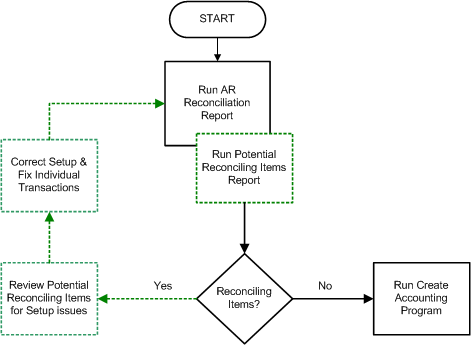
Use the AR Reconciliation report to compare transactional data against accounting data.
Optionally run the Potential Reconciling Items report to view suggested journal items that might potentially post to incorrect GL account types.
Run the Journal Entries report to confirm that the actual GL accounts are correct.
The Journal Entries report shows the transaction and receipt numbers that contribute to a particular GL account. Run this report using the Detail by Account parameter to review the details that make up your general ledger journal entries. This report selects all transactions that will be posted to the general ledger (where associated transaction type has Post to GL set to Yes).
Note: The Journal Entries report can generate multiple reports. The 'Detail by Account' version of this report is probably most useful for reconciliation purposes.
Run the Aging - 7 Buckets - By Account or the Aging - 4 Buckets report to view beginning and ending customer balances. See: Aging Reports.
For a more detailed look at the period's activity, run the registers and journal reports.
Use this table to see which registers and journals to run for which type of accounting data.
| Accounting Data | Accounting Report | Related Transaction Report |
|---|---|---|
| Beginning balance | Not applicable | Aging - 7 Buckets - By Account or Aging - 4 Buckets |
| Transactions accounting data | Sales Journal by Account (for account type of Receivables) | Transaction Register (for postable items) |
| Adjustments accounting data | Adjustments Journal | Adjustment Register |
| Not applicable | Not applicable | Invoice Exception Report (for non-postable items) |
| Unapplied receipts accounting data | Unapplied Receipts Journal | Unapplied and Unresolved Receipts Register |
| Applied receipts accounting data | Applied Receipts Journal | Applied Receipts Register |
| Not applicable | On-Account Credit Memo Gain and Loss Journal | Not applicable |
| Ending balance | Not applicable | Aging - 7 Buckets - By Account or Aging - 4 Buckets |
See: Reconciliation Reports.
The AR Reconciliation report uses the following formula to ensure your period activity matches your receivables aging ending balance:
     Beginning Balance
+    Transactions
+/-  Adjustments
-    Invoice Exceptions
-    Applied Receipts
-    Unapplied Receipts
+/-  Credit Memo Gain/Loss
=    Ending Balance
After identifying and correcting in Receivables those items that did not reconcile, run the Submit Accounting program to initiate the transfer of Receivables data into the general ledger. See: Posting.
After posting, you are ready to reconcile the posted data. See: Reconciling General Ledger Details.
The following illustration describes the above internal reconciliation process.
