You set up your salespersons and assign sales territories using the Resource window, with most of the information you enter being on the Receivables tab. Receivables lets you define multiple salespersons to which you can assign sales credits when entering invoices. If AutoAccounting depends on salesperson, Receivables uses the general ledger accounts that you enter here in combination with your AutoAccounting rules to determine the default revenue, freight, and receivable accounts for your invoices.
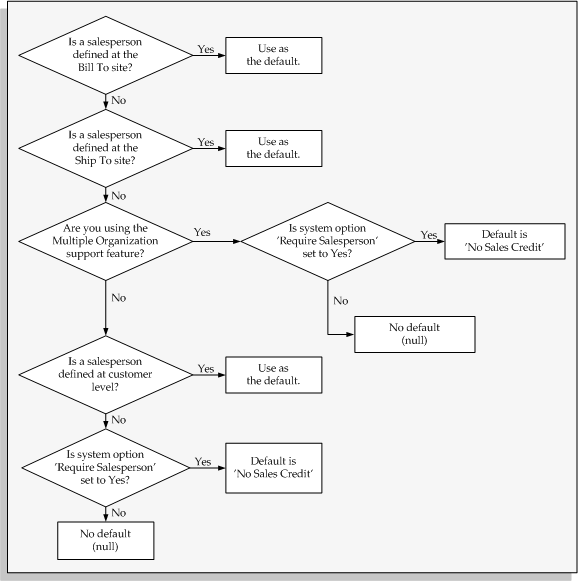
Oracle Receivables uses No Sales Credit as the default in the Salesperson field when you enter transactions if the system option Require Salesperson is set to Yes and no salesperson is defined at the bill-to, ship-to, or customer level.
Note: If AutoAccounting is based on salesperson, then you must query the No Sales Credit record in the Resource window and enter revenue, freight, and receivable accounting information. These accounts are required when creating a debit memo reversal or when entering transactions with No Sales Credit.
Active salespersons appear in the list of values in the Transaction and Customers windows. You can make a salesperson inactive by unchecking the Active in Receivables check box and then saving your work, or by specifying an end date for this salesperson.
Note: Information that you enter in this window is shared by Oracle Customer Relations Management (CRM), Oracle Sales, and Oracle Sales Compensation.
To set up a new or existing resource as a salesperson, see: Creating a Resource Manually, Oracle Trading Community Architecture Administration Guide.
For more information, refer to the online documentation for these products.
The following figure shows how Receivables chooses the default salesperson when you enter transactions.
Determining the default salesperson during transaction entry
For a text description of this illustration, see: Text Description of the Default Salesperson Graphic.
You can organize salespeople into groups. A group is a unit of organization based on the similar function or roles of its members.
For example, a manufacturing company might have sales groups for different product models.
See: Managing Resources with Resource Manager, Oracle Trading Community Architecture Administration Guide.
Receivables captures the sales group attribute so that sales activity reporting can include your enterprise's sales group hierarchy. This lets you present sales data to your management in a meaningful way.
Receivables captures the sales group attribute when:
Importing transaction data from feeder systems, such as Oracle Order Management.
Entering transactions in the Transactions workbench.
See: Entering Revenue Credits.
Other Sources
Overview of Setting Up Resource Manager, Oracle Trading Community Architecture Administration Guide
