The XML Gateway Error Processing Item Type contains error handling processes to manage errors detected by Oracle Workflow Business Event System or Oracle XML Gateway.
Oracle Workflow sends a notification to the Trading Partner contact for data errors or to the XML Gateway system administrator for system or process errors. For errors that require collaboration between the Trading Partner contact and the XML Gateway system administrator, a notification is sent to both parties to encourage discussion and to expedite problem solution.
In addition, Oracle Workflow sends a notification to an appropriate transaction owner depending on the transaction type of an erred inbound transaction. If a transaction owner for a particular transaction type is identified, and the transaction error belongs to the transaction type with the owner defined, then the transaction owner will receive a notification in addition to the system administrator and Trading Partner contact depending on the error type. For example, if an inbound transaction error belongs to the Purchasing transaction type, then the Purchasing transaction owner also receives the notification if his or her user name is defined in the Define Transactions form.
A transaction owner can act on an error notification if needed. Once an open notification has been responded on either reprocess or abort, any other subsequent response from the XML Gateway system administrator will be ignored and the notification should be closed.
However, if the system administrator or transaction owner has not taken an explicit action such as reprocess or abort on a notification that was received earlier, after the notification timeout period, the XML Gateway execution engine will automatically reprocess the corresponding erred transaction until the number of maximum retries is exceeded. Oracle XML Gateway uses the following two profile options to manage the timeout feature:
ECX: Notification Timeout in Minutes (ECX_NOTIFY_TIMEOUT) Profile Option
This profile option sets the timeout period measured in minutes for a notification that is waiting for a response. If the notification timeout value is exceeded, the XML Gateway execution engine will automatically reprocess the erred transaction if it does not exceed the maximum retries limit.
ECX: Maximum Reprocess Attempts For Errored Inbound Transaction (ECX_MAX_RETRY) Profile Option
This profile option governs the number of times that the XML Gateway execution engine will automatically reprocess the erred transaction after the notification timeout period. When an error occurs during reprocessing, notifications will be sent to the XML Gateway system administrator and the transaction owner if identified. If the maximum retries limit is exceeded, the engine will not reprocess the transaction until the system administrator or the transaction owner explicitly opts for reprocessing it.
Note: The Workflow Retry feature is used to support outbound messages; it resumes from the point of failure. The ECX Reprocess Inbound function is used to support the reprocess feature for inbound messages; it resumes using a copy of the inbound message stored in the ECX_DOCLOGS table.
Attributes, also known as variables, are used to support the function, event, notification, and process activities defined for the XML Gateway Error Processing Item Type.
The XML Gateway Error Processing Item Type supports the following error handling processes:
(FYI) Message Delivery Error
Default Error Process
ECX Engine Notification Process
ECX Error Process for Timeout
ECX Main Error Process
ECX Main Inbound Error Process
ECX Main Outbound Error Process
Error handling for Inbound Messages
Error handling for Outbound Messages
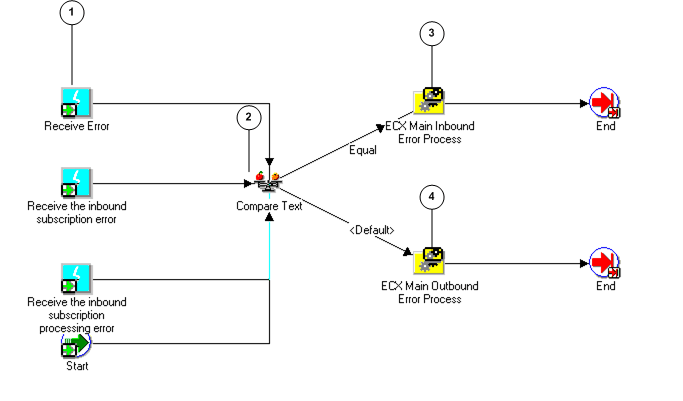
The relationship of the error handling processes is shown below. The ECX Main Error Process calls the ECX Main Error Inbound process for inbound message errors or the ECX Main Error Outbound process for outbound message errors. If inbound, the ECX Main Error Inbound process calls the Error Handling for Inbound Message process, which calls the ECX Error Process for Timeout. If outbound, the ECX Main Error Outbound process calls the Error Handling for Outbound Message process, which calls the Default Error process.
The following is a description of each Process (listed in their functional order above) supported by the XML Gateway Error Processing Item Type:
The ECX Main Error Process is triggered by the Receive Error Event (see illustration, node 1), the Receive Inbound Subscription Error event, or the Receive Inbound Subscription Processing Error event for errors detected by the XML Gateway execution engine; or by Workflow for errors involving the Workflow processes created using the XML Gateway Standard Item Type.
At node 2, the process determines whether the error relates to an inbound or outbound message. The ECX Main Error Process calls the ECX Main Inbound Error Process (node 3) for errors related to an inbound message. For errors related to an outbound message, it calls the ECX Main Outbound Error Process (node 4).
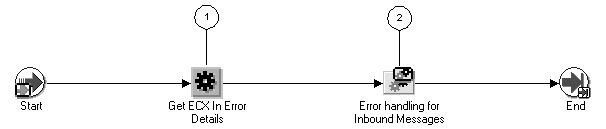
As shown in the illustration below, ECX Main Inbound Error Process gets the error information (node 1) from the XML Gateway execution engine or Workflow engine and calls the Error Handling for Inbound Messages process (node 2).
Errors detected by the XML Gateway execution engine or Workflow engine may trigger a notification. The notification can be sent to the XML Gateway system administrator, the Trading Partner contact, or both depending on the nature of the error, as well as an appropriate transaction owner if the information is identified.
Notifications can be e-mailed to the target recipient(s) if the Workflow mailer is enabled. The e-mail or user name information is defined in the following places:
XML Gateway system administrator's e-mail address is defined in the ECX: System Administrator Email Address profile option.
The Trading Partner contact e-mail address is defined in the Trading Partner form.
The transaction owner's user name can be specified in the Define Transactions form.
The target recipient(s) of the notification are predefined for the error message and cannot be changed.
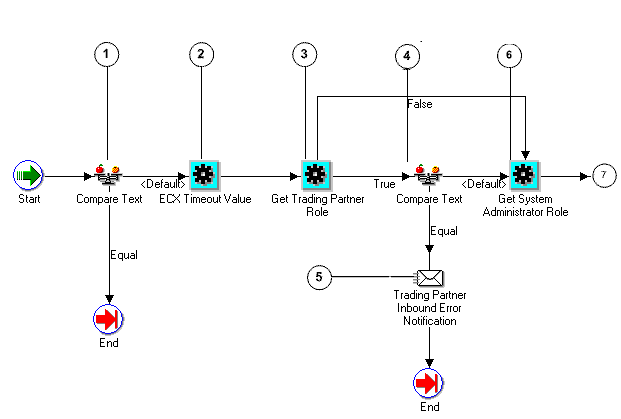
The Error Handling for Inbound Messages process checks the type of the error detected (shown in the following diagram, node 1). If the error type indicates that no notification is sent, the failed process ends, and the error process ends.
If the compare in node 1 indicates that a notification is to be sent, the process retrieves the timeout value measured in minutes from the ECX: Notification Timeout in Minutes profile option (node 2), and retrieves the trading partner contact information (Company Admin e-mail) from the trading partner tables (node 3). If the error type indicates that the target recipient is the Trading Partner contact (performed in node 4), a notification is sent to the Trading Partner (node 5), the failed process ends, and the error process ends.
If the check in node three did not indicate that the target recipient is solely the Trading Partner contact, the process retrieves the System Administrator contact information and the transaction owner contact information if it is available (node 6) and checks the error type again (node 7).
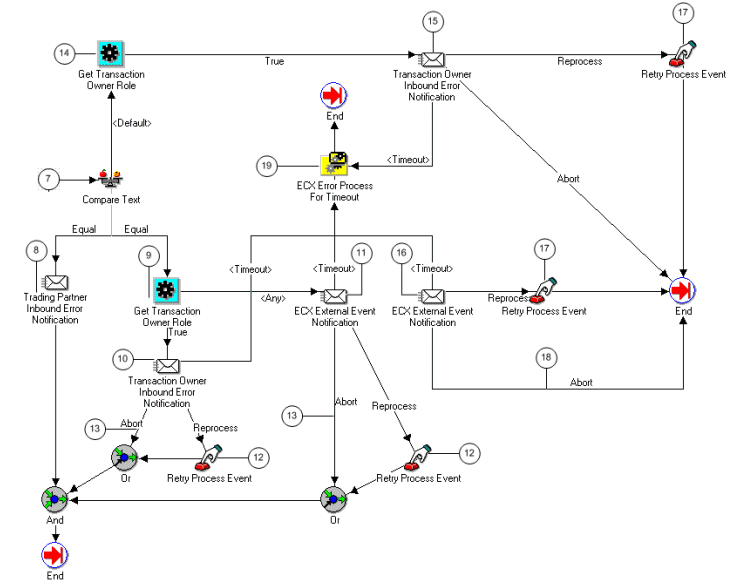
If the target recipients are both the Trading Partner contact and the XML Gateway system administrator, then the process retrieves the transaction owner contact information if available from the Define Transactions form (node 9), and then three notifications are sent, one to each party (nodes 8, 10, and 11). The system administrator and the transaction owner both have the option of reprocessing or aborting the failed inbound process (node 12). Reprocessing resumes using a copy of the inbound message stored in the ECX_DOCLOGS table.
If the target recipient is solely the XML Gateway system administrator, then the process retrieves the transaction owner contact information if available from the Define Transactions form (node 14), and then two notifications are sent, one for the system administrator and the other for an appropriate transaction owner (node 15 and 16). Both of them have the option to reprocess (node 17) or abort (node 18) the failed inbound process.
If the system administrator or a transaction owner does not respond to the notification that is waiting for action, and the notification timeout period specified in the ECX: Notification Timeout in Minutes profile option is exceeded, the ECX Error Process for Timeout will be called (node 19). This step enables XML Gateway execution engine to automatically reprocess the corresponding erred transaction if it does not exceed the maximum retries limit set by the ECX: Maximum Reprocess Attempts For Errored Inbound Transaction profile option.
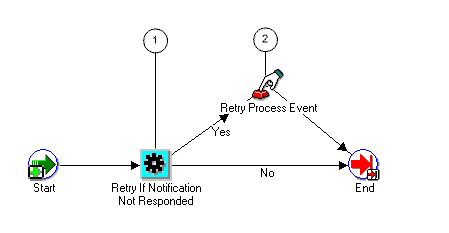
During the error handling for inbound messages, the ECX Error Process for Timeout process is called by the Error Handling for Inbound Messages process to have the XML Gateway execution engine automatically reprocess an erred inbound transaction when the XML Gateway system administrator or the transaction owner has not taken an explicit action on a notification that was sent earlier, and the timeout value for a notification waiting for a response is exceeded but the number of automatically reprocess has not yet reached the maximum retries limit.
When a notification that was sent earlier has not yet responded explicitly (shown in the following diagram, node 1), the XML Gateway execution engine will automatically reprocess an erred transaction (node 2).
ECX Main Outbound Error Process initializes the error (shown below, node 1) and gets the error information (node 2) from the XML Gateway execution engine or Workflow engine and calls the Error Handling for Outbound Messages process (node 3).

Errors detected by the XML Gateway execution engine or Workflow engine may trigger a notification. The notification can be sent to the XML Gateway system administrator, the Trading Partner contact, or both depending on the nature of the error.
Notifications may be e-mailed to the target recipient(s) if the Workflow mailer is enabled. Their e-mail addresses are defined in the following places:
XML Gateway system administrator's e-mail address is defined in the ECX: System Administrator Email Address profile option
The Trading Partner contact e-mail address is defined in the Trading Partner form.
The target recipient(s) of the notification are predefined for the error message and cannot be changed.
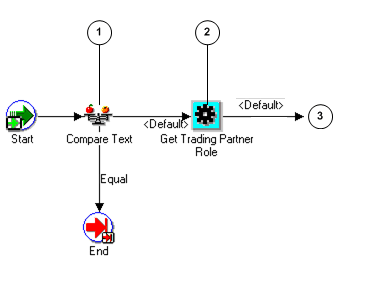
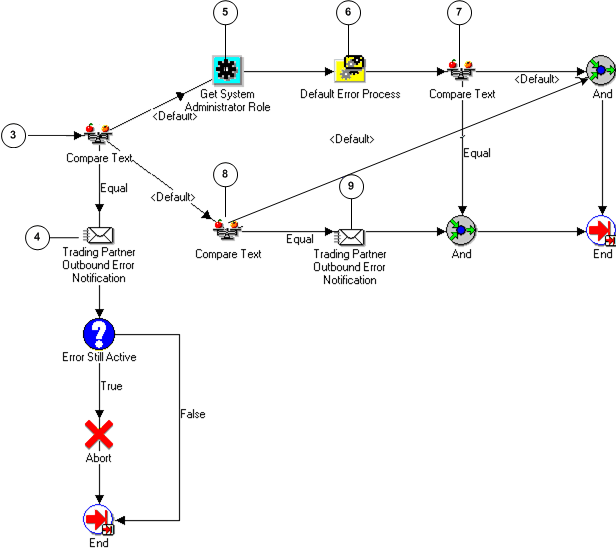
The Error Handling for Outbound Messages process checks the error type to determine if a notification is to be sent (shown below, node 1). If the type indicates that no notification is to be sent, the process ends.
If the type does not indicate that no notification is to be sent, the process retrieves the trading partner contact information (Company Admin e-mail) from the trading partner tables (node 2). The notification type is checked (node 3), and if the target recipient is solely the Trading Partner contact, a notification is sent to the Trading Partner (node 4) and the failed process is aborted.
If the target recipient is not solely the trading partner contact, the system administrator contact is retrieved (node 5) and the Default Error Process will be called (node 6). At node 8 the type is checked to determine if the notification is to be sent to both the trading partner and the system administrator.
If the target recipients are both the Trading Partner contact and the XML Gateway system administrator, then notification is also sent to the Trading Partner contact (node 9).
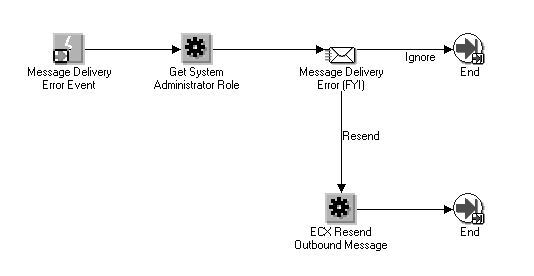
The (FYI) Message Delivery Process is used with Oracle Transport Agent (or other messaging systems) to report message delivery status back to the Workflow process that initiated message creation.
A corresponding event subscription (seeded in XML Gateway) for the oracle.apps.ecx.processing.message.callback event initiates the XML Gateway Standard Error Processing Item Type:FYI_MESSAGE_DELIVERY_ERROR error handling process. In the event of an error, a notification is sent to the System Administrator who has the option to "Resend" the message after correcting the error, or to "Ignore" the notification if no action is required.
The Default Error Process is called by the Error Handling for Outbound Messages process when the error message notification is for the system administrator.
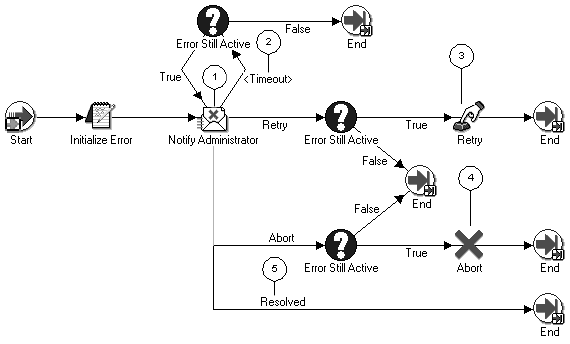
The Workflow notification administrator delivers the notification (shown below, node 1) to the system administrator as well as proceeds on one of the following paths:
Check for response from the system administrator and issue time-out if no response received (node 2).
Execute retry function (node 3) if the system administrator wants to retry the failed outbound process. The retry process resumes from the point of failure. Continue retry function until error is resolved or failed process is aborted.
Execute abort function (node 4) if the system administrator wants to abort the failed outbound process.
Resolve error and end process (node 5)
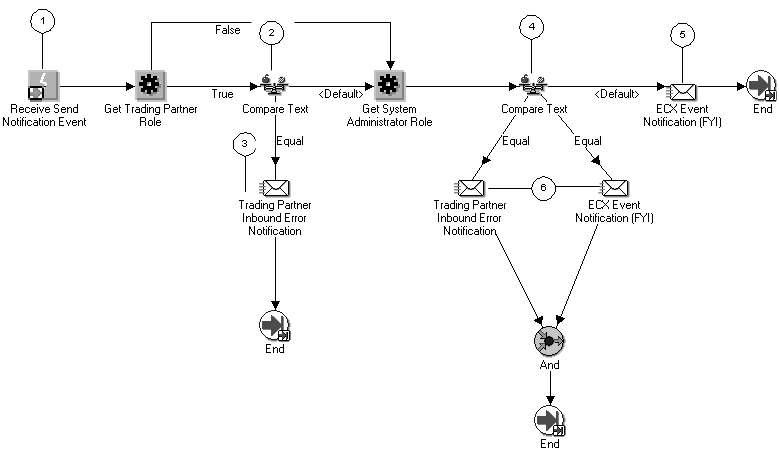
The Receive Send Notification Event (shown below, node 1) triggers the ECX Engine Notification Process.
The ECX Engine Notification Process checks the error type to determine the target recipient (node 2). If the target recipient is the Trading Partner contact, notification is sent (node 3). If the error type does not indicate that the Trading Partner contact is the sole target recipient, the process checks the error type (node 4) to determine if the notification should be sent to the XML Gateway system administrator (node 5), or both parties (node 6).
The following is a description of each Notification supported by the XML Gateway Error Processing Item Type:
The ECX Event Notification [FYI] is used to send a notification to the system administrator.
This notification is used by the ECX Engine Notification Process.
The ECX External Event Notification is used to send a notification to the system administrator.
This notification is used by the Error Handling for Inbound Messages process.
The Callback feature allows messaging systems (including OTA) to report message delivery status back to the Workflow process that initiated message creation. If delivery fails, the apps.ecx.processing.message.callback event is raised. The corresponding event subscription for the FYI_MESSAGE_DELIVERY_ERROR process is executed and a Workflow notification is sent to the System Administrator (defined in the ECX: System Administrator Email Address profile) who has the option to retry/resend or about/ignore the process.
The Trading Partner Inbound Error Notification is used to send a notification to the Trading Partner contact.
This notification is used by the Error Handling for Inbound Message and ECX Engine Notification processes.
The Trading Partner Outbound Error Notification is used to send a notification to the Trading Partner contact.
This notification is used by the Error Handling for Outbound Message process.
The Transaction Owner Inbound Error Notification is used to send a notification to the transaction owner if the owner is specified in the Define Transactions form.
This notification is used by the Error Handling for Inbound Message process.
Several functions are provided in the XML Gateway Error Processing Item Type to support the error handling process.
The ECX Reprocess Inbound function is used if the XML Gateway system administrator responded to the error notification by selecting the "reprocess" option. The reprocess function will rerun the inbound process using a copy of the inbound message stored in the ECX_DOCLOGS table.
The "reprocess" function is not supported for external notifications to the Trading Partner.
The attribute for the ECX Reprocess Inbound function is:
| ECX Message ID | This is a unique identifier provided by the XML Gateway execution engine for each outbound message. |
The ECX Resend Outbound function is provided to support Oracle Exchange only, it is not used in the XML Gateway Error Processing Item Type. The ECX Resend Outbound function resumes from a copy of the outbound message stored in the ECX_DOCLOGS table.
The Oracle Workflow "retry" function is used to rerun an outbound process from the point of failure. This is handled using the Default Error Process.
The attribute for the ECX Resend Outbound function is shown in the following table:
| ECX Message ID | This is a unique identifier provided by the XML Gateway execution engine for each outbound message. |
The ECX Timeout Value function is used to retrieve the timeout period measured in minutes stored in the ECX: Notification Timeout profile option.
If the XML Gateway system administrator or the transaction owner has not taken explicit action, such as reprocess or abort, on a notification that was received earlier, after the notification timeout period, the XML Gateway execution engine will automatically reprocess the erred transaction until the number of maximum retries is exceeded. The maximum retries value is stored in the ECX: Maximum Reprocess Attempts For Errored Inbound Transaction profile option.
The Error Still Active function is used to check whether the error still existed for the outbound message after notifications have sent to appropriate parties, such as Trading Partner contact and XML Gateway system administrator.
The Get ECX In Error Details function activity is used to get the details regarding an inbound error to prepare the e-mail notification. In addition, required information is passed to the Error Handling for Inbound Messages process activity.
The Get ECX Out Error Details function is used to get the details regarding an outbound error to prepare the notification. In addition, required information is passed to the Error Handling for Outbound Messages process.
The Get System Administrator Role function is used to retrieve the e-mail address for the system administrator stored in the ECX: System Administrator Email Address system profile.
The e-mail address retrieved from the system profile is returned by the function and stored in the ECX System Administrator Role (ECX_SA_ROLE) item attribute.
A notification is sent to the XML Gateway system administrator for system or process errors detected by Oracle XML Gateway or Oracle Workflow Business Event System.
The Get Trading Partner Role function is used to determine the e-mail address for the Trading Partner contact that was provided when the Trading Partner was defined.
The function uses the attribute values passed to it to uniquely identify the Trading Partner. The e-mail address associated with the Trading Partner selected returned by the function is stored in the ECX Trading Partner Role (ECX_TP_ROLE) item attribute.
A notification is sent to the Trading Partner contact for data errors detected by Oracle XML Gateway.
The attributes for the Get Trading Partner Role function are shown in the following table:
| Attribute Name | Attribute Description |
|---|---|
| ECX Party ID | This is the unique identifier for the Trading Partner defined in Oracle E-Business Suite. This field is optional. |
| ECX Party Site ID | This is the unique identifier for the Trading Partner site defined in Oracle E-Business Suite. |
| ECX Transaction Type | This is the Transaction Type defined in the XML Gateway Define Transactions form. |
| ECX Transaction Subtype | This is the Transaction Subtype defined in the XML Gateway Define Transactions form. |
The Get Transaction Owner Role function is used to determine the e-mail address for the transaction owner if the owner's user name was specified in the Define Transactions form.
The function uses the attribute values passed to it to uniquely identify the transaction owner if the owner is defined. The e-mail address associated with the transaction owner's user name that was defined in the applications as the application login name is retrieved and returned by the function.
A notification is sent to an appropriate transaction owner depending on the erred transaction type for process errors detected by Oracle XML Gateway.
The Get Transaction Owner Role function uses the following attributes:
| Attribute Name | Attribute Description |
|---|---|
| ECX Transaction Type | This is the Transaction Type defined in the XML Gateway Define Transactions form. |
| ECX Transaction Subtype | This is the Transaction Subtype defined in the XML Gateway Define Transactions form. |
| ECX Party Type | This is the party type for the Trading Partner defined in Oracle E-Business Suite. |
| ECX Party Site ID | This is the unique identifier for the Trading Partner site defined in Oracle E-Business Suite. |
| ECX Message Standard | This is the XML message format standard defined in the Define Transactions form. |
| ECX Message Type | This is the payload message format, which is XML. |
The XML Gateway Error Processing Item Type supports the following event activities:
Message Delivery Error
Receive Error
Receive Send Notification Event
Receive the inbound subscription error
Receive the inbound subscription processing error
All of the XML Gateway seeded events and event subscriptions are seeded with a Customization Level of "L" for Limit, which means the event or event subscription may be enabled or disabled but may not be changed in any other way. Because the seeded events and event subscriptions play an integral role in the total solution, Oracle does not recommend that you disable any of them. If necessary, you may define additional events and event subscriptions to augment the seeded activities.
The Message Delivery Error Event is used by the XML Gateway to indicate that an error has occurred. This event is used with OTA Callback.
The seeded event name is oracle.apps.ecx.processing.message.callback. This event triggers the (FYI) Message Delivery Error Process workflow.
The Receive Error event is used by XML Gateway to indicate that the execution engine has detected an error. Regardless of whether the error was detected by Oracle XML Gateway or Oracle Workflow Business Event System, the same ECX Main Error Process manages the error. See: ECX Main Error Process for the details.
The seeded event name is oracle.apps.ecx.processing.message.error. This event triggers the ECX Main Error Process workflow.
The Receive Send Notification Event is used by XML Gateway to indicate that the execution engine has identified a need to send a notification for errors related to an inbound process. The ECX Engine Notification Process manages the error. See: ECX Engine Notification Process for the details.
The seeded event name is oracle.apps.ecx.processing.notification.send. This event triggers the ECX Engine Notification Process workflow.
The event "oracle.apps.ecx.inbound.message.receive" is raised by the ECX_INBOUND agent listener after it dequeues a message from the ECX_INBOUND queue. The "Receive Inbound Subscription Error" Event is used to indicate that there is an error when executing the subscription for the event "oracle.apps.ecx.inbound.message.receive".
This subscription is savies the xml message to ecx_doclogs, checks the trading partner setup for the given transaction, performs logging, and enqueues the message to the next queue for the actual map processing.
The event "oracle.apps.ecx.inbound.message.process" is raised by the ECX_TRANSACTION agent listener after it dequeues a message from the ECX_IN_OAG_Q queue. The "Receive Inbound Subscription Processing Error" is used to indicate that there is an error when processing the inbound xml document.
The XML Gateway Error Processing Item Type provides several message templates used by the various notification activities to send a notification to the XML Gateway system administrator or the Trading Partner contact based on the nature of the error.
Below is a description of each message template. The message template is displayed in the Body tab and Text Body subtab.
The ECX Event Message [FYI] template is used by the ECX Event Notification. The template includes information regarding the transaction, the type of error detected, and the associated error message.
The ECX External Event Message template is used by the ECX External Event Notification activity. The template includes information regarding the transaction, the type of error detected, and the associated error message.
The Inbound Trading Partner Message template is used by the Trading Partner Inbound Error Notification activity. The template includes information regarding the transaction, the type of error detected, and the associated error message.
The Message Delivery Error template is used by the XML Message Delivery Callback error process. The template includes information regarding the action to take in case of error.
The Outbound Trading Partner Message template is used by the Trading Partner Outbound Error Notification activity. The template includes information regarding the transaction, the type of error detected, and the associated error message.
Each message template has the attributes listed in the following table. The values for the attributes are provided by the Get ECX Out Error Details and Get ECX In Error Details function. The values are used to replace the message tokens in the message template.
For a detailed explanation of each error and possible corrective actions, see Manual Troubleshooting Steps.
The following table describes all the possible attributes:
Event Key is a unique identifier for an instance of an event. The combination of event name, event key, and event data fully describe what occurred in the event.
| Attribute Name | Attribute Description |
|---|---|
| Event Key | Event Key is a unique identifier for an instance of an event. The combination of event name, event key, and event data fully describe what occurred in the event. |
| ECX Transaction Type | This is the Transaction Type defined in the XML Gateway Define Transactions form. |
| ECX Document ID | This is the unique identifier for the business document. It can be the document number or its associated database key, whichever is guaranteed to be unique for the transaction. |
| ECX Error Message | This is the error message text describing the error detected. |
| ECX Error Type | This is the error type code. The valid values are:
|
| ECX Return Code | This is the return status code. The valid values are:
|
| ECX Message Standard | Message format standard (such as OAG) as defined in the Define Transactions form. |
| ECX TP Header ID | Trading Partner name. |
| ECX Message Type | Message Type, which is XML. |
| ECX Logfile | If a log file is created, the name and location. |
| ECX Status | The status of the transaction. |
| ECX Time Stamp | The date the log file was created. |
| ECX Transaction Subtype | This is the Transaction Subtype defined in the XML Gateway Define Transactions form. |
| ECX Party ID | This is the unique identifier for the Trading Partner defined in Oracle E-Business Suite. |
| ECX Party Site ID | This is the unique identifier for the Trading Partner site defined in the XML Gateway Define Transactions form. |
| ECX Internal Control Number | The Internal Control Number is a system-generated number that uniquely identifies the message being processed. |
| Event Name | This is a unique identifier for the business event. The naming convention is oracle.apps.<product code>.<component>.<object>.<event> The Event Name is required for the Generate XML Document function to store the value returned. |
| ECX Party Admin Email | System Administrator as defined in the Trading Partner Setup window. |
| ECX Protocol Address | Protocol address used (for example, SMTP, HTTP, HTTPS). |
| ECX Attribute 1 | Optional variable as defined in the message map. |
| ECX Attribute 2 | Optional variable as defined in the message map. |
| ECX Attribute 3 | Optional variable as defined in the message map. |
| ECX Attribute 4 | Optional variable as defined in the message map. |
| ECX Attribute 5 | Optional variable as defined in the message map. |
| ECX Trigger ID | Unique number given to each event being raised. |
| ECX Trading Partner Role | The e-mail address from the Trading Partner Setup window that is returned by the Get Trading Partner Role function. |
| ECX Protocol Type | Transmission protocol as defined in the Setup Trading Partner window. |
The XML Gateway Error Processing Item Type supports several lookup types for the error handling processes.
The ECX Inbound Error Actions lookups are used by the ECX External Event Notification as a Result Type attribute. The valid values are as follows:
Abort
Abort the failed inbound process.
Reprocess
Reprocess the failed inbound process.
The ECX Outbound Error Actions lookups is used by the Default Error Process. The valid value is as follows:
Abort
Abort the failed outbound process
The retry function is supported by the Default Error Process.
The ECX Outbound Error Types lookups are used by the Get ECX Error Type function as a Result Type attribute. The valid values are as follows:
Generate Error
The error was detected during the message creation process as opposed to the message delivery process.
Send Error
The error was detected during the message delivery process as opposed to the message creation process.
Trading Partner Setup Error
The error was based on incorrect Trading Partner setup. Correct the erroneous set up before proceeding further.
ECX Resend Actions are lookups used by the XML Gateway Error Process. The valid values are as follows:
Ignore
Resend