You must fund a project before the project can accrue revenue and be billed. Funding is the step that allocates an amount associated with a customer agreement to a specific project. The total amount of allocated project funding must equal the current approved project revenue budget amount in order to successfully baseline the project. Optionally, top tasks on projects can be individually funded. If top tasks are funded, then the same requirement of matching budget amounts to funding amounts applies at the top task level of the project.
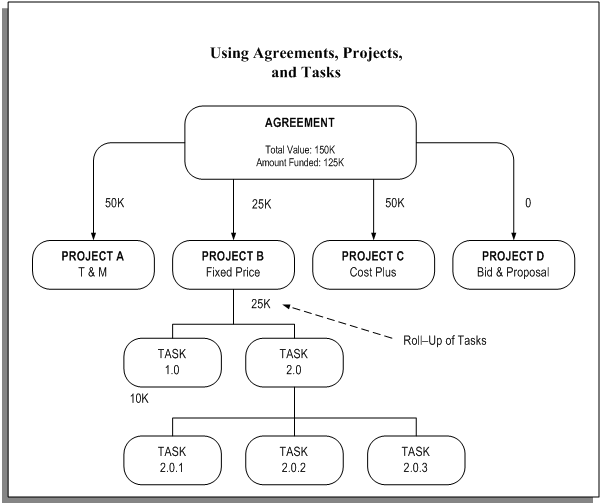
Oracle Projects allows you to define agreements, projects, and tasks to organize your project work. Funding Multiple Projects and Tasks illustration represents an example of how you can use an agreement to fund multiple projects and tasks.
In this example, a single agreement is used to fund four projects. The agreement has a total value of $150,000. The amount funded is $125,000.
Project A, a time and materials project, is funded at $50,000 at the project level.
Project B, a fixed price project, is funded at $25,000. It has a work breakdown structure with two tasks, namely Task 1.0 and Task 2.0. Task 1.0 is funded at $10,000. The remainder of the funding for Project B is assigned to Task 2.0. Task 2.0 has three sub-tasks: Task 2.0.1, Task 2.0.2, and Task 2.0.3.
Project C, a cost plus project, is funded at $50,000.
Project D, a bid and proposal project, has been funded with $0. While this does not allow the project to generate any revenue, it gives the user a link to relate specific bid & proposal projects to agreements for reporting purposes.
The Agreements section describes how to use agreements to fund projects and tasks in more detail.
Funding Multiple Projects and Tasks
In Oracle Projects, an agreement represents any form of contract, written or verbal, between you and one of your customers. For example, an agreement may correspond to a purchase order, a continuing service agreement, or a verbal authorization.
