Oracle Projects generates revenue based on the transactions that you charge to your projects. You configure your projects to accrue revenue based on your company policies. You can review revenue amounts online and you can also adjust transactions. Oracle Projects then processes transactions to adjust the revenue amounts for your project.
When you generate revenue, Oracle Projects calculates revenue, creates revenue events, creates expenditure item revenue details, and maintains funding balances. You run the process PRC: Generate Revenue Accounting Events to derive default GL accounts using AutoAccounting and generate accounting events. You run the process PRC: Create Accounting to create accounting in Oracle Subledger Accounting. If you define your own detailed accounting rules in Oracle Subledger Accounting, then Oracle Subledger Accounting overwrites default accounts, or individual segments of accounts, that Oracle Projects derives using AutoAccounting.
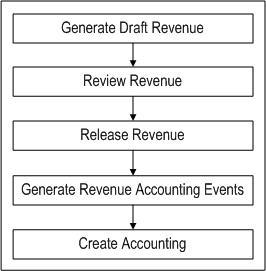
The Oracle Projects revenue flow follows the following steps detailed in the Revenue Flow illustration.
1. Generate draft revenue
2. Review revenue
3. Release revenue
4. Generate revenue accounting events
5. Create accounting
This section describes each step, as well as procedures such as adjusting revenue and creating revenue events and hard limits.