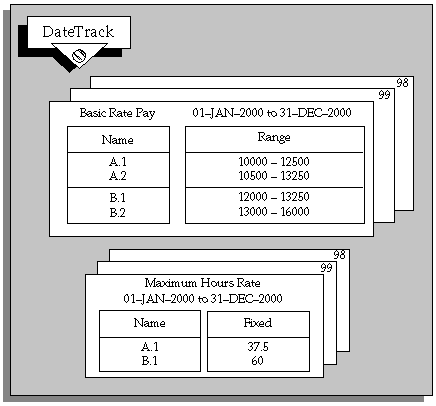
In Oracle HRMS, you can set up a table of values related to each grade. These are called grade rates. You can enter a fixed value or a range of valid values for each grade.
For example, you might define a salary rate and an overtime rate of pay for every grade, with minimum, maximum, and midpoint values. Both rates would be in monetary units. However, you can also define rates with non-monetary units, such as days, hours, or numbers.
These grade rates serve only as a guideline to validate that the salary you propose for an employee on a certain grade is appropriate for that grade. You typically use this approach if you do not follow the grade/step progression approach to grades and pay implementation. If you want to automatically update salaries using grade rates, you can use the grade/step progression process.
You can upload grade rate values that you created using the Grade Rate window to create default salary rates for grades in a grade ladder. However, once you have uploaded any existing rates, we recommend that you use the Total Compensation Setup Wizard to maintain salary rates for use in Grade/Step Progression, see: Setting Up Grade/Step Progression.
Grade rates are datetracked and this means that you can keep the history of the actual values you use. You can also set up rate values at a future date and be sure that this information will automatically take effect on the date you set, and not before.
You can use your grade rate values:
As part of a QuickPaint report or inquiry
To validate salary proposals
To validate other compensation entries you make for employees
The salary administration process validates salary proposals automatically against the appropriate grade rate. You can use formula validation to check other compensation entries.
Grade rate values can be linked directly to currencies. When you enter a monetary value for a grade rate you can associate a currency with this value.
When you save your definition, an automatic process creates corresponding database items that formulas can access.