Oracle HRMS provides two different security models which enable you to set up security specifically for your enterprise: Standard HRMS security and Security Groups Enabled security (formerly called Cross Business Group Responsibility Security).
Note: If you want to set up security for employees who can access the database, but do not change database information, see: Reporting Access and Setting Up Reporting Users.
A further option exists which enables users to simultaneously view selected fields from all business groups in your organization regardless of the security model. For more information see HR: Cross Business Group Profile option.
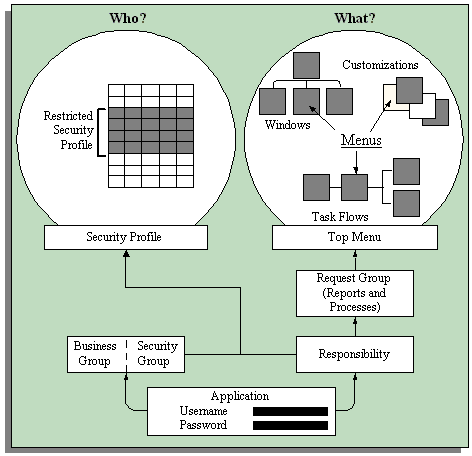
Standard HRMS security restricts access to your enterprise's records and data. To set up Standard HRMS Security, you first create responsibilities and then define the windows, menus items, workflows, data and records the user can access. The System Administrator then assigns users to as many of these responsibilities as is required to complete their business tasks.
If you are using Standard HRMS Security, you must ensure that the Enable Multiple Security Groups profile option is set to the default value No. You must then create a security profile for each distinct security grouping of employees your enterprise requires.
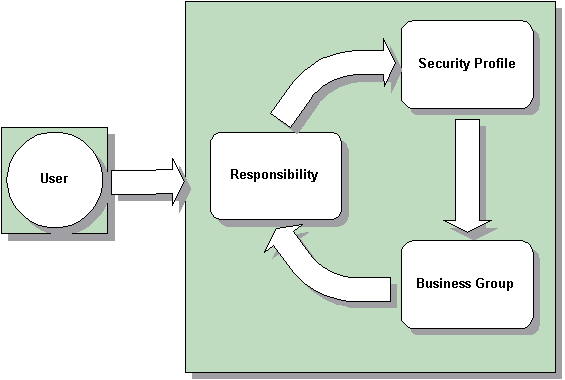
You then create a responsibility for each user type you require, for example HR Manager, Branch Manager and Salesperson, and link the security profile and responsibility to a business group. These three elements create a security grouping to which you assign employees.
Note: Each security grouping you create restricts access to the business group to which the security profile and responsibility are assigned.
By assigning users to the security grouping, you grant them access to the records, menus and data defined in the security profile and responsibility. You can add further users to this security component, but you cannot re-use the security profile and responsibility within another business group.
Your enterprise can also set up request groups to restrict user access to reports and processes. The request group is associated with a security profile which defines the data a user can view, and is then assigned to a responsibility. It is also possible to set up reporting only request groups for users who access the database, but who are not permitted to change any of the records within the system.
For more information, see Setting up Standard Security.
In Standard HRMS Security, you can grant users access to more than one business group within your enterprise. To do this, you must create security profiles and responsibilities and assign them to each additional business group. If a user's responsibility is assigned to more than one business group, they will not be able to view data from more than one business group at any time.
Note: The HR: Cross Business Group Profile option enables users to view some limited information across all business groups within an enterprise. For more information, see HR: Cross Business Group Profile option.
Standard HRMS Security (Security Groups Disabled) is commonly used in organizations which operate within a single legislation and a single business group.
Attention: After setting up Standard HRMS Security, you can switch to the Security Groups Enabled security model. You cannot, however, to revert back to Standard HRMS Security after this change has been made.
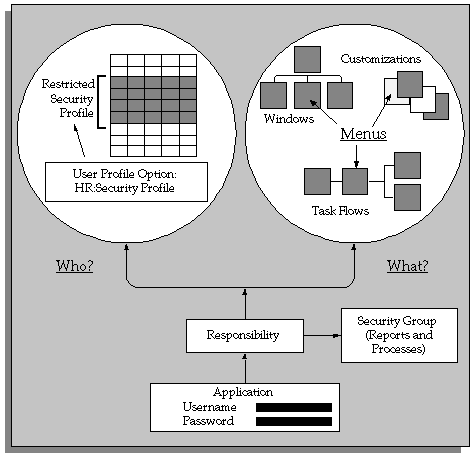
The main difference between the two security models is that the Security Groups Enabled model enables your enterprise to share security profiles and responsibilities between users and business groups. This reduces the set up time, and also increases the flexibility of this security model. The key to re-usability is the relationship between the security elements and the users that you create during the set up process.
Attention: Once you have set up Security Groups Enabled security, you cannot revert to Standard HRMS Security.
The Security Groups Enabled security model enables you to assign a single responsibility to more than one business group, and hence enable users to access records from numerous business groups, although users cannot view information from different business groups simultaneously.
To set up Security Groups Enabled security, you set the Enable Security Groups Profile option to Yes, and run the Enable Multiple Security Groups process. These steps in combination create a Security Group which has the same name as the business group from which it was created. For more information, see Security Groups.
Note: To make the administration of your security setup easy to maintain, it is recommended that you leave the names of the Security Groups the same as your business groups.
Like Standard HRMS Security, your enterprise must create Security Profiles for each distinct security grouping within your enterprise. Security Profiles function slightly differently in the Security Groups Enabled model than they do in Standard HRMS security. Rather than one security profile being assigned to one responsibility, Security Groups Enabled security enables your enterprise to assign numerous security profiles to a responsibility. For example, an HR Manager and an Assistant HR Manager may be able to access the same menus and windows, but may be able to view different data. The following example illustrates the benefits of this function.
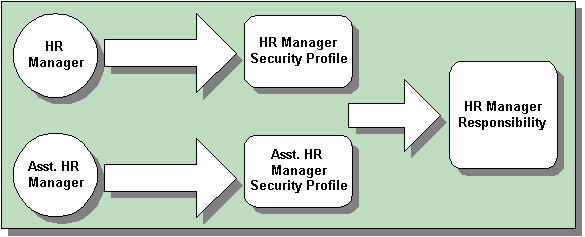
Note: The limitation of this is that a user can only be assigned one Security Profile per responsibility.
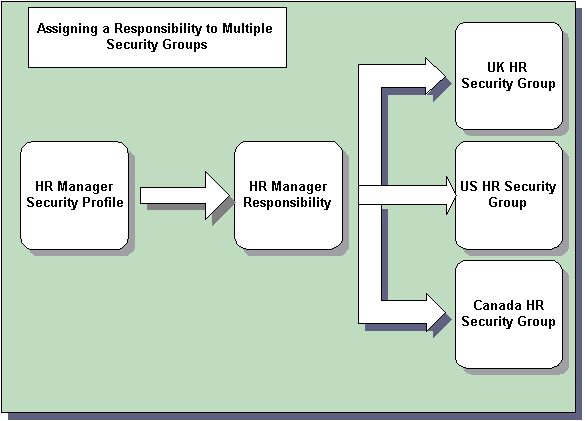
The functionality of responsibilities is also enhanced in the Security Groups Enabled security model. Increasingly, users require access to the records in more than one business group. To accomplish this, you can assign a responsibility to multiple business groups when you use Security Groups Enabled. The records, forms and type of data a user can access will be the same in each of the business groups to which they have access.
Note: When a responsibility is assigned to more than one business group, the user can only view records from one business group at any time.
The ability to assign one responsibility to multiple business groups makes the set up of security quicker and more efficient.
Note: The HR: Cross Business Group Profile Option enables users to view some information across all business groups within an enterprise. For more information, see HR: Cross Business Group Profile option.
As with Standard HRMS Security, you can set up a request group to restrict user access to reports and processes. The request group is associated with a responsibility which defines the data a user can view. It is also possible to set up reporting only request groups for users who access the database, but who are not permitted to change any of the records within the system.
Once your enterprise has defined the security profiles and responsibilities, you must assign them to the relevant security groups. The final stage is to assign users to this group of information. The example below illustrates how the final security set up may look within your enterprise.
For more information see Setting Up Security Groups Enabled Security.
Three distinct enterprise types can benefit from the functionality offered by the Security Groups Enabled model; Service Centers, Multinationals and SSHR enterprises. Of course, the simplified set up and maintenance is of benefit to any enterprise.
Typically, Service Centers create a new business group for each customer they serve. Furthermore, Service Centers only require one responsibility and security profile to enable users to access and change data within the system. As the Security Groups Enabled model enables sharing of security profiles and responsibilities, the security set up process for Service Centers becomes quicker and more efficient.
In the case of Multinational enterprises, it is common to create a business group for each country in which the enterprise operates, and for each legislation the enterprise uses. Using the Security Groups Enabled model enables users to share records and data across business groups and countries.
For enterprises that use SSHR within a global implementation, the advantages of using Security Groups Enabled include quicker set up and easier maintenance. An additional benefit is that transferring employees or employee information between business groups is simplified.