Some HR actions, such as employee hiring, transfer, or termination, require the completion of standard tasks, for example, printing contracts, reassigning resources, and creating users. The Checklists functionality in Oracle HRMS enables you to link the HR action to a life event and generate checklists when the life event is initiated. The application then allocates the checklists to a person or assignment. Each allocated checklist contains the tasks relevant to an individual or assignment. The relevance of the tasks to the person or assignment is determined using eligibility profiles.You can assign each task to a performer either automatically using Oracle Approvals Management (AME), or manually.
After creating a checklist, you can use the Allocated Checklists functionality in Oracle Self-Service Human Resources (SSHR) to display and update the allocated checklists for your direct reports.
Overview of Checklist Functionality
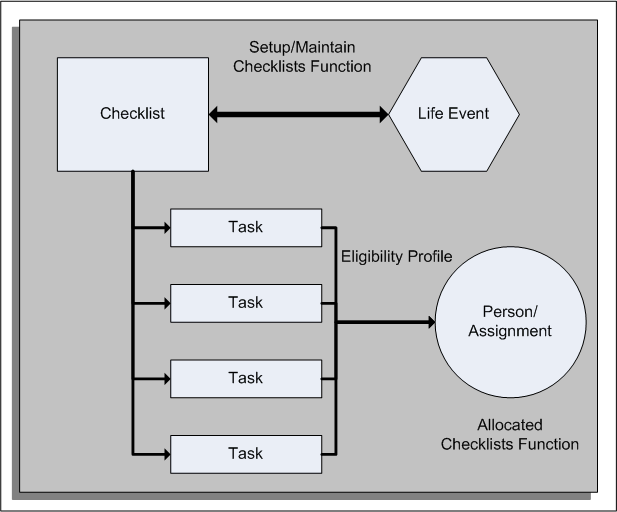
The graphic shows the relationships between checklist components. You can link the checklist to a life event, for example, a New Hire life event, and link each task to an eligibility profile. The tasks that appear on the Allocated Checklists page for each person or assignment depend on the life event and the person's or assignment's eligibility for the task. For example, if you create a location-based eligibility profile for a task, that task appears in the Allocated Checklists page only if the person or assignment meets the eligibility criteria.
You create and maintain checklist templates from the Setup/Maintain Checklists menu option using an HRMS Manager responsibility. Using the Create Checklist page, define the checklist and its behavior, for example, you enter the checklist name and category.
Note: Oracle provides selected checklist categories; however, you can create additional categories if required.
When you create a checklist template, you can link the template to a life event to ensure that the checklist allocated to a person or assignment is appropriate to the HR action being performed.
You create and maintain checklist tasks from the Setup/Maintain Checklists menu option when you create a checklist template. You enter attributes to define the task and its behavior, for example, you enter the task name and specify whether the task is mandatory. If you define a task as mandatory, the self-service manager cannot delete it from an allocated checklist.
You can enter a task duration. When the task appears in an allocated checklist, the date in the Target End Date column reflects this duration.
When you create a checklist task, you can link an eligibility profile to the task. The application allocates tasks to persons or assignments based on these eligibility criteria.
You can use Oracle Approvals Management (AME) to generate a list of performers for the task. To activate AME, you select a value in the Approvals Identifier field of the Checklist Tasks page. The application retrieves the values available for selection from the values you have defined in AME and used in the AME conditions. You can create approval rules based on the task and person's details such as business group, organization name, job, position, or supervisor name.
See: Identifying Performers for Checklist Tasks
If you are using Oracle Approvals Management (AME) to identify performers for a checklist task, the performers automatically receive notification of the task from Oracle Workflow when the task appears in an allocated checklist.
See: Identifying Performers for Checklist Tasks
Alternatively, you can manually assign a performer for a task, either when you create the task or when the task appears in an allocated checklist. If you designate a manager as the performer for a task, the manager can reassign the task from the Allocated Checklists > Update Checklist Task page.
When you invoke the Allocated Checklists function in Oracle Self-Service Human Resources, the application automatically runs the Allocated Checklists concurrent process for the relevant person or assignment. This process identifies whether any life event has occurred for the person or assignment since the last process run and allocates the appropriate checklist. When a manager uses SSHR to view the allocated checklists for a person or assignment, the application displays all allocated checklists.
Note: You should also run the Allocated Checklists concurrent process frequently to keep the allocations up-to-date.
You create tasks using the Setup/Maintain Checklists function, however, you can also maintain tasks and checklists from the Allocated Checklists function. You can maintain the attributes for tasks and checklists, for example, the task or checklist name. From the Allocated Checklists page, you can also delete tasks and checklists.
Note: When you delete an allocated checklist or task from the Allocated Checklists page, you do not delete the corresponding checklist template and task from the database. To delete a checklist template or task from the database, you must use the Setup/Maintain Checklists function. In addition, tasks do not disappear from the allocated checklist automatically when complete; you must delete them yourself if required.
When you display an allocated checklist for a worker on the Allocated Checklists page, you can perform the associated task actions yourself or update the task to assign an alternative performer. When you have processed a task, you can change the task status as appropriate (for example, Completed, Rejected, Outstanding, Suspended).
If necessary, you can change the task duration to generate a new end date for the task.
See: Allocated Checklists