The following sections provide an overview of how to use Oracle HRMS budgeting features and integrate your budgeting process with Oracle General Ledger, Oracle Grants Accounting, and Oracle Labor Distribution:
The Budget Cycle
Migrating an Existing Budget to Oracle HRMS
Creating and Approving Budgets
Reallocating and Reserving Budget Resources
Enforcing Policy with Business Rules
Control Budgeting in a Grants Environment
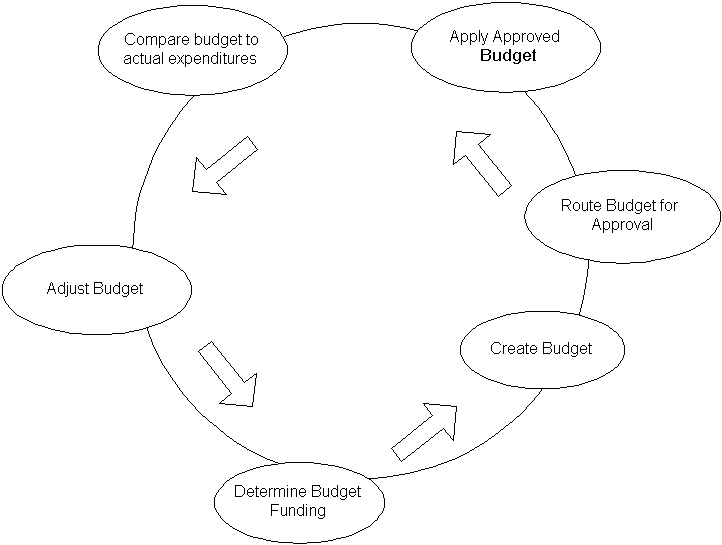
For many enterprises, the budgeting process is a time-consuming, cyclical venture. Oracle HRMS provides support for all phases of the budget cycle:
Stages of the Budget Cycle
For each stage, Oracle HRMS features are available to help you manage your budget.
Budget Funding: Use Oracle General Ledger to report on available funds based on revenue or legislated funding. Run Oracle HRMS control budget reports to determine budget excesses and deficits for the fiscal year.
Budget Entry: Use HRMS Budgeting to define the properties of your budget and enter values.
Budget Approval: Route budget worksheets for approval using Oracle Workflow. On approval, apply the budget to the database.
Budget Analysis: Schedule HRMS control budget reports to compare budgeted amounts with actual expenditures, commitments, and projections.
Budget Adjustments: You can correct an active budget during the fiscal year, reallocating resources to other line items as needed, or reserving resources so that you cannot use them.
If your enterprise implemented Oracle HRMS prior to Release 11i, you can migrate legacy budgets to the current version of HRMS. You can use the migrated budget as the basis for a new budget. See Migrating a Budget to Oracle HRMS.
If your enterprise operates in an environment where budgets are subject to an approval process, you can route a budget online through a hierarchy of approvers. On approval, you apply the budget to the database to activate it. See Completing a Budget Worksheet.
In enterprises without a formal approval process, you can enter budget values directly. See Entering Non-Approved Budgets.
Post a control budget to Oracle General Ledger to make it available to your financial organization, or integrate HRMS budgeting with Oracle Grants Accounting.
See Posting a Budget to Oracle General Ledger as a Batch Process.
In organizations that maintain strict control over the creation or modification of positions, managers cannot exceed budgeted amounts. Budget reallocation (the ability to transfer available resources from one control budget line item to another during a given budget period) provides some flexibility to an otherwise strict system of controls. When excess money, FTE, hours, or headcount is available, such as when a position becomes vacant or goes unfilled, you can reallocate resources from over-budgeted positions, organizations, grades, or jobs to under-budgeted entities.
You can also reserve resources so you cannot use them, and reallocate resources to non-budgeted entities. See Reallocating and Reserving Budget Resources.
Configurable business rules (also called process rules) enable you to validate position transactions, budget worksheets, and reallocation transactions on approval, ensuring that the proposed actions adhere to organization policy.
The life cycle of a transaction consists of three stages:
Initiate
Route and Approve
Apply to the database
As you see in the figure below, the application invokes process rules when you apply your transaction to the database.
Process Rules
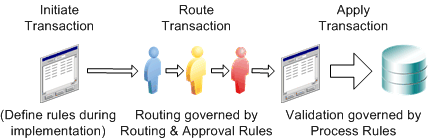
When you apply a business transaction to the database, process rules check the values in the transaction. The rules trigger a warning or error if, for example, budgeted amounts are insufficient to fund a new position, the donated amount in a reallocation is above a specified threshold, or if donated FTE exceeds a specified limit.
See Business Rules.
Oracle HRMS works with Oracle Grants Accounting to create reservations when you approve and post your budget (funds checking). When you assign a person to a budgeted position and calculate commitments, you automatically relieve reservations and create encumbrances in grants. As payroll runs generate actuals, Grants Accounting records the expenditures against award budgets.
Note: Commitments in HRMS are similar to encumbrances in grants accounting.
For more information, see Oracle Labor Distribution, Grants Accounting, Budgets with HRMS (Position Control) - a Business Flow, available on Metalink.