Creating an RTF template file consists of two basic steps:
Design your template layout.
Use the formatting features of your word processing application and save the file as RTF.
Mark up your template layout.
Insert the XML Publisher simplified tags.
When you design your template layout, you must understand how to associate the XML input file to the layout. This chapter presents a sample template layout with its input XML file to illustrate how to make the proper associations to add the markup tags to the template.
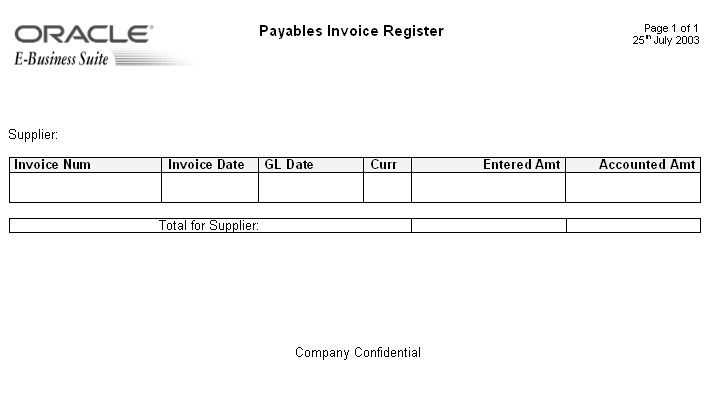
The following is a sample layout for a Payables Invoice Register:
Sample Template Layout
Note the following:
The data fields that are defined on the template
For example: Supplier, Invoice Number, and Invoice Date
The elements of the template that will repeat when the report is run.
For example, all the fields on the template will repeat for each Supplier that is reported. Each row of the invoice table will repeat for each invoice that is reported.
Following is the XML file that will be used as input to the Payables Invoice Register report template:
Note: To simplify the example, the XML output shown below has been modified from the actual output from the Payables report.
 <?xml version="1.0" encoding="WINDOWS-1252" ?>
 - <VENDOR_REPORT>
  - <LIST_G_VENDOR_NAME>
   - <G_VENDOR_NAME>
     <VENDOR_NAME>COMPANY A</VENDOR_NAME>
   -  <LIST_G_INVOICE_NUM>
    -  <G_INVOICE_NUM>
       <SET_OF_BOOKS_ID>124</SET_OF_BOOKS_ID>
       <GL_DATE>10-NOV-03</GL_DATE>
       <INV_TYPE>Standard</INV_TYPE>
       <INVOICE_NUM>031110</INVOICE_NUM>
       <INVOICE_DATE>10-NOV-03</INVOICE_DATE>
       <INVOICE_CURRENCY_CODE>EUR</INVOICE_CURRENCY_CODE>
       <ENT_AMT>122</ENT_AMT>
       <ACCTD_AMT>122</ACCTD_AMT>
       <VAT_CODE>VAT22%</VAT_CODE>
      </G_INVOICE_NUM>
     </LIST_G_INVOICE_NUM>
     <ENT_SUM_VENDOR>1000.00</ENT_SUM_VENDOR>
     <ACCTD_SUM_VENDOR>1000.00</ACCTD_SUM_VENDOR>
    </G_VENDOR_NAME>
   </LIST_G_VENDOR_NAME>
  <ACCTD_SUM_REP>108763.68</ACCTD_SUM_REP>
  <ENT_SUM_REP>122039</ENT_SUM_REP>
 </VENDOR_REPORT>
XML files are composed of elements. Each tag set is an element. For example <INVOICE_DATE> </INVOICE_DATE> is the invoice date element. "INVOICE_DATE" is the tag name. The data between the tags is the value of the element. For example, the value of INVOICE_DATE is "10-NOV-03".
The elements of the XML file have a hierarchical structure. Another way of saying this is that the elements have parent-child relationships. In the XML sample, some elements are contained within the tags of another element. The containing element is the parent and the included elements are its children.
Every XML file has only one root element that contains all the other elements. In this example, VENDOR_REPORT is the root element. The elements LIST_G_VENDOR_NAME, ACCTD_SUM_REP, and ENT_SUM_REP are contained between the VENDOR_REPORT tags and are children of VENDOR_REPORT. Each child element can have child elements of its own.
Your template content and layout must correspond to the content and hierarchy of the input XML file. Each data field in your template must map to an element in the XML file. Each group of repeating elements in your template must correspond to a parent-child relationship in the XML file.
To map the data fields you define placeholders. To designate the repeating elements, you define groups.
Note: XML Publisher supports regrouping of data if your report requires grouping that does not follow the hierarchy of your incoming XML data. For information on using this feature, see Regrouping the XML Data.
Each data field in your report template must correspond to an element in the XML file. When you mark up your template design, you define placeholders for the XML elements. The placeholder maps the template report field to the XML element. At runtime the placeholder is replaced by the value of the element of the same name in the XML data file.
For example, the "Supplier" field from the sample report layout corresponds to the XML element VENDOR_NAME. When you mark up your template, you create a placeholder for VENDOR_NAME in the position of the Supplier field. At runtime, this placeholder will be replaced by the value of the element from the XML file (the value in the sample file is COMPANY A).
The sample report lists suppliers and their invoices. There are fields that repeat for each supplier. One of these fields is the supplier's invoices. There are fields that repeat for each invoice. The report therefore consists of two groups of repeating fields:
Fields that repeat for each supplier
Fields that repeat for each invoice
The invoices group is nested inside the suppliers group. This can be represented as follows:
Suppliers
Supplier Name
Invoices
Invoice Num
Invoice Date
GL Date
Currency
Entered Amount
Accounted Amount
Total Entered Amount
Total Accounted Amount
Compare this structure to the hierarchy of the XML input file. The fields that belong to the Suppliers group shown above are children of the element G_VENDOR_NAME. The fields that belong to the Invoices group are children of the element G_INVOICE_NUM.
By defining a group, you are notifying XML Publisher that for each occurrence of an element (parent), you want the included fields (children) displayed. At runtime, XML Publisher will loop through the occurrences of the element and display the fields each time.