Defining Multiperiod Accounting

Prerequisites

Define the following:

To Define Multiperiod Accounting

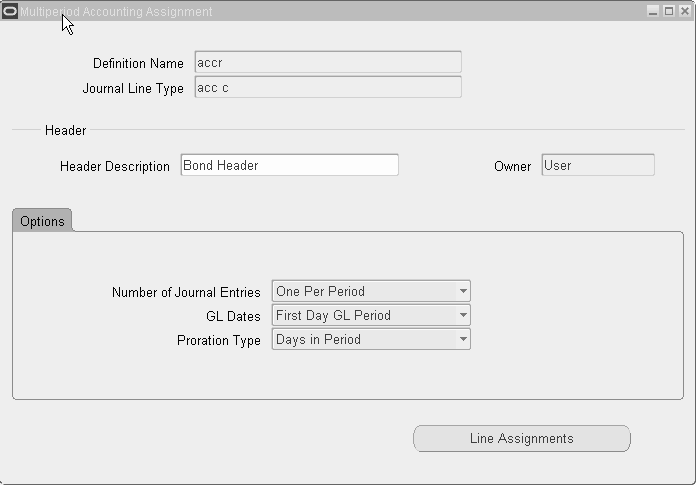
image described in text

  1. In the Line Assignments region of the Journal Lines Definitions window, select the accrual journal line type which will create the originating entry and click Multiperiod Accounting.

    The Definition Name and Journal Line Type fields default from the Journal Lines Definitions window.

  2. Enter data as described in the table below.

    Field Description
    Header Description Description for the header of recognition entries
    Number of Journal Entries Number of multiperiod journal entries to be created. Options are:
    • One: One multiperiod journal entry is created to recognize the entire accrual amount.

      Note: If this option is selected, it is not possible to select a proration type since only one journal entry is created for the entire accrual amount.

    • One per GL Period: One multiperiod journal entry is created per GL period between the dates defined by the multiperiod start and end date accounting attributes.

    GL Dates Specifies when the multiperiod journal entries are created in the GL period

    Note: If a transaction calendar is assigned to the ledger, Subledger Accounting uses this calendar to ensure that the multiperiod accounting journal entries fall on business days.


    Options are:
    • First Day GL Period: Multiperiod journal entries have a GL date of the first day of the period. For example, if a company uses monthly periods, the date is October 1.

    • Last Day GL Period: Multiperiod journal entries have a GL date of the last day of the period. For example, if a company uses monthly periods, the date is October 31.

    • Originating Day: Multiperiod entries have the same GL date as the originating journal entry. For example, if the originating entry has a GL date of October 22, the multiperiod entries have GL dates of the 22nd of the ensuing GL periods, such as November 22 and December 22.

      Note: If the Originating day option is selected and the originating entry falls on a date that does not occur in every GL period, the closest day within that period is used. For example, if the originating entry has a GL date of October 31, the next multiperiod journal entry would have a GL date of November 30.

    Proration Type Specifies how the recognition amount per period should be calculated. Options are:
    • 360 days: Partial periods calculated by assuming 360 days in a year

    • Days in Period: Partial periods calculated by dividing the number of partial period days by the actual number of days in the period

    • First Period: Accrual amount divided by the number of periods and recognized evenly starting with the first period

    • Total Days in Period: Both the partial periods and the whole periods are based on the actual number of days in the period. The number of days within each period is then divided by the total number of days in the whole multiaccounting period. The result is then multiplied by the total amount due to arrive at an amount for each respective period.

  3. Click Line Assignments.

    The Definition Name, Owner, accrual Journal Line Type, and Line Description fields default from the Journal Lines Definitions window.

    The first accrual journal line creates a mirror image of the original accrual line, reversing the impact of the original journal entry to the same General Ledger account. Users cannot change this journal line type or the account derivation rules for it.

    The Inherit check box for the description defaults from the Inherit check box in the Journal Lines Definitions window for the accrual journal line type. If selected, users can deselect the check box and assign a new description.

  4. To assign journal line types to create the recognition journal line, enter data as described in the table below.

    Selected Fields in the Line Assignments Window

    Field Description
    Journal Line Type Select the corresponding recognition journal line type. The list of values includes only recognition journal line types with the same natural side and event class as the accrual journal line type.
    Name (Account Derivation Rule region) The Owner and Description fields default based on the rule selected.