If you are importing deals into Treasury, you can use the Deal Interface Summary window to view the data that is loaded in the XTR_DEALS_INTERFACE table, that has not yet been imported into Treasury.
This section provides an overview of the deal import process, and describes how to view, import, and update import data.
If you have external applications that contain treasury-related deals, you can import that information into Treasury and centralize your treasury management by using the deal import process.
To import deals into Treasury, you can use the Deal Interface Summary window or the Import Deal Data concurrent program. For more information, see: Importing Deals into Treasury, and Import Deal Data.
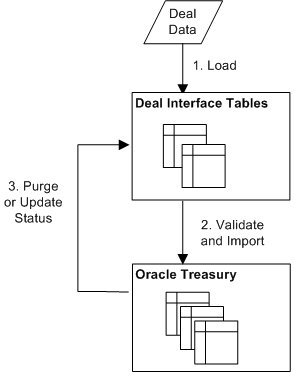
The following figure shows how the deal import process works.
Deals are loaded from an external source into the XTR_DEALS_INTERFACE table using SQL*Loader or other data transfer method. Parcel information for Discounted Securities (NI) deals should be loaded into the XTR_TRANSACTIONS_INTERFACE table using the same transfer method. The deal status of the newly loaded deals is "New". For information on how to load deals into interface tables, see: Understanding Open Interface Tables.
The Import Deal Data concurrent program imports all deals from the XTR_DEALS_INTERFACE table into the appropriate Treasury table. When deals are in the process of being imported, the deal status is changed to "Submitted". During import, deals are given unique deal numbers, validated, and checked against any applicable limits.
If a deal was successfully imported into Treasury, the deal is purged from the XTR_DEALS_INTERFACE table. For Discounted Securities (NI) deals, parcel information is purged from the XTR_TRANSACTIONS_INTERFACE table.
If a deal was not successfully imported into Treasury, the status for the deal is changed to "Error", "Duplicate Deal Error", or "Invalid Deal Type Error" status. For more information on deal errors and how to fix them, see: Updating Deals for Import.
Note: Data resides in the XTR_DEALS_INTERFACE table if it has been loaded, but not imported and has the status "New", if it has been imported but generated an error and has one of the following statuses: "Error", "Duplicate Deal Error", or "Invalid Deal Type Error", or if it has generated an error, but the record has been updated either before import or after an error was generated and has the status "Updated".
To successfully import a deal into Treasury, the deal must pass several levels of validation:
Deal Type: The deal type must be supported for import. Only foreign exchange (FX), intercompany funding (IG), discounted securities (NI), or exposure (EXP) deals can be imported into Treasury. If you try to import a deal that is not an FX, IG, NI, or EXP deal, the import will fail and the deal's import status will be changed to Deal Type.
Deal ID: The external deal ID must be unique. If the external deal ID is not unique, then the import will fail and the deal import status will be changed to Duplicate Deal. In addition, intercompany funding deals must have a unique combination of company code, intercompany party, currency, transfer date, action, principal adjust, company account, and party account, or the import will fail. For more information on validating intercompany funding deals, see: Validating Intercompany Funding Deals During Import.
Additional Criteria by Deal Type: The deal data must be validated against any additional criteria for the deal type. For example, foreign exchange deals must have two currencies and intercompany funding deals must have two parties that belong to the same intercompany group. If the deal does not meet the additional criteria for the deal type, the import will fail and the deal's import status will be changed to Error. For more information on the specific validations required for each deal type, see: XTR_DEALS_INTERFACE.
If you import a company to company intercompany funding deal, Treasury assumes that you are importing only one side of the deal, and it automatically creates the other side of the deal. For example, if you import an intercompany funding deal where Company A pays $100 to Company B, then Treasury automatically generates the other side of the deal, where Company B receives $100 from Company A. To prevent the same deal from being imported twice, Treasury uses strict criteria for determining the uniqueness of an intercompany funding deal. Intercompany funding deals must have a unique deal ID and a unique combination of company code, intercompany party, currency, transfer date, action, principal adjust, company account, and party account. If the deal does not have a unique combination of these attributes, then the deal will not import successfully and the deal's import status will be changed to Duplicate Deal.
The import status for each deal is updated throughout the deal import process. The following table lists the possible deal import statuses, and what each status means.
| Deal Status | Description |
|---|---|
| New | Indicates that the deal was loaded into the interface table, but has not been imported. Any deal with New status is included in the next batch of deals being imported. If a deal with New status is not successfully imported, the deal's import status will change to Error, Deal Type, or Duplicate Deal. |
| Updated | Indicates that the deal was updated after it was loaded into the interface table. A deal can be updated before or after import. Any deal with Updated status is automatically included in the next batch of deals being imported. If a deal with Updated status is not successfully imported, the deal's import status will change to Error, Deal Type, or Duplicate Deal. |
| Error | Indicates that the deal was imported, but that the import failed because it did not meet one of the additional criteria required for the deal type (for example, the deal has an incorrect counterparty). To successfully import the deal, you must fix the errors by choosing the Update Details icon, and editing the deal details. |
| Duplicate Deal | Indicates that the deal was imported, but that the import failed because a duplicate deal exists. A deal can be a duplicate deal if a deal with the same external deal ID already exists or an intercompany funding deal already exists with the same combination of company code, intercompany party, currency, transfer date, action, principal adjust, company account, and party account. You cannot fix a duplicate deal error in Treasury. You must delete the deal from the interface table, change the deal ID in the external source application, and reload the deal into the interface table. |
| Deal Type Error | Indicates that the deal was imported, but that the import failed because the deal has an invalid deal type assigned to it or the deal type cannot be imported (the deal is not an FX, IG, NI, or EXP deal). To successfully import the deal, you must fix the errors by choosing the Update Details icon and editing the deal type. |
| Submitted | Indicates that the deal is in the process of being imported. Continue to refresh your browser to see if the import was successful (the deal is removed from the interface table), or a failure (the deal status changes to Error, Deal Type, or Duplicate Deal). |
Once deals are loaded into the XTR_DEALS_INTERFACE table, you can use the Deal Interface Summary window to view the deals before import.
The table contains deals that have not yet been successfully imported into Treasury: deals that are newly loaded or that you attempted to import, but that failed due to an error. Once a deal is successfully imported into Treasury, it is immediately purged from the interface table. To view a summary report of deals that were successfully imported, see Import Deal Data Report.
Load deals into the XTR_DEALS_INTERFACE table. See: XTR_DEALS_INTERFACE.
Load NI parcel data into the XTR_TRANSACTIONS_INTERFACE table. See: XTR_TRANSACTIONS_INTERFACE.
Navigate to the Deal Interface Summary window.
Query the deals that you want to review.
Note: For more information on the complete set of validations required for each deal type, see: XTR_DEALS_INTERFACE.
If you want to import the deals, choose the Import button. For more information on how to import deals, see: Importing Deals into Treasury.
To update the deals, choose the Update Details icon. For more information on updating deals, see: Updating Deals for Import.
Once you have loaded deal data into the XTR_DEALS_INTERFACE table, you must import that data into Treasury. Only foreign exchange (FX), intercompany funding (IG), discounted securities (NI), or exposure (EXP) deals can be imported into Treasury.
Note: It is recommended that the first few times you load data into the interface table that you review it before importing it into Treasury. By reviewing your data, you can ensure that the data was loaded and will import properly.
Load deals into the XTR_DEALS_INTERFACE table. See: XTR_DEALS_INTERFACE.
Load NI parcel data into the XTR_TRANSACTIONS_INTERFACE table. See: XTR_TRANSACTIONS_INTERFACE.
In the Deal Interface Summary window, choose the Import button, or from the concurrent program manager, run the Import Deal Data concurrent program.
The Import Deal Data concurrent program does the following:
Validates the deals and imports them into the appropriate destination tables.
Generates a report that summarizes which deals were successfully imported.
Purges any deals that were successfully imported from the interface table.
Changes the status of any deals that were not successfully imported. The deal status is changed from New or Updated to Error, Duplicate Deal, or Deal Type.
To view a summary report of deals that were successfully imported, see: Import Deal Data Report.
To see a list of the deals that were not successfully imported, go to the Deal Interface Summary window. For more information on how to update and re-import those deals, see: Updating Deals for Import.
If a deal was incorrectly loaded into the interface table, or if a deal generated an error during import, you must update the deal details before you can successfully import the deal. You can use the Update Deal Details window to update the details for any deal in the XTR_DEALS_INTERFACE table.
For example, if a deal is loaded with the wrong deal type, you can update the deal type before you import it. Also, if you tried to import a deal, but it generated an error, such as an invalid counterparty, you can update the deal and then re-import the deal.
Anytime you change the details of a deal, the deal status changes to Updated. Once a deal status is changed to Updated, Treasury will attempt to import that deal the next time you run the Import Deal Data concurrent process.
Note: If a deal has several errors, and you update the details for one of the errors, the deal status will change to Updated, even if you have not fixed all of the errors. Therefore, do not assume that all deals with Updated status will successfully import into Treasury. You must ensure that you have fixed all of the errors before you can successfully import the deal.
In the Deal Interface Summary window, query the deal that you want to update.
If the deal status is New, Error, or Duplicate Deal ID Error, choose the Update Details button, or click on the error link in the Deal Status column. The Update Deal Details window appears.
If the deal status is Duplicate Deal ID Error, return to the deal's source application, change the deal ID to a unique number, and reload the deal into the XTR_DEALS_INTERFACE table. For more information on loading deals, see: XTR_DEALS_INTERFACE.
In the Update Deal Details window, update the deal details as required.
Save your work.
The deal status changes to Updated and the next time the Import Deal Data concurrent program runs, Treasury will attempt to import the deals.