Payables automatically creates invoices to pay interest for overdue invoices if you enable automatic interest calculation for a supplier, and if you pay an overdue invoice for the supplier in a payment batch or with a Quick payment. The new interest invoices are then ready for validation.
The amount of the interest invoice is the interest amount owed. The interest invoice number is the same as the overdue invoice number, but with the suffix "-INTx", where x is the count of interest invoices that have been created for the overdue invoice. For example, the third interest invoice created for an overdue invoice has the suffix "-INT3".
The payment terms are Immediate. If you do not have Immediate terms defined, the interest invoice payment terms are the same as the overdue invoice. The interest invoices have the same invoice currency and payment currency as the overdue invoices.
Payables does not create interest invoices when you pay overdue invoices using a Manual payment.
When you pay an overdue invoice, Payables uses the invoice due date to determine how many days overdue the invoice is. Payables determines the Due date by using a start date and payment terms. For example, if the start date is January 1, 2002, and the payment terms are Net 30, the invoice will be payable in full on January 30, 2002.
During invoice entry Payables creates scheduled payments for the invoice and uses the invoice Terms Date and Payment Terms to calculate the due date.
During Invoice Validation, if the Recalculate Scheduled Payment Payables option is enabled for the supplier site, Payables automatically recalculates scheduled payments. During recalculation, Payables uses the most recent of the available start date options and the most favorable of the available payment terms options to calculate the latest possible due date.
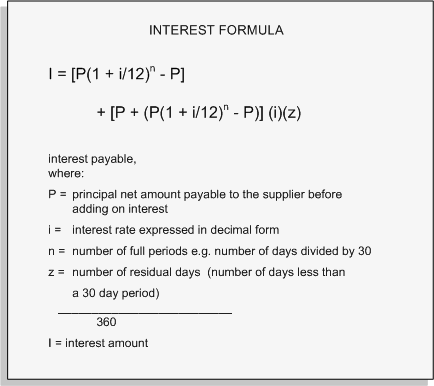
In the Interest Rates window you specify what interest rate is effective during different date ranges you specify. Payables uses the following formula to calculate interest on your invoices. The interest rate Payables uses is the rate effective on the day after the due date of the invoice. Note that this calculation is in accordance with the U.S. Prompt Payment Act, and is not an effective yearly rate. For example, the interest rate on a $100 invoice is 7%. After a year, you would owe $7.23 in interest.
For a text description of the previous graphic, see Text Description of the Interest Formula
Payables creates invoice expense distributions and liability accounting entries for the new invoices using the options and accounts you specify in the Interest tab of the Payables Options window.
The setting of the Prorate Across Overdue Invoice option controls how Payables creates distributions on the interest invoice and what expense accounts it assigns to the new distributions.
If you enable the Prorate Across Overdue Invoice option, Payables prorates the interest amount across the item distributions on the overdue invoice. It then builds the account for each interest invoice distribution by using
the natural (charge) account segment from the interest invoice expense account, and
all other account segments from the corresponding item distribution of the overdue invoice.
If Dynamic Insertion is disabled and the GL accounts that Payables builds are not valid and active, then Payables will instead use the expense interest account for each distribution.
If you do not enable the Prorate Across Overdue Invoice option then Payables creates an interest invoice with one distribution and the expense interest invoice account.
The following section is applicable to customers who use transaction codes. Transaction codes are typically used by US Federal Government customers to produce both proprietary and budgetary entries for a given transaction.
If you have specified a transaction code for your interest invoices, Payables creates the additional accounting entries when you transfer your payments to your general ledger.

When an invoice for an automatic interest supplier site is paid in a pay run or with a Quick payment, Payables determines whether the scheduled invoice payment is overdue. If an invoice is overdue, Payables calculates the interest due and compares the interest amount with the minimum interest amount. If the calculated interest amount is greater than the minimum interest amount, Payables creates an interest invoice for the amount of interest accrued. Payables creates one interest invoice for each invoice payment that is past due.
Payables automatically creates an invoice distribution for the amount of each interest invoice, using the Interest Expense and Interest Liability accounts.
Each interest invoice is validated and included in the payment for the overdue invoice. When you pay them, you can use a remittance advice format if you have defined one for interest invoices.
When you select invoices for payment, Payables generates the Scheduled Payment Selection report. This report shows the invoices that you selected for payment as well as any invoices that meet the selection criteria, but that are not yet ready for payment. It also provides the cash requirements for paying the selected invoices. You can view the invoices selected for payment at any time during the pay run process. However, you can only view the set of invoices that were not selected, and the associated credits and prepayments, if you stop the pay run.
The Scheduled Payment Selection report lets you review this detailed invoice information while having a completely automated pay run and lets you improve the business processes for future pay runs. For example, if you are missing credits, you can adjust the template, or you can correct problems that prevented the credits from being selected and rerun the payment process to pick up those missing invoices. This report is available in XML Publisher and can be easily customized. See: Creating Multiple Payments.
If you print your remittance advice separately after you successfully confirm your pay run, your remittance advice shows both the invoices you paid and the interest invoices and amounts associated with your overdue invoices. See: Creating Multiple Payments.
The following section is applicable to customers who use transaction codes. Transaction codes are typically used by US Federal Government customers to produce both proprietary and budgetary entries for a given transaction.
If you have specified a transaction code for your interest invoices, Oracle Subledger Accounting creates the additional accounting entries when you perform accounting.
When you record a manual payment for an automatic interest enabled supplier site, Payables notifies you if an invoice for which you are recording payment is overdue, but it does not automatically create an interest invoice for the invoice. Payables also notifies you when you adjust a manual payment if the associated invoice is overdue.
If you choose to record payment of the overdue invoice using a manual payment, you can calculate the interest amount and enter a separate invoice to pay the interest amount due. You determine the number of days the invoice is overdue from the Due Date of the Scheduled Payments window, and you determine the effective interest rate by looking in the Interest Rates window. Use the Interest Formula in to calculate interest. See also: Interest Amount Calculation, Recording Manual Payments and Wire Transfers.
When you void a payment, or confirm a stop payment, Payables automatically reverses the payment status and accounting records for the invoices that you paid. Payables automatically reverses and voids interest invoices associated with a void payment or stop payment.
If you void a payment and select the associated invoice(s) for payment on another payment, Payables recalculates your interest and creates new interest invoice(s). See also: Voiding Payments, and Stopping Payments.
ADJUSTING INTEREST INVOICES: You cannot adjust an interest invoice if it is paid, and if the payment that paid it has been accounted.
365 DAY LIMIT. Payables does not continue to calculate additional interest after an invoice is 365 days overdue. If you have installed Oracle U.S. Federal Financials, the limit is 360 days overdue instead of 365.