Based on REST architecture, the REST message uses HTTP header and method POST to create or update Oracle E-Business Suite data through a service provider.
Supporting XML and JSON Message Formats
Unlike SOAP message completely based on XML format, REST messages can process both XML and non-XML formats such as JSON.
Note: Only Jackson JSON format is supported in this release. Other JSON formats, like Google GSON are not supported.
XML, like HTML, organizes information by nesting angle-bracketed tag pairs (< or >).
Compared to XML, JSON is light weight with faster parsing results. It is a simple text-based message format that is often used with REST services.
It uses curly brackets ({ or }) to hierarchically structure information.
REST Message Structure
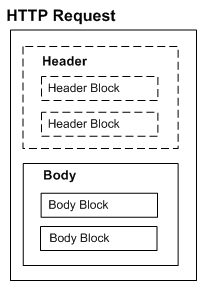
A REST request is a simple HTTP request which includes the following elements:
Header
This element defines the operating parameters of an HTTP transaction.
REST service user credentials can be passed in HTTP header. For more information on REST service security, see REST Security Header.
Body
This element defines the main messages or resources.
'RESTHeader' element can be included in HTTP body to set applications context values if they are required in invoking the REST service.
For more information on setting applications context, see REST Header for Applications Context.
The following diagram depicts the structure of a REST message:
User credentials must be authenticated based on either one of the following methods:
HTTP Basic Authentication
In this security model, username and password should be provided as input data in HTTP header as part of the REST request message. When the REST service receives the request, the user credentials (username and password) will be routed to LoginModule for authentication and authorization. The LoginModule in turn extracts the credentials from HTTP header, authenticates user against Oracle E-Business Suite user table, and establishes the identity for the authenticated user.
If user credentials are validated and applications context required for the REST service to be invoked can be initialized, the REST service can be invoked.
For more information about HTTP Basic Authentication security, see HTTP Basic Authentication.
Token Based Authentication
Instead of passing an associated password for the user, a security token can be passed as user credentials in place of password.
When a user tries to log on to a server with multiple requests, instead of authenticating the user each time with username and password, a unique access token (such as Oracle E-Business Suite session ID) may be sent along with username in HTTP header. Oracle E-Business Suite session ID can be obtained by making call to Login service. The LoginModule will interpret and extract the token from the HTTP header, and validate the subject or username with token in the subsequent requests for authentication.
If user credentials are validated and applications context required for the REST service to be invoked can be initialized, the service can be invoked.
For more information on setting applications context, see REST Header for Applications Context.
For more information about token based security, see Token Based Authentication.
Some Oracle E-Business Suite APIs require applications context values to be passed before they can be invoked. These context values including Responsibility, RespApplication. SecurityGroup, NLSLanguage, and Org_Id may be included in the RESTHeader element as part of the HTTP body.
Optional Context Values in Token Based Security
Context header values are optional. If the context values are not passed while using token based security, the previously passed values will be used. If context values are passed, newly passed values will override the ones set previously for the given token.
The following REST message in XML format shows the RESTHeader element printed in bold:
<?xml version = '1.0' encoding = 'UTF-8'?>
<TESTUSERNAME_Input xmlns="http://xmlns.oracle.com/apps/fnd/rest/FndUserSvc/testusername/">
	   <RESTHeader xmlns="http://xmlns.oracle.com/apps/fnd/rest/FndUserSvc/header">
			<Responsibility>SYSTEM_ADMINISTRATOR</Responsibility>
    	<RespApplication></RespApplication>
    	<SecurityGroup></SecurityGroup>
    	<NLSLanguage>AMERICAN</NLSLanguage>
    	<Org_Id>/Org_Id>
    </RESTHeader>
    <InputParameters>
			<X_USER_NAME>sysadmin</X_USER_NAME>
    </InputParameters>
</TESTUSERNAME_Input>
Optional Language Parameters
Similar to the <NLS_LANGUAGE> parameter to set the language preference in the RESTHeader element, an ISO language parameter <LANGUAGE> is available to support all web service clients in case if they are unaware of the <NLS_LANGUAGE> parameter format in Oracle E-Business Suite and they can send the language preference in RFC 5646 format to set the session language.
Please note that the <NLS_LANGUAGE> and <LANGUAGE> parameters are both optional. The <NLS_LANGUAGE> parameter takes precedence over the <LANGUAGE> parameter if the <NLS_LANGUAGE> value is passed and valid.
When the <NLS_LANGUAGE> and <LANGUAGE> parameters are both null or invalid, the Accept-Language header from the REST header will be considered. If the Accept-Language header is not passed or invalid, then user's default language will be used.
Based on the resources information in a WADL description, you can compile an input payload before invoking a REST service.
Use the following steps to compile an input payload:
In the Integration Repository, search and locate the deployed REST service that you want to use.
Click the View WADL link in the REST Web Service tab. The following WADL description appears:
<xml version="1.0" encoding="UTF-8" standalone="no" ?>
<application xmlns:tns="http://xmlns.oracle.com/apps/fnd/soaprovider/plsql/rest/fnd_user_pkg/" xmlns="http://wadl.dev.java.net/2009/02" xmlns:tns1="http://xmlns.oracle.com/apps/fnd/rest/FndUserSvc/testusername/" name="FND_USER_PKG"
targetNamespace="http://xmlns.oracle.com/apps/fnd/soaprovider/plsql/rest/fnd_user_pkg/">
<grammars>
  		<include xmlns="http://www.w3.org/2001/XMLSchema" href="https://<hostname>:<port>/webservices/rest/FndUserSvc/?XSD=TESTUSERNAME_SYNCH_TYPEDEF.xsd" />
</grammars>
	<resources base="http://<hostname>:<port>/webservices/rest/FndUserSvc/">
		<resource path="/testusername/">
			<method id="GET" name="POST">
				<request>
					<representation mediaType="application/xml" type="tns1:InputParameters" />
					<representation mediaType="application/json" type="tns1:InputParameters" />
				</request>
				<response>
					<representation mediaType="application/xml" type="tns1:OutputParameters" />
					<representation mediaType="application/json" type="tns1:OutputParameters" />
				</response>
			</method>
		</resource>
	</resources>
</application>
Locate the schema information (.XSD) for the Test User Name (TESTUSERNAME) service operation from the WADL description. The XSD for the operation TESTUSERNAME in the WADL would be:
http://<hostname>:<port>/webservices/rest/FndUserSvc/?XSD=TESTUSERNAME_SYNCH_TYPEDEF.xsd
Note: The schema information for the service operation can also be constructed by concatenating the values of the following elements from the WADL description:
<resources base="http://<hostname>:<port>/webservices/rest/FndUserSvc/">
<resource path="/testusername/">
Construct the payload of the service by using any XSD to XML conversion tools to get the payload information.
Once the payload is compiled, it can be used to invoke the TESTUSERNAME REST service operation. The request, response, and fault messages with both XML and JSON formats are listed in the following table:
| REST Messages with XML and JSON Formats | |
|---|---|
| Input Payload (Request Message) | XML-based REST Message<?xml version="1.0" encoding="UTF-8" ?>
<TESTUSERNAME_Input xmlns="http://xmlns.oracle.com/apps/fnd/rest/FndUserSvc/testusername/">
<RESTHeader xmlns="http://xmlns.oracle.com/apps/fnd/rest/FndUserSvc/header">
<Responsibility>SYSTEM_ADMINISTRATOR</Responsibility>
<RespApplication></RespApplication>
<SecurityGroupE></SecurityGroup>
<NLSLanguage></NLSLanguage>
<Org_Id></Org_Id>
</RESTHeader>
<InputParameters>
<X_USER_NAME>sysadmin</X_USER_NAME>
</InputParameters>
</TESTUSERNAME_Input> JSON-based REST Message {"TESTUSERNAME_Input":{
"@xmlns":"http://xmlns.oracle.com/apps/fnd/rest/FndUserSvc/testusername/",
"RESTHeader":{
"@xmlns":"http://xmlns.oracle.com/apps/fnd/rest/FndUserSvc/header",
"Responsibility":"SYSTEM_ADMINISTRATOR",
"RespApplication":"SYSADMIN",
"SecurityGroup":"STANDARD",
"NLSLanguage":"AMERICAN",
"Org_Id":"202"
},
"InputParameters":{
"X_USER_NAME":"operations"
}
}}
|
| Response | XML-based REST Message<?xml version="1.0" encoding="UTF-8" standalone="no"?> <OutputParameters xmlns:xsi="http://www.w3.org/2001/XMLSchema-instance" xmlns="http://xmlns.oracle.com/apps/fnd/rest/FndUserSvc/testusername/"> <X_USER_NAME>2</X_USER_NAME> </OutputParameters> JSON-based REST Message {
"OutputParameters" : {
"@xmlns:xsi" : "http://www.w3.org/2001/XMLSchema-instance",
"@xmlns" : "http://xmlns.oracle.com/apps/fnd/rest/fndGlobalSvc/user_id/",
"TESTUSERNAME" : "2"
}
}
|
| Error Response | XML-based REST Message<ISGServiceFault> <Code>IRepAccessError</Code> <Message>This is a sample Fault Message. Message will vary depending on fault condition</Message> <Resolution>Check the server logs for details</Resolution> <ServiceDetails> <ServiceName>FndUserSvc</ServiceName> <OperationName>testusername</OperationName> <InstanceId>0</InstanceId> </ServiceDetails> </ISGServiceFault> JSON-based REST Message {
"ISGServiceFault": {
"Code": "IRepAccessError",
"Message": "Sample Fault Message. Will vary depending on fault condition",
"Resolution": "Check the server logs for details",
"ServiceDetails": {
"ServiceName": "FndUserSvc",
"OperationName": "testusername",
"InstanceId": "0"
}
}
}
|
For more examples of REST messages used in OZF_SD_REQUEST_PUB service invocation, see Examples of REST Messages.
To better understand REST request and response messages received through Oracle E-Business Suite, the following sample REST messages are described in this section:
The following example shows a synchronous XML-based REST request for a PL/SQL service (OZF_SD_REQUEST_PUB API):
<?xml version="1.0" encoding="UTF-8" ?>
<CREATE_SD_REQUEST_Input xmlns:xsi="http://www.w3.org/2001/XMLSchema-instance"
      xsi:schemaLocation="http://xmlns.oracle.com/apps/ozf/rest/ozfsdrequestpubsvc/create_sd_request/xsd/OZF_SD_REQUEST_PUB_CREATEREQUEST.xsd"
      xmlns="http://xmlns.oracle.com/apps/ozf/rest/ozfsdrequestpubsvc/create_sd_request/">
	<RESTHeader xmlns="http://xmlns.oracle.com/apps/fnd/rest/ozfsdrequestpubsvc/header">
    	<Responsibility>SYSTEM_ADMINISTRATOR</Responsibility>
    	<RespApplication></RespApplication>
    	<SecurityGroupE></SecurityGroup>
    	<NLSLanguage></NLSLanguage>
    	<Org_Id></Org_Id>
  	</RESTHeader>
  <InputParameters>
		<P_API_VERSION_NUMBER>1.0</P_API_VERSION_NUMBER>
		<P_INIT_MSG_LIST>T</P_INIT_MSG_LIST>
 	   <P_COMMIT>F</P_COMMIT>
		<P_VALIDATION_LEVEL>100</P_VALIDATION_LEVEL>
      <P_SDR_HDR_REC>
        <REQUEST_NUMBER>SDR-CREATE-BPEL1</REQUEST_NUMBER>
        <REQUEST_START_DATE>2008-08-18T12:00:00</REQUEST_START_DATE>
  		  <REQUEST_END_DATE>2008-10-18T12:00:00</REQUEST_END_DATE>>
        <USER_STATUS_ID>1701</USER_STATUS_ID>
        <REQUEST_OUTCOME>IN_PROGRESS</REQUEST_OUTCOME>
        <REQUEST_CURRENCY_CODE>USD</EQUEST_CURRENCY_CODE>
        		<SUPPLIER_ID>601</SUPPLIER_ID>
        		<SUPPLIER_SITE_ID>1415</SUPPLIER_SITE_ID>
       		<REQUESTOR_ID>100001499</REQUESTOR_ID>
		 	 	<ASSIGNEE_RESOURCE_ID>100001499</ASSIGNEE_RESOURCE_ID>
		  		<ORG_ID>204</ORG_ID>
		  		<ACCRUAL_TYPE>SUPPLIER</ACCRUAL_TYPE>
		  		<REQUEST_DESCRIPTION>Create</REQUEST_DESCRIPTION>
				<SUPPLIER_CONTACT_EMAIL_ADDRESS>sdr.supplier@testing.com</SUPPLIER_CONTACT_EMAIL_ADDRESS>
       		<SUPPLIER_CONTACT_PHONE_NUMBER>2255</SUPPLIER_CONTACT_PHONE_NUMBER>
   	 		<REQUEST_TYPE_SETUP_ID>400</REQUEST_TYPE_SETUP_ID>
       		<REQUEST_BASIS>Y</REQUEST_BASIS>
       		<USER_ID>1002795</USER_ID>
   </P_SDR_HDR_REC>
   <P_SDR_LINES_TBL>
     <P_SDR_LINES_TBL_ITEM>
       	<PRODUCT_CONTEXT>PRODUCT</PRODUCT_CONTEXT>
				<INVENTORY_ITEM_ID>2155</INVENTORY_ITEM_ID>
				<ITEM_UOM>Ea</ITEM_UOM>
				<REQUESTED_DISCOUNT_TYPE>%</REQUESTED_DISCOUNT_TYPE>
				<REQUESTED_DISCOUNT_VALUE>20</REQUESTED_DISCOUNT_VALUE>
				<COST_BASIS>200</COST_BASIS>
				<MAX_QTY>200</MAX_QTY>
				<DESIGN_WIN>200</DESIGN_WIN>
				<APPROVED_DISCOUNT_TYPE>%</APPROVED_DISCOUNT_TYPE>
				<APPROVED_DISCOUNT_VALUE>20</APPROVED_DISCOUNT_VALUE>
				<APPROVED_MAX_QTY>200</APPROVED_MAX_QTY>
				<VENDOR_APPROVED_FLAG>Y</VENDOR_APPROVED_FLAG>
				<PRODUCT_COST_CURRENCY>USD</PRODUCT_COST_CURRENCY>
				<END_CUSTOMER_CURRENCY>USD</END_CUSTOMER_CURRENCY>
     </P_SDR_LINES_TBL_ITEM>
   </P_SDR_LINES_TBL>
   <P_SDR_CUST_TBL>
		<P_SDR_CUST_TBL_ITEM>
			<CUST_ACCOUNT_ID>1290</CUST_ACCOUNT_ID>
			<PARTY_ID>1290</PARTY_ID>
			<SITE_USE_ID>10479</SITE_USE_ID>
			<CUST_USAGE_CODE>BILL_TO</CUST_USAGE_CODE>
			<END_CUSTOMER_FLAG>N</END_CUSTOMER_FLAG>
		</P_SDR_CUST_TBL_ITEM>
		<P_SDR_CUST_TBL_ITEM>
			<CUST_ACCOUNT_ID>1287</CUST_ACCOUNT_ID>
			<PARTY_ID>1287</PARTY_ID>
			<SITE_USE_ID>1418</SITE_USE_ID>
			<CUST_USAGE_CODE>CUSTOMER</CUST_USAGE_CODE>
			<END_CUSTOMER_FLAG>Y</END_CUSTOMER_FLAG>
		</P_SDR_CUST_TBL_ITEM>
   </P_SDR_CUST_TBL>
  </InputParameters>
</CREATE_SD_REQUEST_Input>
The following example shows a synchronous JSON-based POST request for the same PL/SQL service (OZF_SD_REQUEST_PUB API):
Note: Only Jackson JSON format is supported in this release. Other JSON formats, like Google GSON are not supported.
{
  "CREATE_SD_REQUEST_Input": {
    "@xmlns": "http://xmlns.oracle.com/apps/ozf/rest/ozfsdrequestpubsvc/create_sd_request/",
    "RESTHeader": {
      "@xmlns": "http://xmlns.oracle.com/apps/fnd/rest/ozfsdrequestpubsvc/header",
      "Responsibility": "SYSTEM_ADMINISTRATOR"
    },
    "InputParameters": {
      "P_API_VERSION_NUMBER": "1.0",
      "P_INIT_MSG_LIST": "T",
      "P_COMMIT": "F",
      "P_VALIDATION_LEVEL": "100",
      "P_SDR_HDR_REC": {
        "REQUEST_NUMBER": "SDR-CREATE-BPEL1",
        "REQUEST_START_DATE": "2008-08-18T12:00:00",
        "REQUEST_END_DATE": "2008-10-18T12:00:00",
        "USER_STATUS_ID": "1701",
        "REQUEST_OUTCOME": "IN_PROGRESS",
        "REQUEST_CURRENCY_CODE": "USD",
        "SUPPLIER_ID": "601",
        "SUPPLIER_SITE_ID": "1415",
        "REQUESTOR_ID": "100001499",
        "ASSIGNEE_RESOURCE_ID": "100001499",
        "ORG_ID": "204",
        "ACCRUAL_TYPE": "SUPPLIER",
        "REQUEST_DESCRIPTION": "Create",
        "SUPPLIER_CONTACT_EMAIL_ADDRESS": "sdr.supplier@testing.com",
        "SUPPLIER_CONTACT_PHONE_NUMBER": "2255",
        "REQUEST_TYPE_SETUP_ID": "400",
        "REQUEST_BASIS": "Y",
        "USER_ID": "1002795"
      },
      "P_SDR_LINES_TBL": {
        "P_SDR_LINES_TBL_ITEM": {
          "PRODUCT_CONTEXT": "PRODUCT",
          "INVENTORY_ITEM_ID": "2155",
          "ITEM_UOM": "Ea",
          "REQUESTED_DISCOUNT_TYPE": "%",
          "REQUESTED_DISCOUNT_VALUE": "20",
          "COST_BASIS": "200",
          "MAX_QTY": "200",
          "DESIGN_WIN": "200",
          "APPROVED_DISCOUNT_TYPE": "%",
          "APPROVED_DISCOUNT_VALUE": "20",
          "APPROVED_MAX_QTY": "200",
          "VENDOR_APPROVED_FLAG": "Y",
          "PRODUCT_COST_CURRENCY": "USD",
          "END_CUSTOMER_CURRENCY": "USD"
        }
      },
      "P_SDR_CUST_TBL": {
        "P_SDR_CUST_TBL_ITEM": [
          {
            "CUST_ACCOUNT_ID": "1290",
            "PARTY_ID": "1290",
            "SITE_USE_ID": "10479",
            "CUST_USAGE_CODE": "BILL_TO",
            "END_CUSTOMER_FLAG": "N"
          },
          {
            "CUST_ACCOUNT_ID": "1287",
            "PARTY_ID": "1287",
            "SITE_USE_ID": "1418",
            "CUST_USAGE_CODE": "CUSTOMER",
            "END_CUSTOMER_FLAG": "Y"
          }
        ]
      }
    }
  }
}
The following example shows a JSON-based GET request for a Java Bean Service called REST Service Locator:
 Request Headers
            Authorization: Basic c3lzYWRtaW46c3lzYWRtaW4=
            Accept: application/json
            Content-Language: en-US
Note: For GET requests, JSON is the default output response format. Use Accept header application/xml to receive response in XML format. If Content-Type header is sent in GET HTTP request, it will be ignored.
The following example shows an XML-based REST response for the OZF_SD_REQUEST_PUB API service:
<?xml version="1.0" encoding="UTF-8" standalone="no"?>
<OutputParameters
xmlns:xsl=""http://www.w3.org/2001/XMLSchema-instance" xmlns="http://xmlns.oracle.com/apps/ozf/rest/ozfsdrequestpubsvc/create_sd_request/">
     <X_RETURN_STATUS>E</X_RETURN_STATUS>
     <X_MSG_COUNT>1</X_MSG_COUNT>>
	  <X_MSG_DATA>The Organization Id provided is invalid, please provide a valid Organization Id.</X_MSG_DATA>
     <X_REQUEST_HEADER_IDxsi:nil="true"/>
</OutputParameters>
The following example shows a JSON-based REST response for the OZF_SD_REQUEST_PUB API service with POST method:
{
  "OutputParameters" : {
    "@xmlns:xsi" : "http://www.w3.org/2001/XMLSchema-instance",
    "@xmlns" : "http://xmlns.oracle.com/apps/ozf/rest/ozfsdrequestpubsvc/create_sd_request/",
    "X_RETURN_STATUS" : "E",
    "X_MSG_COUNT" : "1",
    "X_MSG_DATA" : "The Organization Id provided is invalid, please provide a valid Organization Id.",
    "X_REQUEST_HEADER_ID" : {
      "@xsi:nil" : "true"
    }
  }
The following example shows a JSON-based REST response for the REST Service Locator (getRestInterface service operation) service with GET method:
   {
                  "OutputParameters" : {
                    "EbsRestServiceBean" : [ {
                   "alternateAlias" : "plsql/PLSQL:FND_PROFILE",
                   "serviceAlias" : "NotAnything",
                   "serviceName" : "PLSQL:FND_PROFILE",
                   "wadlUrl" : "http://<hostname>:<port>/webservices/rest/profile?WADL"
                    } ],
                "ControlBean" : [ {
                      "fields" : "",
                      "filter" : "",
                      "limit" : "",
                      "offset" : ""
                } ]
          }
        }
The following sample shows the XML-based REST response message when XML is not well formed:
<ISGServiceFault>
	<Code>RequestParsingError</Code>
	<Message>SAXException in XmlRequestObject, while parsing XML request The request could not be parsed correctly</Message>
	<Resolution>This may be due to malformed construction of the payload or incorrectContent-Type header. Please check the wellformed-ness of payload, matching Content-Type header of the http request and retry.</Resolution>
	<ServiceDetails>
		<ServiceName>ozfsdrequestpubsvc</ServiceName>
		<OperationName>create_sd_request</OperationName>
		<InstanceId>0</InstanceId>
	</ServiceDetails>
</ISGServiceFault>
The following sample shows the XML-based REST response message when RespApplication (Responsibility Application short name) is invalid:
<ISGServiceFault>
	<Code>InvalidResponsibilityApplicationShortCode</Code>
	<Message>Responsibility short code is invalid System error while processing the request</Message>
	<Resolution>Check the server logs for details</Resolution>
	<ServiceDetails>
		<ServiceName>ozfsdrequestpubsvc</ServiceName>
		<OperationName>get_text_number</OperationName>
		<InstanceId>0</InstanceId>
	</ServiceDetails>
</ISGServiceFault>