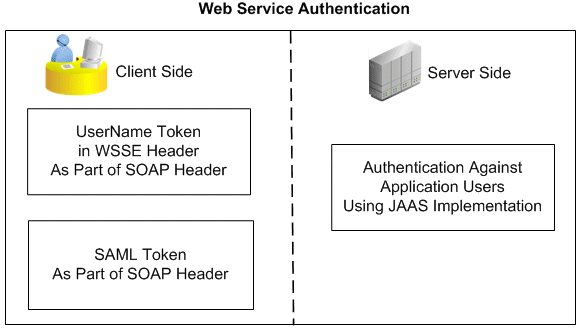
Web service security (WS-Security) is a specification to enable applications to conduct secure message exchanges. It proposes a standard set of extensions that can be used when building secure Web services to implement message content integrity and confidentiality. It also provides support for multiple security tokens, the details of which are defined in the associated profile documents.
To secure Web service content and authenticate Web service operation, Oracle E-Business Suite Integrated SOA Gateway supports the following authentication security models for inbound service requests:
For SOAP Services
At design time, an integration administrator must select one authentication type before deploying a service. If no authentication type is identified for the service, then a validation error occurs.
If the authentication type of a deployed SOAP service needs to be changed, the administrator must first undeploy the SOAP service, make appropriate changes, regenerate the SOAP service, and then deploy it again. For more information on how to deploy and undeploy SOAP services, see: Deploying and Undeploying SOAP Web Services.
For REST Services
All REST services are secured by either HTTP Basic Authentication (username and password) or Token Based Authentication (username and a valid token, such as Oracle E-Business Suite session ID).
Subject Authentication to Establish User's Identity
At run time, when SOAP requests are received through Oracle SOA Suite for the deployed SOA Composites in an Oracle WebLogic managed server, each message is authenticated, depending on the selected authentication type, by a JAAS (Java Authentication and Authorization Service) based login module for Oracle E-Business Suite.
Note: JAAS (Java Authentication and Authorization Service) is a Java security framework that can be used for authentication of users (user login) to securely determine who is currently executing Java code, and for authorization of users to ensure they have appropriate access control privileges required to access or perform certain operations.
To authenticate users, the JAAS based login module for Oracle E-Business Suite will be deployed into the WebLogic server containing Oracle SOA Suite.
For REST services, when users are authenticating based on provided username/password information in REST requests, security Login service is used to validate user credentials and return a unique access token (such as Oracle E-Business Suite session ID). The token may be sent to LoginModule and used in subsequent requests for token based authentication.
Subject Authorization to Verify Execution Privileges
At design time, users are given appropriate access privileges to execute certain functions or APIs through security grants and RBAC-based function security.
Authorization for SOAP Services
At run time, SOAP message header information is used to determine whether the current context has access to the operation that is invoked. For example, Oracle E-Business Suite applications context contains many crucial elements that are used in passing values required in proper functioning of Oracle E-Business Suite Web services. This context header information is required for an API transaction or a concurrent program in order for an Oracle E-Business Suite user who has sufficient privileges to run the program.
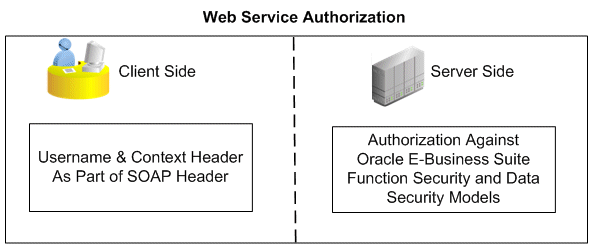
The following code snippet shows the sample header of applications context:
<soapenv:Header>
 ..
	<!--wsse Header-->
	<fnd:SOAHeader>
	<fnd:Responsibility>SYSTEM_ADMINISTRATOR</fnd:Responsibility>
	<fnd:RespApplication>FND</fnd:RespApplication>
	<fnd:SecurityGroup>STANDARD</fnd:SecurityGroup>
	<fnd:NLSLanguage>AMERICAN</fnd:NLSLanguage>
	<fnd:Org_Id>204</fnd:Org_Id>
</fnd:SOAHeader>
</soapenv:Header>
For more information about SOAP header elements used for authorization, see SOAP Header for Applications Context.
Authorization for REST Services
After authentication, the LoginModule verifies the authenticated user's role and access privilege and then authorizes the execution of underlying API only if the user has the required privilege to execute the API.
In the UsernameToken based security, the username/password sent in the SOAP header for authentication is associated with the User created in Oracle E-Business Suite.
Username is a clear text; password is the most sensitive part of the UsernameToken profile. In this security model, the supported password type is plain text password (or PasswordText).
Note: The PasswordText password type is the password written in clear text. SOAP requests invoking the Web services should include security header consisting of Username and plain text password. The password received as part of the SOAP request at runtime will be validated against the encrypted password stored in Oracle E-Business Suite. After validation, the plain text password from the SOAP request will be discarded.
At run time, SOAP request messages received through Oracle SOA Suite are passed on to a JAAS based login module for Oracle E-Business Suite for authentication based on the wsse:security Web Security headers.
A basic UsernameToken security header can be explained as follows:
<S11:Envelope xmlns:S11="..." xmlns:wsse="...">
 <S11:Header>
...
   <wsse:Security>
   <wsse:UsernameToken>
     <wsse:Username>Zoe</wsse:Username>
     <wsse:Password>password</wsse:Password>
     </wsse:UsernameToken>
   </wsse:Security>
...
  </S11:Header>
...
</S11:Envelope>
Attention: Authorization Check at Both the Trading Partner Level and WS-Security Header Level for XML Gateway Interfaces
In Oracle XML Gateway, each trading partner is configured with Oracle E-Business Suite users. Only these authorized users defined in the Trading Partner Setup form are allowed to perform XML transactions. External clients can pass such usernames in the <USERNAME> and <PASSWORD> elements defined within the <ECX:SOAHeader> element (or <XMLGateway_Header> element for generic XML Gateway services) in the SOAP body. These username parameters are validated by Oracle XML Gateway against the username defined in the trading partner setup before initiating a transaction.
Therefore, for XML Gateway interface type, the authorization check is performed at both the trading partner level, as well as on the username passed in the wsse:security header in the SOAP request. For information on trading partner setup and how to associate users with trading partners, see the Oracle XML Gateway User's Guide.
A WS-Security header in the SOAP message from Oracle E-Business Suite can be as follows:
<xml version="1.0" encoding="UTF-8">
<env:Envelope xmlns:env="http://schemas.xmlsoap.org/soap/envelope/" xmlns:xsd="http://www.w3.org/2001/XMLSchema"
xmlns:xsi="http://www.w3.org/2001/XMLSchema-instance">
 <env:Header>

	<wsse:Security xmlns:wsse="http://docs.oasis-open.org/wss/2004/01/oasis-200401-wsswssecurity-secext-1.0.xsd>
	 <wsse:UsernameToken>
     <wsse:Username>Kwalker</wsse:Username>
     <wsse:Password Type="http://docs.oasis-open.org/wss/2004/01/oasis-200401-wss-username-token-profile-1.0#PasswordText">password</wsse:Password>
     </wsse:UsernameToken>
  </wsse:Security>
 </env:Header>

 <env:Body>
...
 </env:Body>
</evn:Envelope>
To authenticate Web services relying on sending a username only through SAML assertion, Oracle E-Business Suite Integrated SOA Gateway supports SAML Token (Sender Vouches) based Web service security.
Security Assertion Markup Language (SAML) is an XML-based standard for exchanging authentication and authorization data between security domains, that is, between an identity provider and a service provider.
How to Authenticate Users through a Trusted Sender-Vouches SAML Token
A SAML token uses SAML assertions as security tokens. One type of SAML token is the sender-vouches SAML token. This token uses a sender-vouches method to establish the correspondence between a SOAP message and the SAML assertions added to the SOAP message.
When a Web application invokes a service that uses SAML token as its authentication type, this SOAP request message containing or referencing SAML assertions is received through Oracle SOA Suite and passed on to a JAAS based login module for Oracle E-Business Suite to authenticate the service based on the wsse:security Web Security headers. As part of the validation and processing of the assertions, the receiver or the login module for Oracle E-Business Suite must establish the relationship between the subject, claims of the referenced SAML assertions, and the entity providing the evidence to satisfy the confirmation method defined for the statements.
In other words, in order to validate and authenticate a user who logs on to the enterprise information system, a trusted sender-vouches SAML token security must be used to establish the correspondence between the SOAP message and the SAML assertions added to the SOAP message.
Note: Since everyone can send a SAML Token with valid conditions, the authentication framework only trusts certain SAML token sources and stores the public key of each of these sources in a common key store. This Public Key Infrastructure (PKI) based security provides more sophisticated trusted rules to authenticate Web services.
Please note that the following algorithms have been certified for SAML Token security in this release:
Symmetric Encoding Algorithm: http://www.w3.org/2001/04/xmlenc#aes128-cbc
Key Encryption Algorithm: http://www.w3.org/2001/04/xmlenc#rsa-oaep-mgf1p
Attention: To ensure SAML Token security works properly, necessary setup steps need to be performed. For setup information on SAML Token security, see Setting Up SAML Token Security for Oracle E-Business Suite Integrated SOA Gateway Release 12.2, My Oracle Support Knowledge Document 1332262.1 for details.
To authenticate users, any entity that establishes a PKI trust with Oracle E-Business Suite Integrated SOA Gateway can send the SAML Assertion with a valid Username. A PKI trusted entity will send a SAML token profile with the username embedded with it and that must be digitally signed. The SAML Token policy attached to the Web service verifies attributes like "Issuer", "Conditions", and so on. After the verification, the login module (IsgSAMLLoginModule) extracts the SAML principal (username in NameIdentifier) through a NameCallback. This is verified against LDAP for Single Sign-On (SSO) users or against Oracle E-Business Suite FND_USER for non-SSO users.
Please note that for Oracle E-Business Suite Integrated SOA Gateway, it is mandatory that all users must be valid Oracle E-Business Suite users. If SSO is used, then the user in LDAP server for SSO should be in synchronous with Oracle E-Business Suite FND_USER table. Otherwise, the user authorization check will fail when looking up the application responsibilities for user authorization against entries in the FND_USER table. For more information on integrating Oracle E-Business Suite in an enterprise single sign-on environment, see the Oracle E-Business Suite Security Guide.
Note: The login module IsgSAMLLoginModule gets invoked through the Authentication Provider IsgAuthenticator.
The following diagram illustrates the sender-vouches SAML Token based security authentication process flow:
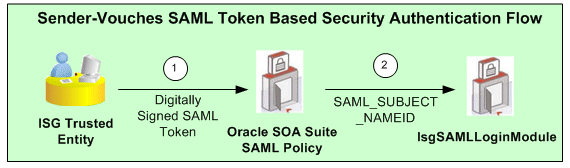
A trusted application authenticates a user and creates a digitally signed SOAP request, containing a SAML Sender-Vouches Token.
Please note that a trusted application can be any application whose Public Key is known to Oracle E-Business Suite Integrated SOA Gateway and which can send digitally signed SAML Assertions in SOAP requests using that public key.
SAML Token Policy attached to the Web service verifies signature and SAML conditions.
IsgSAMLLoginModule in Oracle SOA Suite extracts the SAML principal (username in NameIdentifier) through a NameCallback. This is verified against LDAP for Single Sign-On (SSO) users or against Oracle E-Business Suite FND_USER for non-SSO users.
The format of the NameIdentifier indicates if the user has been authenticated against LDAP (for a SSO user) or Oracle E-Business Suite FND_USER (for a non-SSO user). If the format is dn=xxxx, then this is a SSO user who has been authenticated against LDAP. Otherwise, this is a non-SSO user who has been authenticated against Oracle E-Business Suite FND_USER.
A sample sender-vouches SAML assertion for a non-SSO environment can be as follows:
<Assertion AssertionID="be7d9814c36381c27fefa89d8f27e126" IssueInstant="2010-02-27T17:26:21.241Z" Issuer="www.oracle.com" MajorVersion="1" MinorVersion="1" xmlns="urn:oasis:names:tc:SAML:1.0:assertion"  xmlns:samlp="urn:oasis:names:tc:SAML:1.0:protocol"><Conditions NotBefore="2010-02-27T17:26:21.241Z" NotOnOrAfter="2011-02-27T17:26:21.241Z"/>
	<AuthenticationStatement AuthenticationInstant="2010-02-27T17:26:21.241Z" AuthenticationMethod="urn:oasis:names:tc:SAML:1.0:am:password">
		<Subject>
				<NameIdentifier Format="urn:oasis:names:tc:SAML:1.1:nameid-format:unspecified" NameQualifier="notRelevant">SYSADMIN</NameIdentifier>
				<SubjectConfirmation>
				<ConfirmationMethod>urn:oasis:names:tc:SAML:1.0:cm:sender-vouches</ConfirmationMethod>
				</SubjectConfirmation>
		</Subject>
	</AuthenticationStatement>
</Assertion>
A sample sender-vouches SAML assertion for a SSO environment can be as follows:
<Assertion
IssueInstant="2010-02-27T17:26:21.241Z" Issuer="www.oracle.com"
MajorVersion="1" MinorVersion="1"
xmlns="urn:oasis:names:tc:SAML:1.0:assertion"
xmlns:samlp="urn:oasis:names:tc:SAML:1.0:protocol"><Conditions
NotBefore="2010-02-27T17:26:21.241Z"
NotOnOrAfter="2011-02-27T17:26:21.241Z"/>
<AuthenticationStatement
AuthenticationInstant="2010-02-27T17:26:21.241Z"
AuthenticationMethod="urn:oasis:names:tc:SAML:1.0:am:password">
		<Subject>
				<NameIdentifier Format="urn:oasis:names:tc:SAML:1.1:nameid-format:unspecified"
				 NameQualifier="notRelevant">orclApplicationCommonName=PROD1,cn=EBusiness,cn=Products,cn=OracleContext,dc=us,dc=oracle,dc=com</NameIdentifier>
				<SubjectConfirmation>
				<ConfirmationMethod>urn:oasis:names:tc:SAML:1.0:cm:sender-vouches</ConfirmationMethod>
				</SubjectConfirmation>
		</Subject>
	</AuthenticationStatement>
</Assertion>
Issuer: The value of this attribute is defined through Oracle SOA Suite. It will appear in jps-config.xml. For information on how to add Issuer, see Setting Up SAML Token Security for Oracle E-Business Suite Integrated SOA Gateway Release 12.2, My Oracle Support Knowledge Document 1332262.1.
Conditions: This tag defines the time limit in which this SAML Assertion is valid.
NameIdentifier: The value of this tag contains the username.
If the username is of the form of LDAP DN, then the username is verified in the registered OID for a SSO user. Otherwise, the username is verified in FND_USER table for a non-SSO user.
SubjectConfirmation: It should be sender-vouches.
For information on how the sender-vouches SAML Token is used in SOAP security header to authenticate Web services, see SAML Token-based SOAP Security Header.
Oracle E-Business Suite Integrated SOA Gateway supports HTTP Basic Authentication security to authenticate the users who invoke REST services over secure transport protocol - HTTPS.
When an HTTP client application tries to access an Oracle E-Business Suite REST service, user security credentials (username/password) should be provided as input data in HTTP header as part of the REST request message. The username and password will be routed to LoginModule for authentication and authorization.
The LoginModule in turn extracts the credentials from HTTP header, authenticates user against Oracle E-Business Suite user table, and establishes identity for the authenticated user. The LoginModule will then send the response to ISG Service Provider framework.
For the authenticated and authorized user request, the Service Provider framework invokes a security service to initialize the applications context, and then execute the REST service.
For the unauthenticated or unauthorized user request, the Service Provider framework returns system fault to the client.
The following diagram illustrates the authentication process flow of HTTP Basic Authentication security:
Authentication Process Flow for HTTP Basic Authentication Security
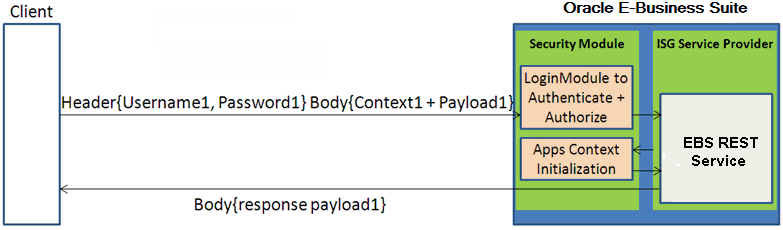
Based on HTTP Basic Authentication defined by W3C, the HTTP client application should use the following header field to send user credentials:
Authorization: Basic <base64 encoded version of username:password>
Please note that if it is a SSO-enabled Oracle E-Business Suite environment, user authentication should be delegated to SSO which performs authentication against information stored in Oracle Internet Directory (an LDAP server).
Token based security authenticates users using security tokens provided by the server. When a user tries to log on to a server with multiple requests, instead of authenticating the user each time with username and password, a unique access token (such as Oracle E-Business Suite session ID) may be sent as Cookie in HTTP header.
For example, when an Oracle E-Business Suite user has initially authenticated on a given username and password, after successful login, the security Login service creates an Oracle E-Business Suite user session and returns the session ID, as shown in the following:
<response>
<data>
<accessToken>OEj6fXXoDoo4EeubKLgYes7io7</accessToken>
<accessTokenName>myEbsInstance</accessTokenName>
<ebsVersion>12.2.0</ebsVersion>
<userName>SYSADMIN</userName>
</data>
</response>
The session ID that points to the user session will be passed as Cookie to HTTP headers of all subsequent Web service calls for user authentication.
POST /webservices/rest/Invoice/create_invoice
Cookie: <accessTokenName>=<accessToken>
Content-Type: application/xml
The LoginModule will interpret and extract the token (session ID) from HTTP headers, and validate the subject or username with token, not password, in the subsequent requests for authentication.
Similar to the HTTP Basic Authentication security, if the request passes the authentication and authorization, the Service Provider framework invokes a security service to initialize the applications context, and then executes the REST service. Otherwise, system fault will be returned.
The following diagram illustrates the authentication process flow of Token Based Authentication security:
Authentication Process for Token Based Authentication Security
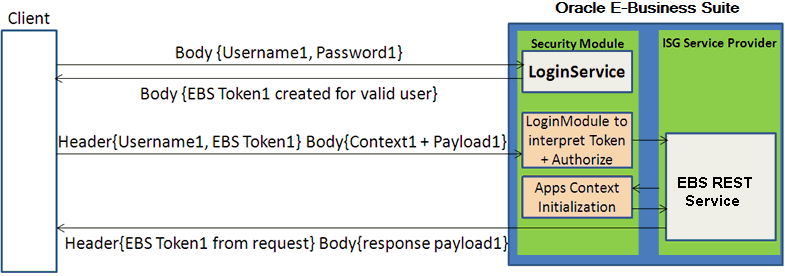
In this diagram, username/password information is provided and validated in the initial request. A unique token (EBS Token1) is obtained through the Login Service for the valid user. In case a different service is requested in the subsequent call, username along with the token, instead of the password, are provided in the header this time.
In this subsequent request, applications context information that may be required in initializing Oracle E-Business Suite session is also provided in the request. Security LoginModule will be used to interpret and extract the token from the header to authenticate the user and then authorize the request. Applications context session will also be initialized before invoking the REST service. After a successful service invocation, a response message will be sent along with the response payload if it is available.
Advantages of Using Token Based Security
Please note that when token based security is used, applications context information mentioned above does not have to be passed in every request. If the context values are not provided in the consecutive requests, the previously passed values will be used.
This will reduce the size of the payload included in HTTP headers and thus less data bandwidth is required. It is particularly useful for mobile data networks.
For more information on applications context in REST header, see REST Header for Applications Context.
For more information about how to use context values to initialize or re-initialize the Oracle E-Business Suite session, see the Oracle Application Object Library REST Security Services section, Oracle E-Business Suite Security Guide.