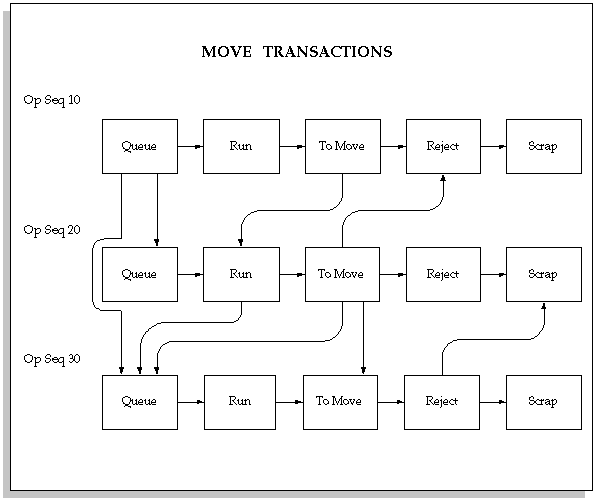
You can move assemblies within an operation (for example, from Queue to Run) or from one operation to the next. You can move assemblies backward and forward within the routing.
You can move the assemblies that you are building from one operation and/or intraoperation step to another using the Move Transactions window. See: Interoperation Moves You can move assemblies forward and backward within and between operations. Moving assemblies into the To Move, Reject, or Scrap intraoperation step of an operations completes those assemblies at that operation. When assemblies are completed at an operation, the system automatically backflushes Operation Pull components and charges resources. See: Operation Completion Moves
Processing for move, scrap, reject, move and complete, and return and move transactions enable the parent assembly record to process even if backflush records fail. In background processing for standard completion and return transactions, once the move completion manager picks up a record for processing, backflushing occurs in the same commit cycle. This prevents the possibility of processing transactions if backflushing fails.
Note: If Oracle Mobile Supply Chain Applications is installed, the Mobile Manufacturing component enables you to perform all work in process move transactions using a mobile client device networked with a computer system. See: Assembly Transactions, Oracle Mobile Supply Chain Applications User's Guide.
If function security permits, you can complete assemblies from any routing operation into inventory or return completed assemblies from inventory to any routing operation from the Move Transactions window. See: Security Functions and Assembly Move Completion and Move Return Transactions.
Move transactions that complete assemblies at autocharge operations, automatically charge resources and overhead at that operation. If assemblies are completed at an operation, and Manual resources are assigned to that operation, the system notifies you that these resources exist. To charge these resources, use the Resources button to access the Resource Transactions window. See: Charging Resources with Move Transactions
You can also scrap defective assemblies by moving them into a scrap intraoperation step. If you enter scrap account number or scrap account alias when you scrap assemblies, the cost of the scrapped assemblies is removed from the job or repetitive schedule. If you do not enter a scrap account or select an alias, the cost of the scrap remains in the job or schedule until job or period close. See: Scrapping Assemblies.
When you move assemblies into the Queue intraoperation step of an operation that has either PO Move or PO Receipt resources assigned to it (or when the job is released, depending on your setup), the system automatically creates a purchase requisition in Oracle Purchasing. When you receive assemblies back from an outside processing supplier in Oracle Purchasing, PO Receipt or PO Move resources are automatically charged at the standard or the actual rate. Purchase requisitions are also automatically created when you release a job or repetitive schedule if there are PO Move or PO Receipt resources at the first operation. See: Overview of Outside Processing.
You can also add 'ad hoc' operations to discrete job using the Move Transactions window. However, you can only add operations if the Allow Creation of New Operations parameter is set and the TP:WIP:Move Transactions profile option is set to on-line processing. See: Move Transaction Parameters and Profile Option Summary.
You can view shop floor statuses when performing move transactions. Statuses are removed from intraoperation steps when the quantities at those operations drop to zero.

When you enter move transactions in the Move Transactions window you must choose one of the following transaction types:
| Move | Moves assemblies within (intraoperation) and between (interoperation) routing operations. You can move assemblies forward or backward within and between routing operations. |
| Complete | Completes assemblies from any routing operation and intraoperation step into inventory. Assembly move completions move assemblies from the current operation to the To Move intraoperation step of the last operation then complete them into inventory. Assemblies are completed into the default completion subinventory and locator specified for the discrete job or repetitive line/assembly. Where applicable, move completion transactions also charge move based resources and overheads and create backflush transactions for components with supply types of Assembly and Component Pull. |
| Return | Returns assemblies from inventory to any routing operation and intraoperation step. Assembly move returns first return assemblies from the discrete job or repetitive line/assembly completion subinventory/locator to the To Move intraoperation step of the last operation then move them into the operation and intraoperation step you specify. Where applicable, move return transactions also create transactions that reverse charges to move based resources and reverse backflush transactions for components with supply types of Assembly and Component Pull. |
You can specify which move transaction type is used as the default transaction type in the Move Transactions window using the TP:WIP:Move Transactions profile option. See: Profile Options.
Note: You cannot complete or return lot controlled assemblies with move complete and move return transactions. You also cannot complete or return serial number controlled assemblies unless the Oracle Inventory Serial Generation attribute for the assembly is set to Dynamic entry at sales order issue.