Receivables lets your customers use a credit card to remit payments for open debit items. The procedure for processing credit card payments in Receivables is similar to the procedure for creating automatic receipts.
By providing a credit card number as payment, your customer expects that the credit card issuer will transfer funds to your bank account as payment for their open debit items. The Automatic Receipts program lets you collect payments according to a predefined agreement with your customer. The Automatic Remittances program integrates with Oracle Payments to transfer funds from the customer's bank account to yours on the receipt maturity date.
When you create a remittance batch, Receivables creates a funds capture process request and sends it to Payments, which completes the authorization and settlement steps. Payments communicates directly with third party payment networks to authorize and reserve funds.
You must complete these steps to process credit card payments in Receivables:
Assign a credit card receipt method and credit card payment instrument to the transactions that you want to pay by credit card. This assignment "flags" transactions for credit card payment. See: Setting Up Receivables for Credit Card Transactions and Payments.
Run the Automatic Receipts program to select the transactions that are flagged for credit card payment. The Automatic Receipts program creates a batch of receipts (payments) for the selected transactions. See: Creating and Approving Automatic Receipt Batches.
Approve the batch of automatic receipts to reserve the payment amount from your cardholder's account and close the selected transactions. The Approve Automatic Receipts program sends the receipt batch to Oracle Payments for credit card authorization. Payments integrates with third party payment processors to authorize your customer's credit card account number and assign an approval code to the transaction record in Payments. See: Authorizing Credit Card Payments.
If authorization is successful, then Payments assigns the approval code and the receipt is approved. If authorization is not successful, then the receipt is rejected from the batch.
To decrease processing time, you can create and approve your automatic receipts in one step. See: Creating and Approving Automatic Receipt Batches.
Note: Payments can authorize your customer's credit card account number at different times during the payment processing flow. For example, credit card authorization can take place at the time of the order (in Oracle Order Management) or at the time of billing (in Receivables). This section primarily addresses credit card authorization in Receivables only.
Create and approve a remittance batch to request transfer of funds (funds settlement) from the credit card issuer to your bank. See: Capturing Credit Card Payments and Creating and Approving Remittance Batches.
Payments handles the funds settlement processing as part of the funds capture process request that Receivables initiates.
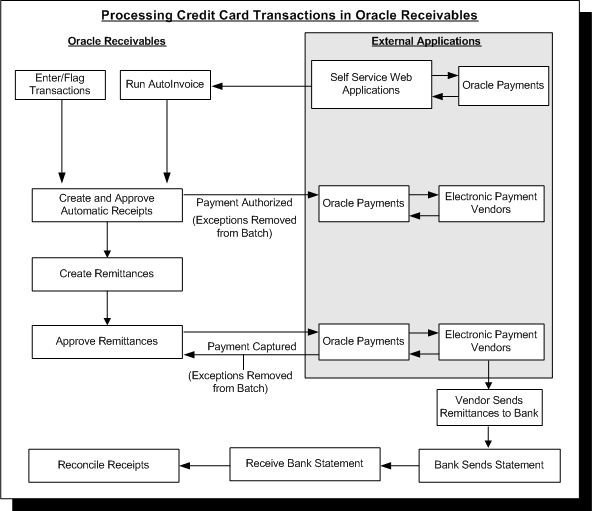
The following figure shows how Receivables uses Oracle Payments and external payment processors to process transactions (invoices) and credit card receipts (payments).
Processing Credit Card Transactions and Payments
Receivables also lets you process refunds to your customers' credit card accounts. Receivables passes refund information via Oracle Payments to the third party payment processor, which in turn credits your customer's credit card account. For more information, see: Credit Card Refunds.
Receivables provides you with a funds transfer error handling feature that lets you quickly and efficiently correct credit card errors that occur during payment authorization and capture. See: Correcting Funds Transfer Errors.
