Oracle Transport Agent (OTA) is a lightweight messaging platform for transmitting documents over HTTP and Secure HTTP (HTTPS). OTA implements a messaging protocol on top of the HTTP Application protocol.
The OTA server is a Java-based servlet that uses the OTA messaging protocol to support the following requirements:
Guaranteed, exactly-once delivery of a message over HTTP(S)
Complete audit and history tracking of messages sent and received
Outbound e-mail delivery of messages (SMTP)
Server certificate authentication (when using SSL mode)
Client certificate authentication
Built-in Application user authentication to Oracle E-Business Suite and Oracle Exchange
This section will describe how client authentication is implemented in the latest release of OTA. Oracle E-Business Suite users may choose to implement client authentication. It is not mandatory.
In this document, the Sender refers to the "Client" that sends a document or requests connection. The Receiver refers to the "Server" that receives the document or connection request.
The OTA protocol stack is as follows:
OTA (Messaging Protocol)
HTTP (Application Protocol)
SSL (Encryption/Security Protocol - optional)
TCP/IP (Network Protocol)
The OTA protocol defines the conversation semantics used by two Web servers running the OTA Servlet. The two OTA Servlets "talk" to each other to provide guaranteed, exactly-once delivery of the message.
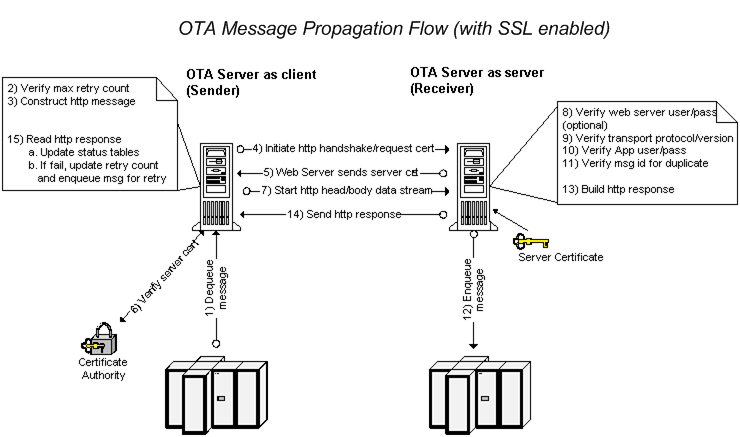
The following diagram displays the message propagation flow of an OTA message with SSL enabled:
The OTA client dequeues the message from the ECX_OUTBOUND queue.
The OTA client verifies the maximum retry count.
The OTA client constructs the HTTP message.
The client initiates the HTTP handshake and request for certification with the destination server.
The destination Web server sends its certification.
The client receives and verifies the server's certification.
If verified, the client starts the HTTP message head and body data stream.
The server optionally verifies the username and password.
The server verifies the transport protocol and version.
The server verifies the Oracle E-Business Suite username and password.
The server verifies that the message ID is not a duplicate.
The server enqueues the message for consumption.
The server builds the HTTP response message.
The server sends the HTTP response back to the client.
The client reads the response and updates the status tables. If the response indicates the message failed, the retry count is updated and the message is enqueued for retry.
Two OTA servers communicate by sending and receiving a series of name/value pairs in the HTTP body of an HTTP POST/RESPONSE. Following is an example post from the sending OTA server (Note: the header authorization encryption follows the W3C standard):
HTTP Header
Http-Version: HTTP/1.1
Authorization: Digest username="myusername",
realm="testrealm@host.com",
 nonce="dcd98b7102dd2f0e8b11d0f600bfb0c093",
 uri="/dir/index.html",
qop=auth,
nc=00000001,
cnonce="0a4f113b",
response="6629fae49393a05397450978507c4ef1",
opaque="5ccc069c403ebaf9f0171e9517f40e41"
 Content-length: 12345
Content-type: text/html
HTTP Body
TRANSPORT_PROTOCOL=OXTA
 TRANSPORT_PROTOCOL_VERSION=1.0
REQUEST_TYPE=SEND
MESSAGE_ID=A1234567890ZZ0987654321
MESSAGE_TYPE=XML
MESSAGE_STANDARD=OAG
 TRANSACTION_TYPE=PO
TRANSACTION_SUBTYPE=PROCESS
 DOCUMENT_NUMBER=12345
 PARTYID=9999
PARTY_SITE_ID=8888
 PROTOCOL_TYPE=HTTPS-OXTA
 PROTOCOL_ADDRESS=HTTPS://www.me.com/servlets/oracle.ecx.oxta. transportAgentServer
USERNAME=myusername
PASSWORD=myloginpassword
 ATTRIBUTE1=
 ATTRIBUTE2=
 ATTRIBUTE3=
 ATTRIBUTE4=
 ATTRIBUTE5=
 PAYLOAD=<xml   ... ...>
The HTTP Body contains the message envelope, message payload, and the following transport parameters:
The Transport Protocol specifies the messaging protocol to the receiving servlet. The value will always be "OXTA" when sent by an OTA server. The receiving OTA server validates that the TRANSPORT_PROTOCOL is OTA, and then sends back the appropriate response in the HTTP response body.
The Transport Protocol Version specifies the version of the messaging protocol used to send the message
This parameter indicates the type of request sent from the OTA server. REQUEST_TYPE is not required on the receiving side. If no value is set, the default "SEND" type is used. Valid values are in the following list:
SEND - (Default) The receiving OTA server treats this as a live, production message.
AUTH - (Authorization test) The receiving OTA server treats this as a request to test the communication according to the OTA AUTH protocol. This request type requires only the following parameters:
| Parameter | Sample Value |
|---|---|
| TRANSPORT_PROTOCOL | OXTA |
| TRANSPORT_PROTOCOL_VERSION | 1.0 |
| REQUEST_TYPE | AUTH |
| USERNAME | MYUSERNAME |
| PASSWORD | MYPASSWORD |
If the authorization passes, the response will contain an HTTP 200 response code and an OXTA 1000 status message. Refer to HTTP Status Codes for a list of status codes.
AUTH2 -(Authorization test, method 2) The receiving OTA server treats this as a request for a test according to the OTA AUTH2 test protocol. This request type requires only the following parameters:
| Parameter | Sample Value |
|---|---|
| TRANSPORT_PROTOCOL | OXTA |
| TRANSPORT_PROTOCOL_VERSION | 1.0 |
| REQUEST_TYPE | AUTH2 |
| USERNAME | MYUSERNAME |
| PASSWORD | MYPASSWORD |
| PARTY_SITE_ID | 123 |
| TRANSACTION_TYPE | PO |
| TRANSACTION_SUBTYPE | PROCESS |
EME - (Email me) The receiving OTA server receives the message and places it on the outbound queue for delivery to the address specified in the PROTOCOL_ADDRESS parameter. This request type requires only the following parameters:
| Parameter | Sample Value |
|---|---|
| TRANSPORT_PROTOCOL | OXTA |
| TRANSPORT_PROTOCOL_VERSION | 1.0 |
| REQUEST_TYPE | EME |
| USERNAME | MYUSERNAME |
| PASSWORD | MYPASSWORD |
| PROTOCOL_ADDRESS | me@mydomain.com |
| PAYLOAD | <xml....> |
This is the unique message identifier set by the sending OTA server. The receiving OTA server uses this identifier to determine if the message is a duplicate. The identifier is the Oracle AQ message ID from the outbound XML Gateway queue.
This indicates the type of content in the payload. When used with XML Gateway, the value will always be "XML".
Used by XML Gateway to determine the type of document sent. This is a user-defined value entered in the External Transaction Type field in the Transactions form. Sample values include PO, Invoice, and Shipping. For more information see Define Transactions.
Used by XML Gateway to determine the transaction subtype of the document sent. This is a user-defined value entered in the External Transaction Subtype field in the Transactions form. Sample values include Create or Change. For more information see Define Transactions.
This is the primary identifier of the business document in the payload. Examples include purchase order number and invoice number. This parameter is used in the Transaction Monitor as an identifier when checking the status of a document.
The sender/receiver negotiated identifier that identifies the receiver of the document (company level). This is a user-defined value that is entered in the External Source Location Code of the Trading Partner form. For more information see: Define Trading Partners.
The sender/receiver negotiated identifier that identifies the receiver of the document (company site level). The value of this parameter is the SOURCE_TP_LOCATION_CODE from the Trading Partner form. For more information see: Define Trading Partners.
This is the application protocol to transmit the document. It also contains an identifier for the program to use to transmit the document over the protocol. The following table lists the valid values for PROTOCOL_TYPE. For more information, see Protocol Type.
| PROTOCOL_TYPE | Description |
|---|---|
| HTTP | Straight HTTP post |
| HTTP-ATCH | Straight HTTP post with attachment |
| HTTPS | Straight HTTP post using SSL |
| HTTPS-ATCH | Straight HTTP post with attachment, using SSL |
| HTTP-OXTA | OTA Protocol over HTTP (guaranteed delivery) |
| HTTPS-OXTA | OTA Protocol over HTTPS (guaranteed delivery) |
| OTAH-ATCH | OTA Protocol over HTTP (guaranteed delivery) with attachment |
| OTAHS-ATCH | OTA Protocol over HTTPS (guaranteed delivery) with attachment |
| SMTP | Send document via SMTP (e-mail) |
This is the fully-qualified address to which to transmit the document. The following table lists sample protocol addresses for the protocol types shown:
| PROTOCOL_TYPE | Sample PROTOCOL_ADDRESS |
|---|---|
| HTTP | http://www.me.com:8080/servlets/mycustom |
| HTTP-OXTA | http://www.me.com:9000/servlets/oracle.apps.ecx.oxta.TransportAgentServer |
| HTTPS-OXTA | http://www.me.com/servlets/oracle.apps.ecx.oxta.TransportAgentServer |
| SMTP | Me@mydomain.com |
This is the username/password to authenticate on the receiving server. The OTA server uses this username and validates it against valid Oracle E-Business Suite users or valid Exchange users (buyer/supplier login). The username/password values are also in the authorization section of the HTTP header for optional Web server-level authentication.
This contains the identifier of the system sending the message. This is a user-defined value entered in the ECX_OAG_LOGICALID profile option. See Define System Profile Options.
Not used.
This contains the identifier of the final destination for the document, when dynamic routing is implemented. This is a user-defined value entered in the Target Location Code field in the Trading Partner definition form. It is a routing mechanism to notify the receiver to route the document to another trading partner known to the receiver.
For more information about dynamic routing, see: Static and Dynamic Routing.
Not used.
Not used.
Contains the XML document to be processed.
The OTA server uses standard HTTP response codes to determine if the HTTP post (at the HTTP protocol level) was successful. If successful, OTA will examine the HTTP header to determine if the OTA message was successfully delivered. If the HTTP response does not equal 200, OTA assumes the post failed and will requeue the message for retry (until maximum retry has been reached).
The following is an example of an HTTP response:
HTTP Header
 HTTP/1.1 200 OK
 Server: Apache/1.2.0
 Date: Fri, 15 Jun 2002 16:20:46 GMT
 Content-Length: 567
 STATUS_CODE: 1000
 STATUS_DESCRIPTION: OK
 MESSAGE_RECEIPT_ID: A9876543210987654321
 Content-type: text/html
HTTP Body
 <HTML><BODY> <TABLE>   <TR><TD>Status Code</TD><TD>1000</TD></TR> <TR><TD>Status Description</TD><TD>Message Successfully received</TD></TR>  <TR><TD>Message Receipt ID</TD><TD>A9876543210987654321</TD> </TR> </TABLE> </BODY></HTML>
The HTTP Response body is created for information only and is not read by the sending OTA server. The sending OTA server uses the STATUS_CODE in the HTTP Response header to determine the success or failure.
If the Status Code value is 1000 (meaning success), the MESSAGE_RECEIPT_ID in the HTTP Response body contains a unique identifier generated by the receiving OTA server. This completes the cycle for the guaranteed delivery process.
If the Status Code is anything other than 1000, a failure has occurred. The STATUS_DESCRIPTION field will contain a brief description of the error. Refer to HTTP Status Codes for a list of status codes.
For outbound documents, the OTA client uses information in the Message Map to fetch and bundle the attachment in its outbound package.
For inbound documents, OTA extracts the associated attachments from the inbound MIME message and deposits them into the FND module of the receiving instance.
Note: Oracle Transport Agent also supports MIME messages without attachments. Similarity to the message process with attachments, OTA uses the same approach to process the message, but without further processing attachments if they do not exist.
For outbound documents, the OTA client constructs the XML message with a valid MIME message containing the message payload and places it in its outbound package.
For inbound documents, OTA extracts the body of the message and then passes the message to the receiving instance.
For more information about how OTA handles attachments, see Attachments and Oracle Transport Agent (OTA).