The following concepts enable you to accurately interpret the results of the People Management intelligence reports:
One of the most powerful features of the People Management reports is that you can define how workforce is counted.
Workforce does not necessarily have to be a count of the number of people in your enterprise; it can instead be a count of the assignments and any budget measurement type you have set up. For example, you can count workforce using the budget measurement types of FTE or Headcount.
Additionally, by writing your own formula, using Oracle FastFormula, or the provided formula, you can instruct the report to count workforce exactly how you want to.
To enable you to investigate the workforce in your enterprise, the reports calculate gains and losses as follows:
Gains are the total workforce that exists in the organization or organizations at the end of a time period, which did not exist at the beginning of the time period.
Losses are the total workforce that exists in an organization or organizations at the beginning of a period, but no longer exists at the end of the period.
Total Workforce is the workforce at the end of the time period.
Note: Workforce is counted using active and suspended assignments.
You can decide which area of your enterprise to report on using the parameters of the reports. There are two different methods of enterprise selection:
Rollup Organizations
Rollup Each Organization
Use the Organization or Top Organization and Hierarchy parameters, together with the Organization Rollup parameter to report on one organization, an organization hierarchy, or a section of an organization hierarchy.
To report on a hierarchy, or a section of a hierarchy, enter the top organization or hierarchy you want to report on in the report parameters. You can then decide whether or not you want to rollup all the subordinate organizations in the hierarchy by entering either Yes or No in the Rollup Organizations parameter.
In some reports you can leave the Organization parameter blank to include all organizations in the hierarchy.
Select the area of your enterprise in the reports by selecting a section of an organization hierarchy. For each report, you only need to enter one organization; all its subordinate organizations are included in the report.
You can then decide to either display information about each organization separately, or rollup information at each level of the hierarchy.
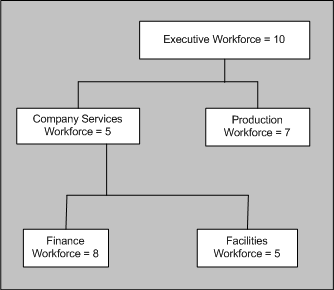
For example, consider the hierarchy for Global Industries shown in the diagram below. To select this section of the hierarchy, you enter Executive in the Organization parameter. The report automatically includes the Company Service, Production, Finance, and Facilities subsidiary organizations.
If you decide not to rollup the workforce count, the report displays each organization independently, and shows the workforce total for only that organization. The workforce total for each organization would be the same as shown in the diagram below. It shows the Executive Workforce of 10 at the top of the organization. Reporting to the Executive Workforce are the Production Workforce of 7, and the Company Services Workforce of 5. Reporting to the Company Services Workforce are the Financial Workforce of 8, and the Facilities Workforce of 5
Global Industries Hierarchy
If you decide to rollup each organization, the report will display information that is calculated for that organization and all the organizations below it in the hierarchy.
For Global Industries, the Workforce figures would be shown as in the following table:
| Organization | Rolled Up Workforce |
|---|---|
| Executive (Top Organization) | 35 |
| Company Services | 18 |
| Finance | 8 |
| Facilities | 5 |
| Production | 7 |
The Workforce Summary Analysis, Workforce Ratio, and Workforce Comparison HRMSi reports use job categories to investigate Workforce within your enterprise.
Note: You can also analyze how successfully you are recruiting for each job category using the Recruiting and Hiring HRMSi reports.
Oracle HRMS enables you to set up job categories for the different jobs within your enterprise. You can set up categories to classify all your jobs. So you could, for example, set up the job categories of technical, managerial, administration, and so on.
Jobs within your enterprise can fall into more than one category, and HRMS enables you to enter as many categories as you need for a job.
Use the Workforce Ratio report to analyze the percentage of workforce your enterprise has in different job categories. Use the Workforce Comparison report to analyze the absolute levels of workforce.
Both the Workforce Ratio, and the Workforce Comparison reports use assignments to calculate the workforce for each job category. For an assignment to be included it must:
Be active or suspended.
Have the job and job category selected.
Fit the selection criteria entered.
For example: if you report on salaries by grade, the assignment must be for that grade.
If a job category does not have any workforce associated with it, the reports show it as a zero on the table, but do not display it in the bar chart.
Jobs may be assigned to more than one category. For example the job of Software Manager could have the job categories of technical and managerial. If you choose to report on both these categories, reports will display all assignments with the job of Software Manager in both the managerial and technical job categories.
For information on associating jobs with specific job categories, see Defining A Job