Most enterprises adhere to rules, regulations, and reporting requirements when changing the terms of work. Oracle Self Service Human Resources (SSHR) provides a set of configuration tools and web flows for initiating, updating, and approving self-service actions according to prescribed rules.
Self-service actions represent the business processes, or actions, that change the conditions of employment in your enterprise. Public sector organizations typically refer to these processes as personnel actions, and they include business actions that manage hiring, training, promotion, transfer, compensation, and termination. Self-service actions are useful for any enterprise that wants to configure business processes using rules to determine eligibility and approval requirements, track action history as well as details, or generate standard documents for specific actions.
Self-service actions fall into three overall types, each with its own unique expectations, rules, and requirements:
Hiring
Deployment
Termination
Oracle SSHR emphasizes business process over data maintenance. Though the interface provides an online form that you fill out in the course of navigating a series of web pages, your implementation team organizes the sequence and content of the data to reflect the standards and practices of your organization. With each self-service action, your implementation team defines a process consistent with the way your organization manages changes to personnel records. You design and implement your own version of each process, and specify the business rules that enable you to route each action for approval automatically.
SSHR provides a transition from technical orientation to functional. This approach enables you to initiate and manage self-service actions as business processes with which you are already familiar, rather than maintaining data in the abstract in application windows. Your focus is on the task you need to perform. Some examples of the predefined SSHR workflow modules supported by self-service actions include:
Hiring or termination
Recruitment
New Hire
Applicant Hire
Termination
Termination with compensation
Deployment or status changes
Employee Status Change (assignment, full/part time, grade, movement within pay scale)
Transfer
Leave of Absence (long term absence, sickness, sabbatical)
Special/Extra Information Types (ending training or apprenticeship periods, disciplinary actions)
Other Employment Information (ending training or apprenticeship periods, disciplinary actions)
Individual Compensation Distributions (awarding bonuses or other specific pay and allowance types)
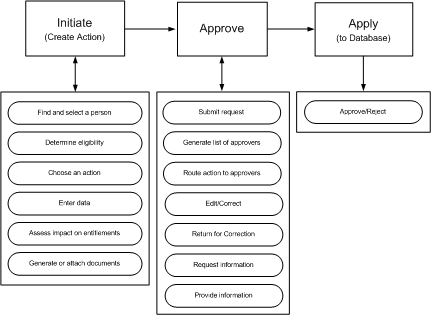
You carry out a self-service action in three overall stages that reflect standard business procedures:
Initiate
Approve
Apply
For each stage, your implementation team has a range of options and features to configure unique process flows you recognize as a reflection of the way you do business. The following process flow diagram displays all the features available. What you see may differ, depending on your organization's requirements.
Life Cycle of a Self - Service Action
Initiate
Advanced search capability helps you confirm that you have selected the correct person before initiating an action. The People List and Actions page tell you whether or not a person is eligible for an action on the specified effective date. The Actions page notifies you of your own pending actions on the selected person, actions you have saved for later, and actions on the selected person awaiting approval of others. If your organization's requirements permit, you can specify that your action take effect on a date you specify, or "on approval". You enter the data that your enterprise, rules, and regulations require. What-If analysis gives you a real-time view of the impact of your proposed action on the selected person's entitlements to compensation and benefits. You can generate formatted documents, such as a pre-approval Request for Action, or a standard letter, containing merged values from your action. In addition, you can attach supporting documents, such as a resume, certificate, or Web address. Before submitting your action for approval, you can add to the list of approvers, or add people to notify.
Approve
Self-service actions use Oracle's standard workflow and approvals management tools. Oracle AME generates a list of approvers and Oracle Workflow routes your action automatically. Approvers retrieve notifications from their Worklist. Approvers with appropriate update privileges can modify the action, including its effective date. Recipients can request additional information, or return the action for correction to previous approvers. If the database encounters intervening or future-dated actions on the same person, it refreshes your action with the appropriate values, or routes your action to a Human Resources representative after approval for manual entry of the changes.
Apply
The application applies the action to the database after final approval.
SSHR workflow features enable you to engage in an online collaborative environment in which you can focus on the task of routing and approving actions based on their merits, with near transparency regarding selection and notification of approvers.
See: Configuring Self-Service Actions
See: Managing Conflicting Actions
See: Initiating a Self-Service Action
See: Approving a Self-Service Action
You can perform the following personnel actions even if person type changes exist for a person's record at a future date:
Hire
Terminate
Rehire
Reverse Terminate
See: Performing Business Transactions when Person Type Changes Exist at a Future Date