Oracle Subledger Accounting provides accounting reports for fiscal and internal control purposes. Create your own layouts and publish your reports using Oracle XML Publisher.
XML Publisher is a template-based publishing tool that is delivered with the Oracle E-Business suite that enables users to rapidly develop and maintain custom report formats. You can design and control how the reports are presented by using report templates. When generating a report, XML Publisher merges report template files with report data to create documents that support numerous formatting options, including colors, images, font styles, and headers and footers.
See Introduction
Subledger Accounting provides the following reports:
This chapter describes the parameters and data elements for each report.
System administrators can define new concurrent programs using any subset of the parameters. Users can create new XML Publisher templates using any subset of the data elements.
See: Overview of Concurrent Programs and Requests, Creating a Template
When generating a report using a report template, first generate an XML output file of the requested report. XML Publisher applies the requested report template to the XML output file of the requested report to generate a file in the requested format.
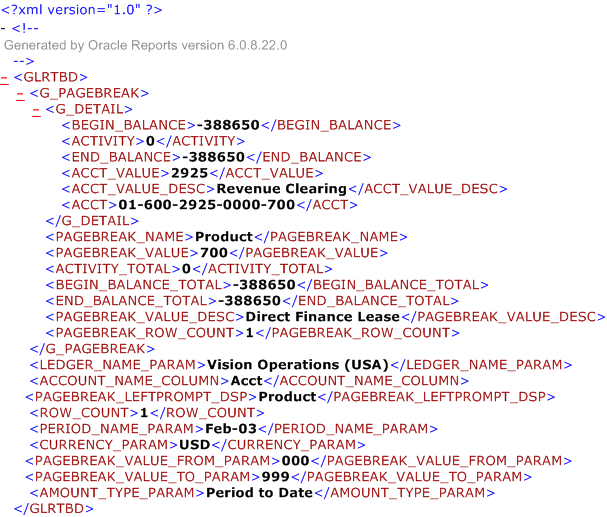
The figure below shows a sample XML output file.
XML output files are composed of tag set elements. For example, in the figure above, <BEGIN_BALANCE>-388650</BEGIN_BALANCE> is the beginning balance element, which consists of a starting and ending tag. The data between the tags is the value of the element. In the figure above, the value for the beginning balance element is -388650.
The parameters in some of the following reports are categorized as follows:
Selection parameters: filter the information retrieved by the report
Custom parameters: used to pass information to the template, such a boilerplate text or formatting options
The custom parameters described in the table below apply to all the Subledger Accounting reports.
Custom Parameters
| Parameter | Token | Required | Valid Values |
|---|---|---|---|
| Custom Parameter 1 | P_CUSTOM_PARAMETER_1 | No | No validation |
| Custom Parameter 2 | P_CUSTOM_PARAMETER_2 | No | No validation |
| Custom Parameter 3 | P_CUSTOM_PARAMETER_3 | No | No validation |
| Custom Parameter 4 | P_CUSTOM_PARAMETER_4 | No | No validation |
| Custom Parameter 5 | P_CUSTOM_PARAMETER_5 | No | No validation |