Within Oracle HRMS you can enter the following information for each HR organization within a Dutch organization hierarchy:
social insurance provider
tax office
To store this information, you first need to define each separate provider as an external organization with the corresponding organization classification.
You can create multiple external organizations for each organization classification depending on the requirements of your enterprise. For example, you may have two internal organizations that require different tax offices or tax numbers. Therefore, you can set up two Dutch tax offices as external organizations and assign them to each internal organization.
When you have defined your external organizations, you define links to your internal organizations. However, you do not need to define the information for each individual organization. As long as you maintain the information for at least the top-level HR organization, the values will be inherited by the subordinate organizations.
You specify the preferred hierarchy for your organization in the Dutch Business Group window.
See: Creating Organization Hierarchies
See: Entering Dutch Business Group Information
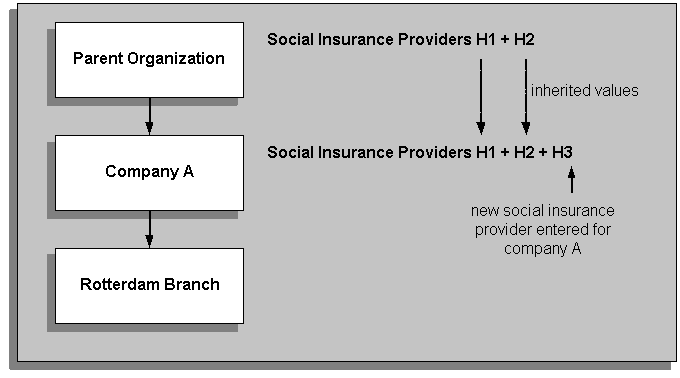
The following diagram illustrates how values entered against the top-level organizations are inherited by the subordinate organizations. The Social Insurance Providers H1 and H2 are stored against the top-level organization. This means that the list of possible social insurance providers for the second-level organization (Company A) is the inherited values (H1 and H2) plus H3.
Inherited Information for External Organizations
For more information on defining the organizational links between external and internal organizations, see: HR Organization: Entering Social Insurance Provider Information and HR Organization: Entering Dutch Organization Information
When you link your external organizations to your internal organizations, you select SI classifications that identify which types of social insurance the external organization provides. The employees assigned to that internal organization inherit the social insurances from that provider. You can set up all of the mandatory social insurances for a particular provider and assign the provider to your internal organization for all of the mandatory insurances. The SI classification All Mandatory Insurances ensures that the employees within your internal organization inherit all of the mandatory social insurances.
For examples of assigning social insurance types and providers to your internal organizations and how your employees inherit the information, see: Examples of Assigning Social Insurance Types and Providers to Employees
It is important that your hierarchy includes the relevant internal organizations with links to applicable external organizations. If this information is not set up correctly, the social insurance information that you record for your employees may result in incorrect social insurance calculations for Oracle Payroll.
You select a classification of social insurance that a person is entitled to at the assignment level. The application checks if the organization the employee is assigned to has a social insurance provider that offers this type of social insurance classification for the dates selected. If an appropriate social insurance provider is not found, then the application continues to search up through the hierarchy.
For example, if you select WAO disability insurance as the social insurance classification for the employee at the assignment level, the application will look at the employee's internal organization to see if that organization has a social insurance provider that provides the social insurance type with the classification of WAO disability insurance.
Note: When searching for external organizations, the application only travels up the organizational hierarchy in the direction of the parent organization.
Organization Hierarchy and Employee Data
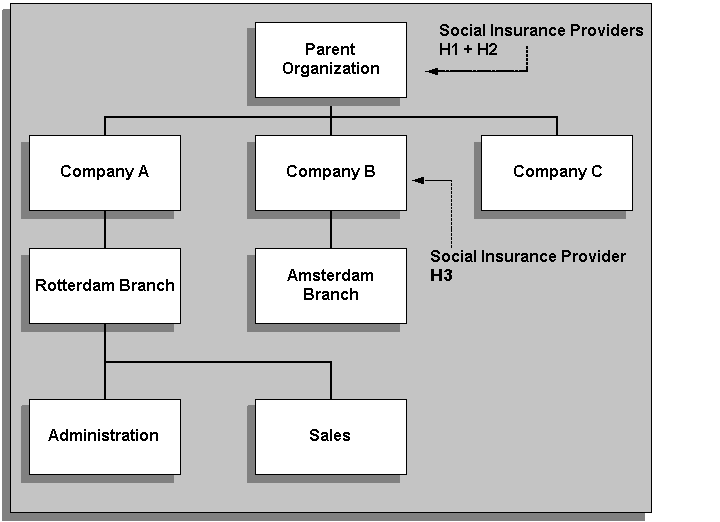
The previous diagram shows that the Social Insurance Providers H1 and H2 that have been assigned to the Parent Organization are available for the employees in Companies A, B and C, and their subordinate branches (Rotterdam and Amsterdam) and departments (Administration and Sales). The Social Insurance Provider H3 has been assigned to Company B, and is therefore only available for the employees at Company B and the Amsterdam Branch.
If an employee at the Amsterdam Branch is eligible for a social insurance classification that required a social insurance type that Social Insurance Provider H3 did not provide, the application would search up through the hierarchy at the next parent organization (Parent Organization) in the organization hierarchy to find the relevant social insurance type.